
Ask anyone who has bought a session replay tool how many recordings they watched last month. The honest answer is usually “a few, when something was already on fire.” The recordings are there. The problem is arithmetic: a replay plays in real time, a useful moment lasts seconds, and nobody knows in advance which minute of which session holds it. So replay becomes the thing you open after you already know the answer, to show someone else.
InsightClickIQ treats that as a navigation problem. Every session can be summarised in a paragraph, the paragraph comes with timestamped highlights, and every timestamp is a link that opens the player at that second. Those same links appear wherever the AI points you at a session — an investigation’s evidence, a signal’s session chips, an agent’s findings — so the path from “something is wrong” to watching it go wrong is one click.
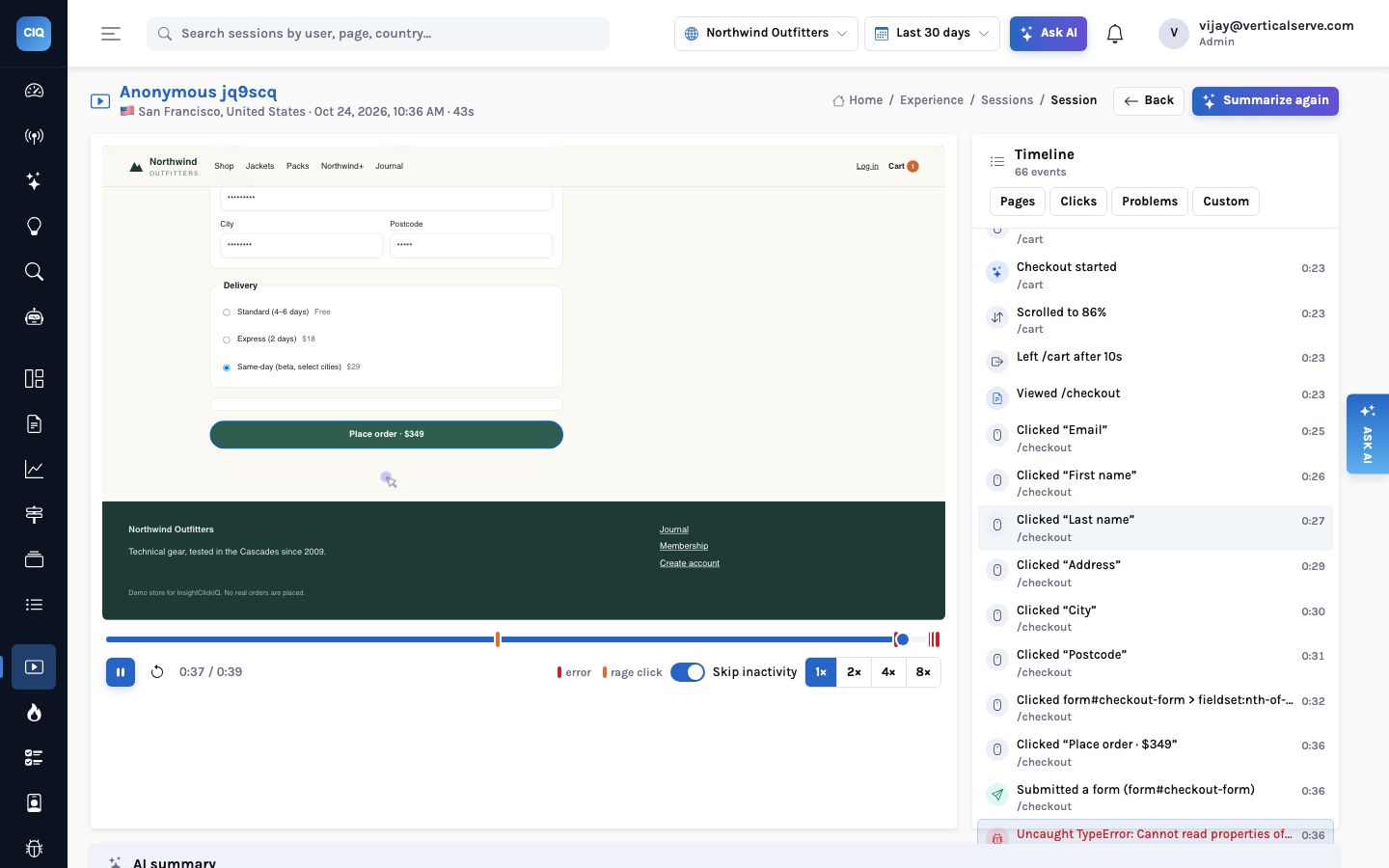
?t=37, the player starts a second early and the timeline has moved to the first Uncaught TypeError at 0:36. The red ticks on the scrubber are errors; the orange one is a rage click. Note the selected delivery option: “Same-day (beta)” is what throws.What is recorded, and what is not
Replay is an option on the snippet, not a separate product. When it is on for a project and a session is sampled in — the sample rate is decided once per session — the core script loads a second file, the rrweb recorder, from your InsightClickIQ host. It is about 23 KB gzipped and is never downloaded for sessions that are not recorded. It captures the DOM and its changes rather than video, ships them in chunks every five seconds or at about 512 KB, and the API stores each chunk gzipped in your object store (S3, Azure Blob, Google Cloud Storage, OCI Object Storage, MinIO, or a local directory). Postgres only holds an index row per chunk.
That makes recordings small. The checkout session above lasted 43 seconds and produced eight chunks totalling 14.8 KB. On the Northwind demo store, 80 of the 8,239 sessions in the last 30 days carry a replay, because the demo’s traffic generator records a sample; every session, recorded or not, has the full event timeline.
| Seen in the replay | How | Configurable |
|---|---|---|
| Inputs, textareas, selects | Masked — you see asterisks, never the value | On by default (mask_all_inputs) |
| Text you mark private | Shown as **** | [data-private] or your own selector |
| Regions you block | Not recorded at all; no clicks reported from inside | [data-clickiq-block] or your own selector |
| Visitors who opt out | clickiq("consent", false) stops and clears the recording | Per visitor, remembered |
| Native iOS / Android / React Native apps | Masked screenshots: text inputs, web views and private views blacked out on the device | clickiqPrivate, <ClickIQPrivate>, mask_all_text |
The masking matters for more than compliance. Because the recording never holds what people typed, a summary written from it cannot leak it either, and you can send a replay link to a developer without first checking what is on screen. The full privacy model →
The summary reads the timeline, not the video
Press AI summary on a session — or let an investigation or an agent do it for you
— and InsightClickIQ sends the model the session’s event timeline: pages, clicks
with the element’s text and selector, rage and dead clicks, form interactions (field
names and timings, never values), errors with their messages, custom events like
Added to cart. It does not send the recording. The answer comes back in a fixed
shape: a paragraph, the visitor’s intent, the outcome, a list of
highlights each with an offset in seconds and a kind (page, click, conversion, dead,
rage, error), and the frustration moments.
Reading events rather than pixels is a deliberate trade. It is fast and cheap, it works for sessions that were never recorded, and it cannot describe something that is not in the data. The summary of the session above:
“Visitor arrived from Google searching for jackets, quickly found and added the Cascade Down Parka (XL, $349) to cart. On the cart page they repeatedly tried to apply a coupon but the ‘Apply coupon’ button was completely unresponsive, triggering a rage-click. They proceeded to checkout anyway, filled out the shipping form, but every attempt to place the order failed with a JavaScript crash (‘Cannot read properties of undefined (reading ‘days’)’), rage-clicking ‘Place order · $349’ before abandoning the session.”
Intent: buy a jacket with a coupon · Outcome: errored
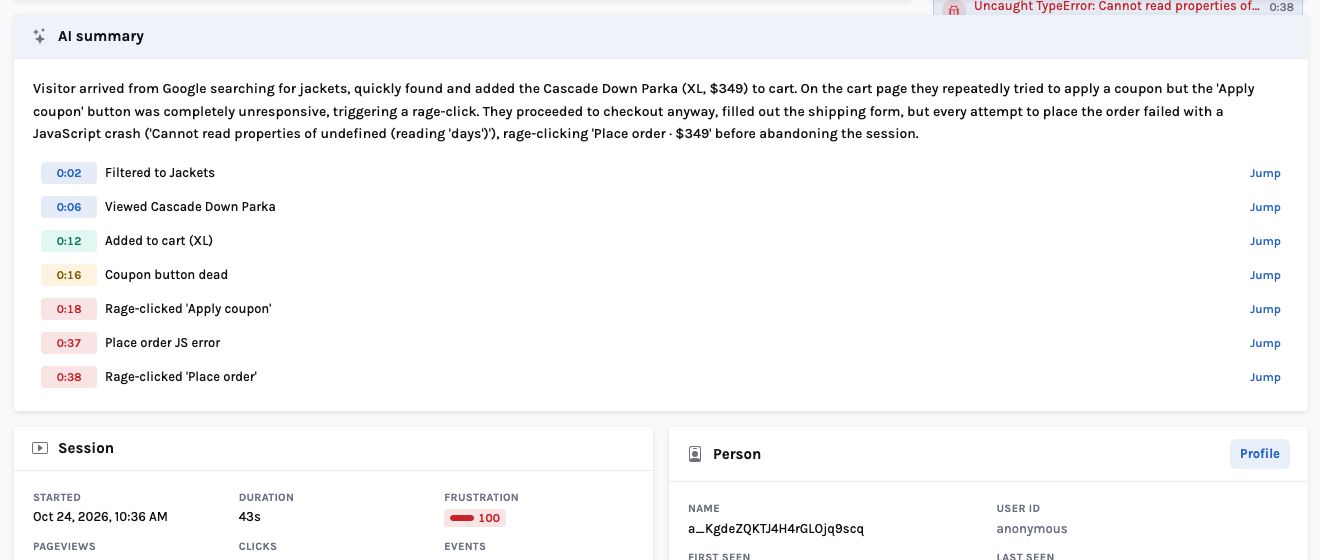
Summaries are stored once written. The first one for a session took 5.4 seconds on the demo (a model call on Bedrock); opening the same session again returned it in 0.02 seconds. Summarize again regenerates it. With no model configured the product still answers — every AI surface in InsightClickIQ has a rule-based path — but the rules text is plainer than the model’s.
Highlights that seek, and why one second early
The player is rrweb-player rebuilding the page from the recorded DOM, with three additions that matter for finding things. The scrubber carries markers for errors and rage clicks, so trouble is visible before you press play. Skip inactivity jumps over idle stretches. And every highlight and every row of the timeline is clickable: pressing one seeks the player to that moment, and the timeline then follows the playhead as it runs.
The seek lands one second before the event, not on it. A rage click is the end of something — the first unanswered click, the second, the burst — and arriving exactly on the timestamp means watching the aftermath. A second of run-up is enough to see the cursor arrive and the click go unanswered.
The same second, from everywhere else
A summary’s highlights are useful on the session page. They become much more useful
when other parts of the product can point at them. The session page reads a ?t=
parameter: /sessions/<id>?t=37 opens the session, waits for the player,
and seeks to 0:36. If the session has no recording, the same link scrolls the event timeline
to the moment instead, so the link is never dead.
| Where you find the link | What it points at | Lands at a second? |
|---|---|---|
| Session summary highlights | The moments the summary picked out | Yes — Jump on each |
| Investigation evidence chips | The moment that proves a theme, in one of the sampled sessions | Yes — ?t=offset |
| The session timeline | Any event: a click, an error, a form submit | Yes |
| Signal cards | The sessions behind a frustration, error or slow-page signal | The session; its summary has the seconds |
| Journey drop-off, form abandonment | Up to 10 (journeys) or 8 (forms) sessions, recorded ones first, most frustrated first | The session |
MCP summarize_session | Summary, intent, outcome and highlights for an external agent | Offsets in the answer |
The investigation link is the one that changes how people work. An investigation samples sessions by any filter — frustrated and not converted, a page, a device, the sessions behind a signal — summarises each, and groups them into themes. Each theme’s evidence has to cite a real highlight offset in a real session; if the model offers evidence it cannot point at, that evidence is dropped before you see it. So a chip that reads “0:37 Place order JS error — ‘days’ undefined” is a promise you can check in one click.
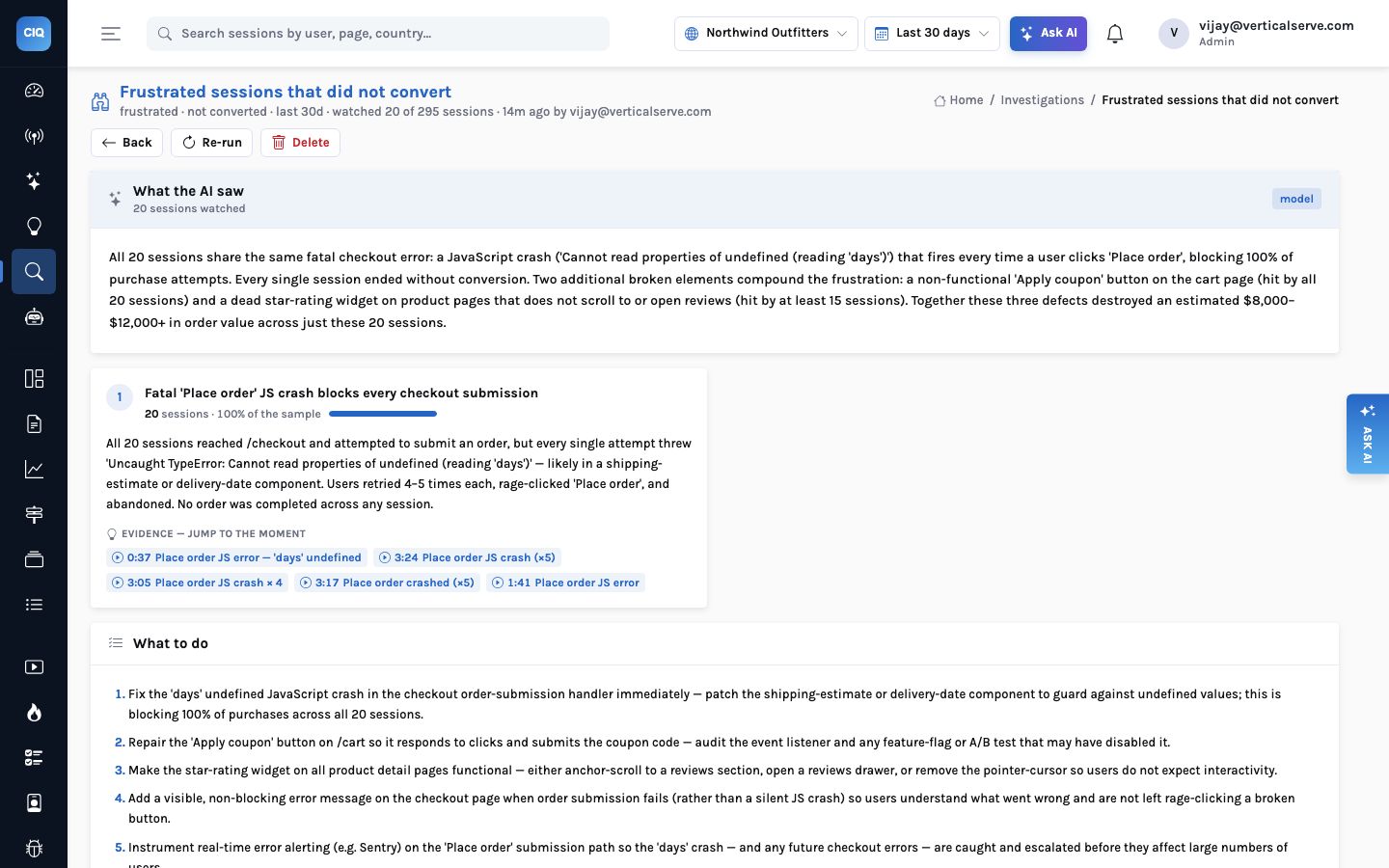
Watching twenty sessions end to end, at a few minutes each, is an hour or more. Watching the five moments the investigation pointed at, a few seconds each, is under a minute, and you have still seen it with your own eyes rather than taking a summary on trust.
You filter sessions, open one, watch at 2× until something happens, and repeat. You see what you happen to watch. Most teams stop after a handful, and the handful is whichever ones loaded first.
The summary, the investigation or the signal makes a claim and attaches the second that proves it. You check the claim rather than hunt for it, and the recordings you open are the ones that matter.
What it does not do
- It does not watch the pixels. A summary knows what the events say. A layout bug that produces no click, error or dead click — a price rendered under an image, say — is visible in the replay but not in the summary. That is the price of summaries that are fast, cheap and cannot invent what they did not see.
- It does not record native apps as video. Native replay, added since this post was
first written, is a series of masked screenshots at most once a second, so animations are
lost. Summaries, highlights and
?t=links work on it the same way. - It does not record every session unless you ask it to. Replay is sampled per project. Signals, investigations and summaries work on all sessions; only the video-like rebuild needs a recording.
- It does not share a recording you did not choose to share. Timestamped comments now sit on the progress bar, and a share link shows one session with the scopes you pick (replay, comments, AI summary) until a date you pick, and can be revoked.
Where this sits against the market
AI session summaries are no longer unusual: Datadog added summaries with linked moments in August 2026, Amplitude has a Session Replay Agent, Microsoft Clarity has Copilot summaries. The difference worth testing is what the summary is wired into — whether an investigation across twenty sessions, a signal with a cost on it, or an external agent can hand you the same second. In InsightClickIQ they all can, because they all share one offset.
A replay you have to search is an archive. A replay that opens at the second the claim is about is evidence.
The coupon bug, end to end → · How investigations choose and group sessions → · Summaries for your own agents, over MCP →


