- contact@insightclickiq.com
- Every click, every session, explained by AI

MCP server
Your analytics, inside the assistant you already use
Claude Code, Claude Desktop, Cursor or any MCP client can query InsightClickIQ through the same engine the console uses. The model calling it never writes SQL either.
Connect
One command, one token
Each project page has a Connect an AI agent (MCP) card with ready-to-paste configuration for Claude Code, Claude Desktop, Cursor and curl. Authenticate with your access token or an API key; every tool resolves the caller and pins the database session to their organisation, the same row-level security the console uses.
Claude Codeclaude mcp add --transport http clickiq https://clickiq.example.com/mcp \
--header "Authorization: Bearer <api key>"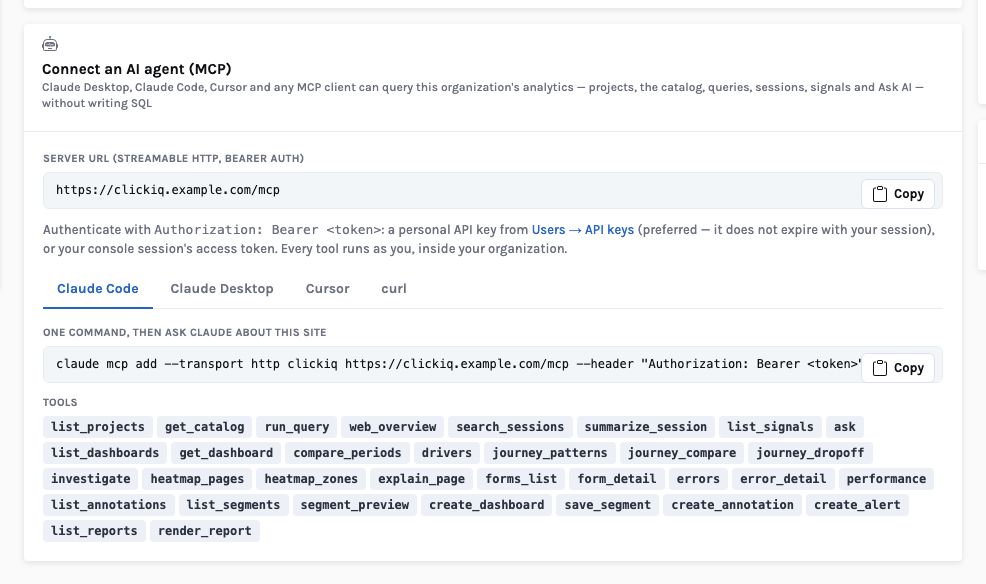
Tools
The same registry the agents use
One definition per tool: the agent harness and the MCP server read the same schemas, so a tool added for one is available to the other.
| Group | Tools |
|---|---|
| Projects and catalog | list_projects, get_catalog (events, properties, top values) |
| Queries | run_query (any QuerySpec), compare_periods, drivers, web_overview, ask |
| Sessions | search_sessions, summarize_session |
| Signals and dashboards | list_signals, list_dashboards, get_dashboard |
| Journeys, zones, forms | journey_patterns, journey_compare, journey_dropoff, heatmap_pages, heatmap_zones, explain_page, forms_list, form_detail |
| Quality | errors, error_detail, performance |
| Audiences and markers | list_segments, segment_preview, list_annotations |
| Experiments and surveys | list_flags, experiment_results, list_surveys, survey_results |
| Reports | list_reports, render_report |
| Writes (editors only) | investigate, create_dashboard, save_segment, create_annotation, create_alert |
How it works
An MCP call: authenticated, tenant-pinned, run through the shared tool registry
What you can ask
Questions this answers
Type them into Ask, give them to an agent as a goal, or send them through MCP from your own assistant.
Which page lost the most visitors this week compared with last?compare_periods and drivers
Summarise the three most frustrated sessions on /cartsearch_sessions then summarize_session
What does the zone table say about /cart?explain_page
Render the executive usage report for the last 7 daysrender_report
Create a dashboard with these three chartscreate_dashboard (editor)
Annotate today's deploy as v2.5create_annotation (editor)
Outcomes
What teams do with it
Analytics in the coding loop
Ask from the editor whether the change you just shipped broke the funnel.
One security model
The assistant sees exactly what the person who connected it may see.
No second integration to maintain
The tools are the agents' tools; new capabilities arrive in both.
Where it stops. MCP gives an assistant the analytics, not your source code or other systems; combining them is up to the assistant you connect. Results are compacted (table rows capped at 50) to fit a model's context.