- contact@insightclickiq.com
- Every click, every session, explained by AI

Data platform
Your events, your engine, your warehouse
The analytics run on infrastructure you choose and the data leaves on your terms: one query engine over Postgres or ClickHouse, retention by partition, a warehouse export in open formats, sampling when volume demands it, and email for the people who will not open a console.
Warehouse export
Parquet in your bucket, every hour or every day
An export job copies a project’s events, sessions and people incrementally to your object store: s3://, az://, gs://, oci:// or an S3-compatible endpoint (MinIO, Ceph). Files are Parquet (snappy) or gzipped NDJSON, laid out as project=<id>/table=event/dt=YYYY-MM-DD/ with a manifest per run, so Athena, BigQuery, Synapse or Snowflake read them as external tables. The console gives the DDL.
Each job keeps a cursor: events by id, sessions and people by their last change, so a session that changes is exported again. A run on the Northwind demo wrote 226,340 rows as 116 Parquet files in 6.3 seconds.
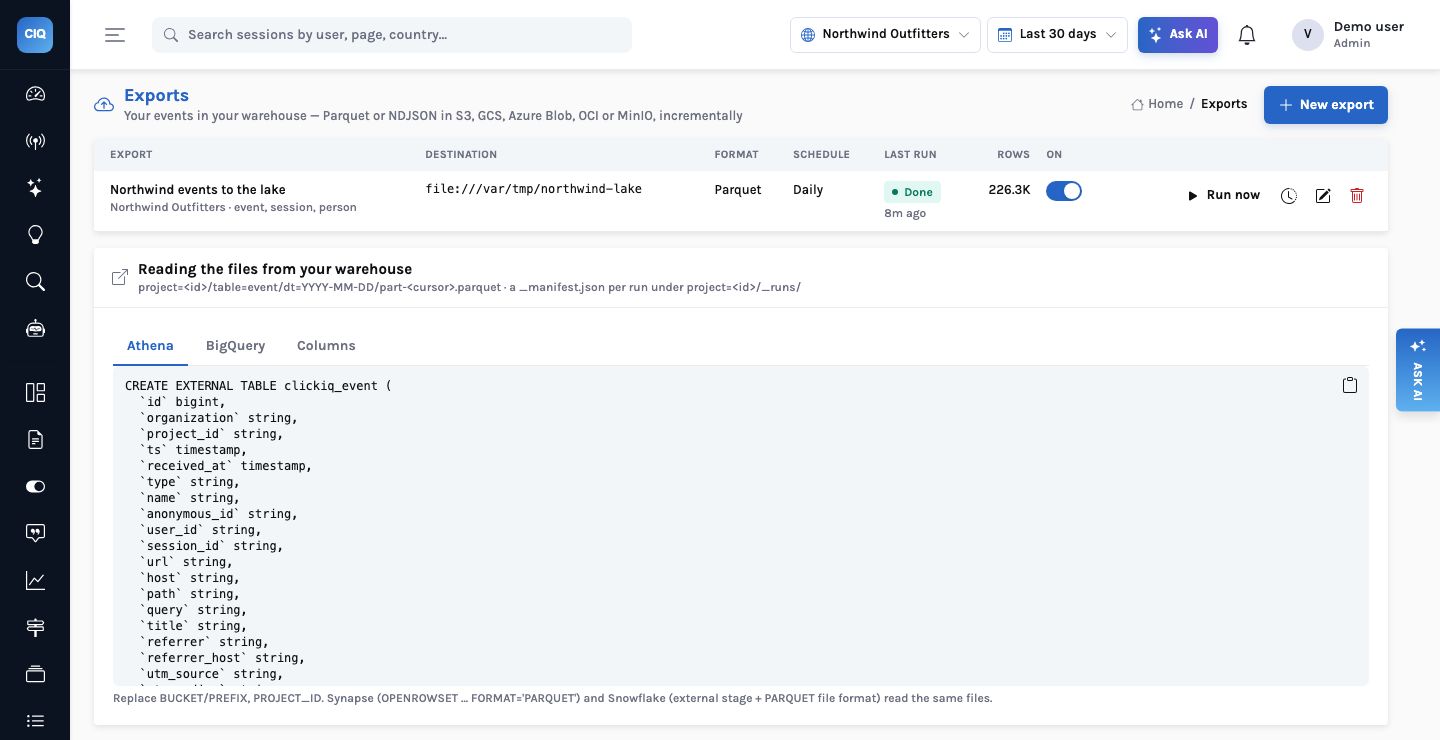
s3://, az://, gs:// or oci://.
Event engine
Postgres by default, ClickHouse when the event table gets large
| Choice | What changes |
|---|---|
CLICKIQ_EVENT_STORE=postgres | The event table in Postgres under row-level security, partitioned by month |
CLICKIQ_EVENT_STORE=clickhouse | The event table in ClickHouse (ReplacingMergeTree, partitioned by month, a TTL); sessions, people and content stay in Postgres |
| Dual-write | Write both while ClickHouse warms up, backfill history, then flip; a ClickHouse failure never fails ingest |
| One builder, two dialects | Every QuerySpec compiles to either engine; on the demo the same specs answered identically, ClickHouse 1.3–17× faster per statement |
| Partitions and retention | Monthly partitions created ahead; a daily round drops whole months no project keeps, trims the rest in batches, and removes replays |
| Read replica | Console reads on a replica with a breaker that falls back to the primary |
Volume & email
Keep a share of whole sessions; send the numbers by email
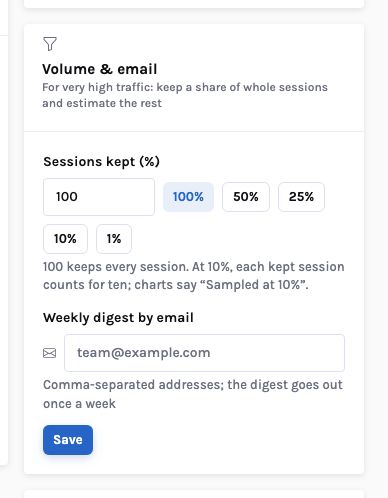
Sampling keeps or drops a whole session by a hash of its id, with the same function in every SDK, so funnels and replays stay intact. Counts and sums are weighted back up, and every chart says “Sampled at 25%”. Errors and conversions are not exempt: keeping the interesting sessions would bias every rate. If you must see every error, keep 100% and scale with ClickHouse.
Email by SMTP or Amazon SES: alerts on every state change with the metric’s trend as an inline chart, the weekly digest to a project’s list, and “Email this report” with the PDF attached.
How it works
Where an event goes: the store you configured, then the warehouse you own
What you can ask
Questions this answers
Type them into Ask, give them to an agent as a goal, or send them through MCP from your own assistant.
How many events did we export yesterday?The job’s run history: rows, files, bytes, duration
Email the executive report to the leadership listThe PDF attached, with a note
Alert me by email if checkout errors doubleAn alert with an email channel
Is this chart sampled?Every sampled answer says so, with the lowest rate in the window
Which event store is this deployment on?The health config: backend, table, TTL, dual-write
How big is each monthly partition?The retention health page, per partition
Outcomes
What teams do with it
Open formats, your bucket
Parquet with a schema and DDL; no lock-in for the raw events.
Scale by configuration
Postgres to around 100 M events a month, ClickHouse beyond, the same queries.
Numbers that reach people
Digests and alerts in the inbox, reports with the PDF attached.
Where it stops. Sampled projects weight counts and sums; averages, percentiles, funnels, retention and paths are computed on the sample, so their rates are right and their absolute counts are of the sample. Some reads (the raw event list, session timelines, the live feed) always come from Postgres, which is why dual-write stays on with ClickHouse.