- contact@insightclickiq.com
- Every click, every session, explained by AI

AI agent analytics
Your copilots are product features. Measure them like one.
If you ship an AI agent or a copilot, its quality, speed and cost are part of the product. InsightClickIQ records each model call, tool call and thumbs-up as an event next to the clicks and sessions of the people using it, and watches them the way it watches checkout.
Dashboard
Volume, failures, latency, cost and feedback per agent
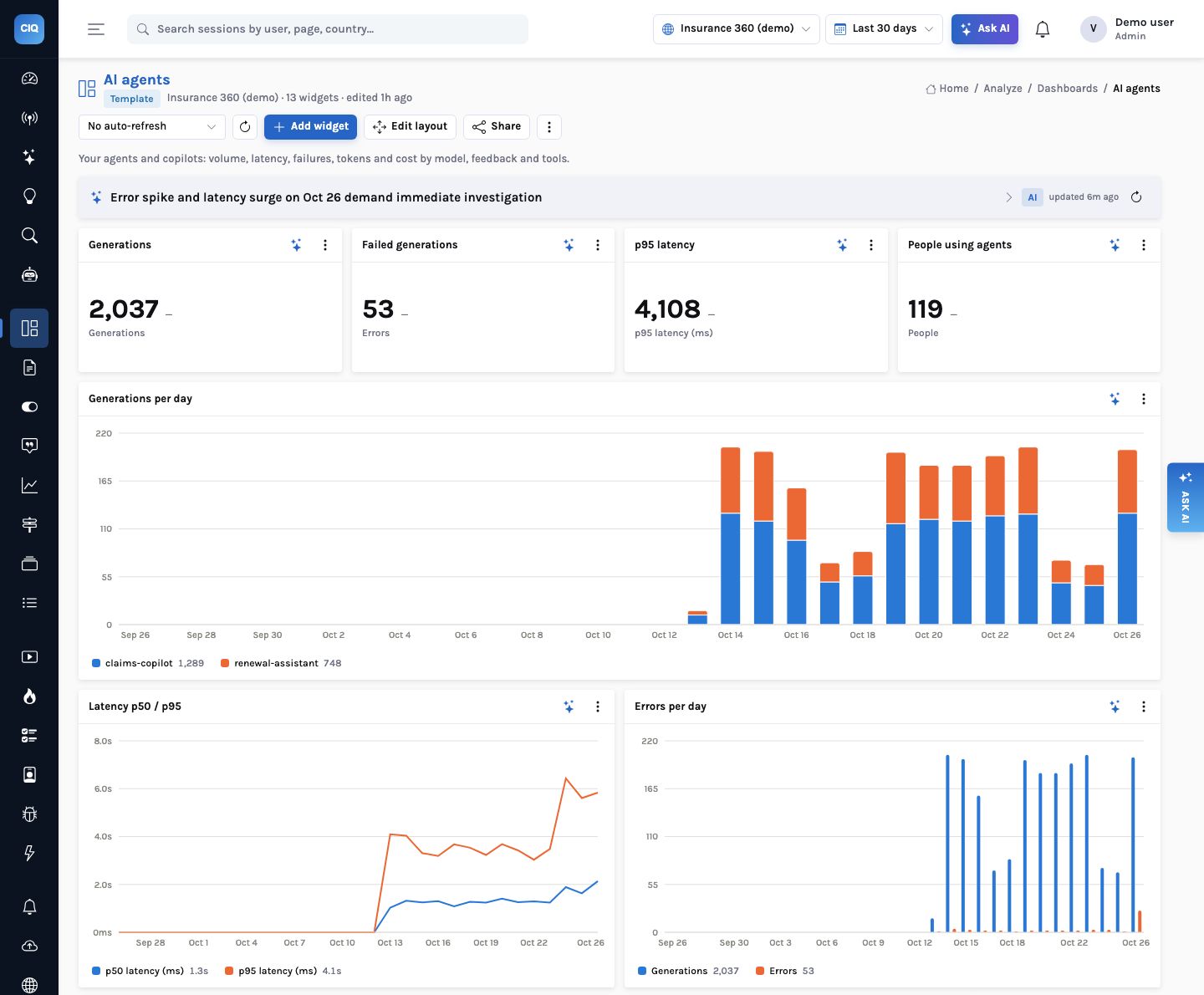
Send $ai_generation events and the AI agents dashboard template appears: generations, failed generations, p95 latency and people using agents with a comparison; generations per day by agent; p50 and p95 latency; errors per day; error rate by agent; tokens and cost by model; thumbs-down by agent; top tools with their failures and p95.
On the Insurance 360 demo, two internal agents made 2,037 generations for 119 people in the last 30 days: claims-copilot 1,289 (20 errors) and renewal-assistant 748 (33 errors). Sonnet carried 1,145 generations for about $11, Haiku 892 for about $2.76 (illustrative demo rates).
Events
Four events, never the prompt by default
| Event | Properties |
|---|---|
$ai_generation | agent, model, provider, input and output tokens, latency_ms, cost_usd, status ok or error, error, trace_id, tool_calls |
$ai_tool_call | agent, tool, latency_ms, status, trace_id, error |
$ai_feedback | agent, trace_id, rating (up, down or 1–5), comment |
$ai_session | Links an agent conversation to the product session it happened in |
| Prompt and response text | Dropped by the SDKs unless you opt in, and dropped again at ingest unless the project allows it |
Instrument
Python, LangChain or the browser
The Python SDK (pip install insightclickiq-sdk, no dependencies) batches on a background thread and never blocks a request. clickiq.ai.trace times a block, records each tool inside it, and sends one generation on exit, with status error and the exception if it raised. The LangChain callback handler records every LLM call and tool run of a chain without touching its code. Browser copilots use clickiq.ai.generation from the snippet.
Python
import clickiq
clickiq.init("ciq_…", "https://clickiq.example.com")

with clickiq.ai.trace(agent="claims-copilot", model="claude-sonnet-4-6", user_id="u_42") as t:
    with t.tool("policy_lookup"):          # a timed $ai_tool_call
        policy = lookup(claim)
    reply = llm.invoke(prompt)
    t.set(input_tokens=reply.usage.input, output_tokens=reply.usage.output)
t.feedback("up")                           # $ai_feedback for the same trace

# LangChain: one handler, every model call and tool run
from clickiq.langchain import ClickIQCallbackHandler
chain.invoke({"question": q}, config={"callbacks": [ClickIQCallbackHandler(agent="claims-copilot")]})
How it works
Agent analytics: from a model call in your code to a signal with a recommendation
What you can ask
Questions this answers
Type them into Ask, give them to an agent as a goal, or send them through MCP from your own assistant.
Which agent fails most this week?Error rate by agent
Why did claims-copilot get slower?p95 by day and model, and the tools with the slowest p95
What does each model cost us per generation?Tokens and cost by model
Which agent gets the most thumbs-down?Thumbs-down share by agent and its trend
Do people who use the copilot convert more?A funnel or segment on $ai_generation
Which tool calls fail?Top tools with failures and p95 latency
Outcomes
What teams do with it
Regressions caught the day after
A latency or error signal per agent, with a recommendation.
Cost next to value
Tokens and dollars by model beside adoption and outcomes.
Quality you can show
Thumbs-down share by agent, in a weekly report that writes itself.
Where it stops. Cost is what you send in
cost_usd; InsightClickIQ does not price tokens itself. Prompt and response text is not analysed unless you opt in. The dashboard template appears only once $ai_generation events have arrived.