- contact@insightclickiq.com
- Every click, every session, explained by AI

Mobile apps
Web and app in one set of journeys
Native apps send the same events as the browser: a screen is a pageview, a tap is a click, a crash is an error. On top of that, tap heatmaps per screen, app start, screen load, frozen frames and ANRs, and a masked replay of the session, summarised by the same AI.
Three SDKs
React Native, iOS and Android, no runtime dependencies
Each SDK has the same calls (screen, track, tap, identify, reset, flush, optOut), automatic sessions (30 minutes of inactivity; time in the background counts), an offline queue persisted on the device (500 events), batches of up to 50 every 10 seconds or when the app goes to the background, and retries with backoff.
- React Native (≥ 0.72) and Expo: a provider,
useScreenTrackingfor React Navigation and<ClickIQTouchCapture>for taps - iOS 15+ (UIKit and SwiftUI), Swift 6, Swift Package Manager;
.clickiqScreen("LessonList")andinstallTapCapture(window:) - Android minSdk 24, Kotlin; Compose and Fragment helpers or automatic Activity screens; taps captured on every Activity
- Feature flags, survey helpers and session sampling on all three; crashes sent on the next launch (iOS, Android), uncaught JS errors in React Native
The server records the platform, app version and device model as columns, so you can break any chart down by them, and a person who signs in on the web and in the app is counted once.
React Native
import { ClickIQProvider, ClickIQTouchCapture, useScreenTracking, track, identify }
  from "@insight/clickiq-react-native";

// App.tsx: one screen() per route change, every tap with its position
useScreenTracking(navigationRef);
<ClickIQProvider options={{ key: "ciq_…", host: "https://clickiq.example.com" }}>
  <ClickIQTouchCapture style={{ flex: 1 }}>…</ClickIQTouchCapture>

identify(user.guid, { role: "student" });
track("Lesson started", { subject: "math" });ClickIQ.installTapCapture(window: window) // taps, rage and dead taps
List(lessons) { LessonRow($0) }.clickiqScreen("LessonList") // SwiftUI
searchField.clickiqPrivate = true // never a label, black in replaycomposable("lessons") { ClickIQScreen("LessonList"); LessonListScreen() }
ClickIQ.track("Lesson started", mapOf("subject" to "math"))
pinView.clickiqPrivate() // masked in taps and replayTap heatmaps
Where people tap on each screen, on a real frame of it
Taps carry their position (a fraction of the screen width, and points from the top of the screen or of the scroll content), so Heatmaps has a Web / iOS / Android switch. Pick a screen and Phone or Tablet, and the tap, rage and dead layers are drawn on the newest replay frame of that screen (or a device outline with the tapped labels when there is none). The zone table, click rate, time to first tap and “Explain this page” work per screen as they do per page.
Three taps within 600 ms inside 24 points are a rage tap; a tap on a view nothing interactive claimed is a dead tap. On the iLearnRight demo, Retry on /LessonList collects 33 taps, 11 of them rage.
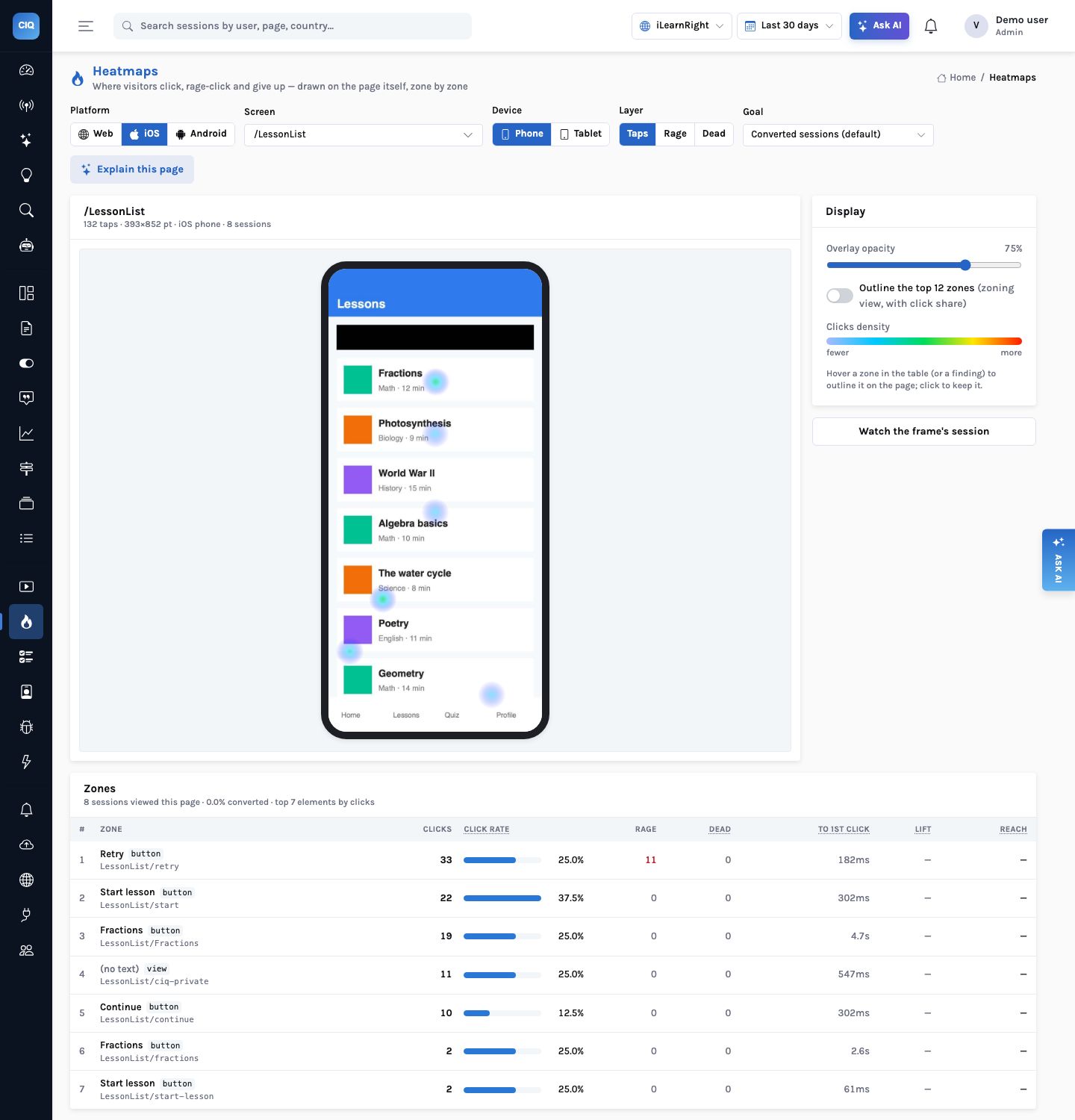
LessonList/ciq-private. Retry leads with 33 taps and 11 rage taps.Mobile vitals
App start, screen load, frozen frames and ANRs
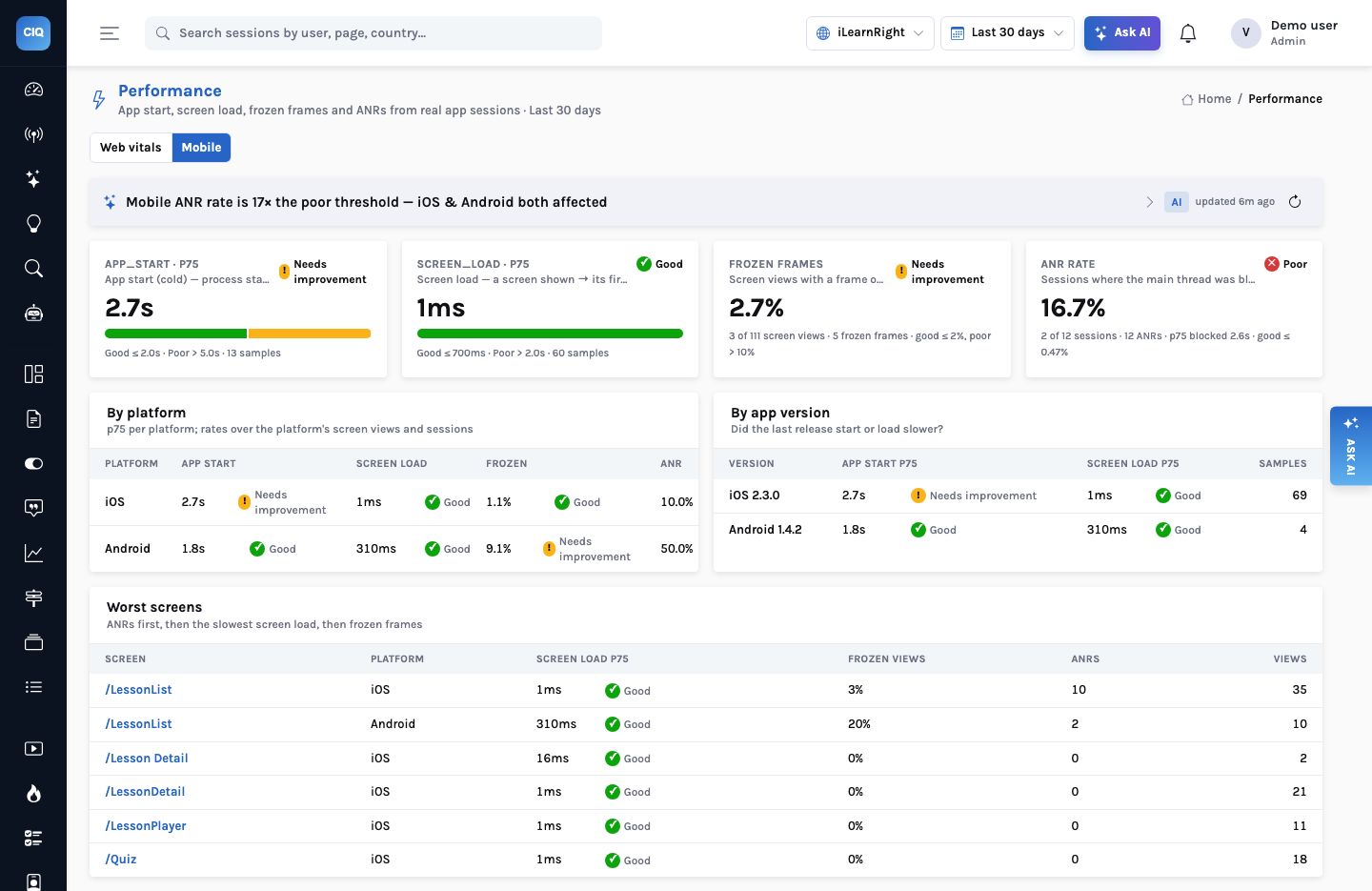
Each SDK measures the four numbers that decide whether an app feels fast, and Performance shows them on a Mobile tab rated good, needs improvement or poor, by platform, by app version and by screen, worst first.
- APP_START: cold launch to the first frame after the first screen (good ≤ 2 s, poor > 5 s); approximate on React Native, which starts with the JS bundle
- SCREEN_LOAD:
screen()to the next frame (good ≤ 700 ms, poor > 2 s) - FROZEN_FRAMES: frames over 700 ms in one screen view; rated on the share of screen views with one (2% / 10%)
- ANR: the main thread blocked for 2 s on iOS or 5 s on Android; rated on the share of sessions (0.47% / 1%)
On iLearnRight the ANR rate is poor: 2 of 12 native sessions (12 ANRs, p75 blocked 2.6 s), and the insight at the top of the tab leads with it.
Native replay
A masked replay of the app session, summarised like a web one
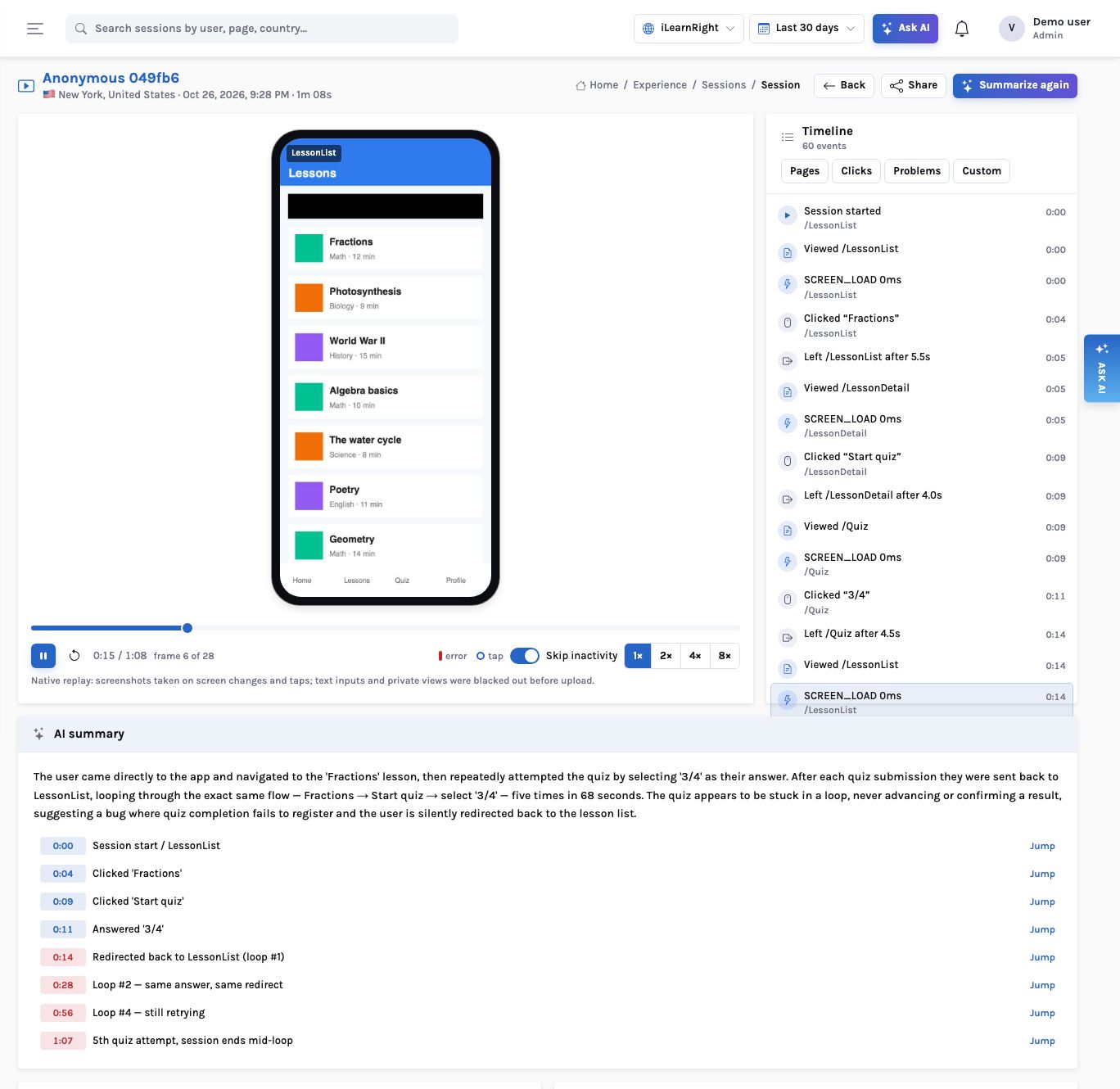
Native replay is a series of screenshots, taken on a screen change, 0.3 s after a tap and at most once a second while the screen changes; an unchanged screen sends nothing. Text inputs, password fields, web views and any view you mark private are painted black on the device, before the image is encoded (on React Native the server paints the measured regions before anything is stored). The project can also mask every label.
The player shows the frames in a phone outline with tap rings, the same timeline, comments and share links as the web, and the AI summary reads the event timeline. On an iOS session in the demo it found a loop: the learner answered the Fractions quiz five times in 68 seconds and was sent back to the lesson list each time.
Privacy
What each SDK masks before a frame leaves the device
| iOS | Android | React Native | |
|---|---|---|---|
| Always masked | UITextField, UITextView, secure entry, WKWebView | EditText, password inputs, WebView | ClickIQTextInput, the focused input, <ClickIQPrivate> |
| Mark your own | view.clickiqPrivate = true, .clickiqPrivate() in SwiftUI | view.clickiqPrivate(); ClickIQ.privateRegion for Compose | <ClickIQPrivate>, useClickIQPrivate(ref) |
| Where it is painted | In the renderer, before encoding | On the bitmap, before compression | By the server, before storage |
| Mask all text | Every UILabel and SwiftUI text | Every TextView | The whole frame is blurred |
| Taps on private views | Counted, no label | Counted, no label | Counted, no label |
On the go
The console on a phone
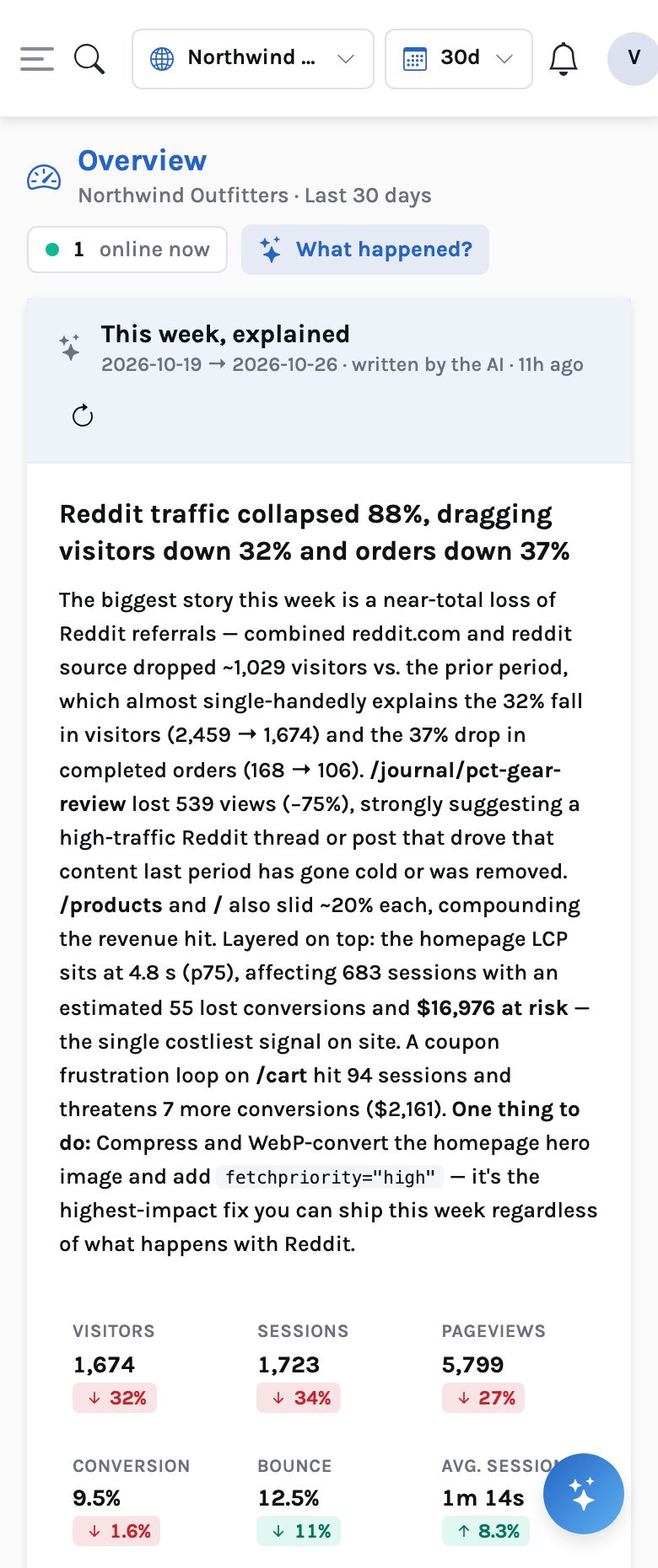
The console itself is responsive: the Overview, its insight card and the digest read on a phone, so the person who gets a signal on the move can open it.
How it works
A native app session: from a tap in the app to a heatmap, a vital and a summarised replay
What you can ask
Questions this answers
Type them into Ask, give them to an agent as a goal, or send them through MCP from your own assistant.
Compare iOS and Android conversion for Lesson startedA breakdown by platform
Where do people tap on the lesson list?The iOS tap heatmap and its zone table
Which screens freeze?Worst screens by frozen-frame rate, linked to their heatmap
Did 2.3.0 slow down app start?APP_START p75 by app version
Summarise this app sessionIntent, outcome and highlights that seek the frame player
Crashes on Android this weekError events with the source class
Outcomes
What teams do with it
One product view across surfaces
The same person on the web and in the app, counted once in one funnel.
Release checks by version
Vitals, errors and engagement broken down by app version and device model.
Replay you can defend
Inputs and private views blacked out on the device; nothing unmasked is stored.
Where it stops. Native replay is stills at up to one frame a second, not video: animations are lost. React Native finds only the inputs you wrap (and the focused one), Jetpack Compose content needs a registered private region, and React Native has no ANR (its JS thread is not the main thread). Screens are named by you (Android can record Activities automatically).