- contact@insightclickiq.com
- Every click, every session, explained by AI

InsightClickIQ · AI-first click analytics
Every click, every session, explained by AI
One snippet captures what people do on your site or app: pageviews, clicks, rage and dead clicks, forms, scroll, errors, Core Web Vitals and session replay. InsightClickIQ then reads it before you ask. A weekly digest says what changed and what it costs, signals put a number of lost conversions on each problem, and agents investigate and show every step they took. Every figure comes from a query the engine validated and ran; the model never writes SQL.
~8 KBgzipped core snippet; replay loads only when sampled
17AI insight surfaces, from the overview to a single chart
9agent playbooks, runnable on a schedule
37tools shared by the agents and the MCP server
Proof, not promises
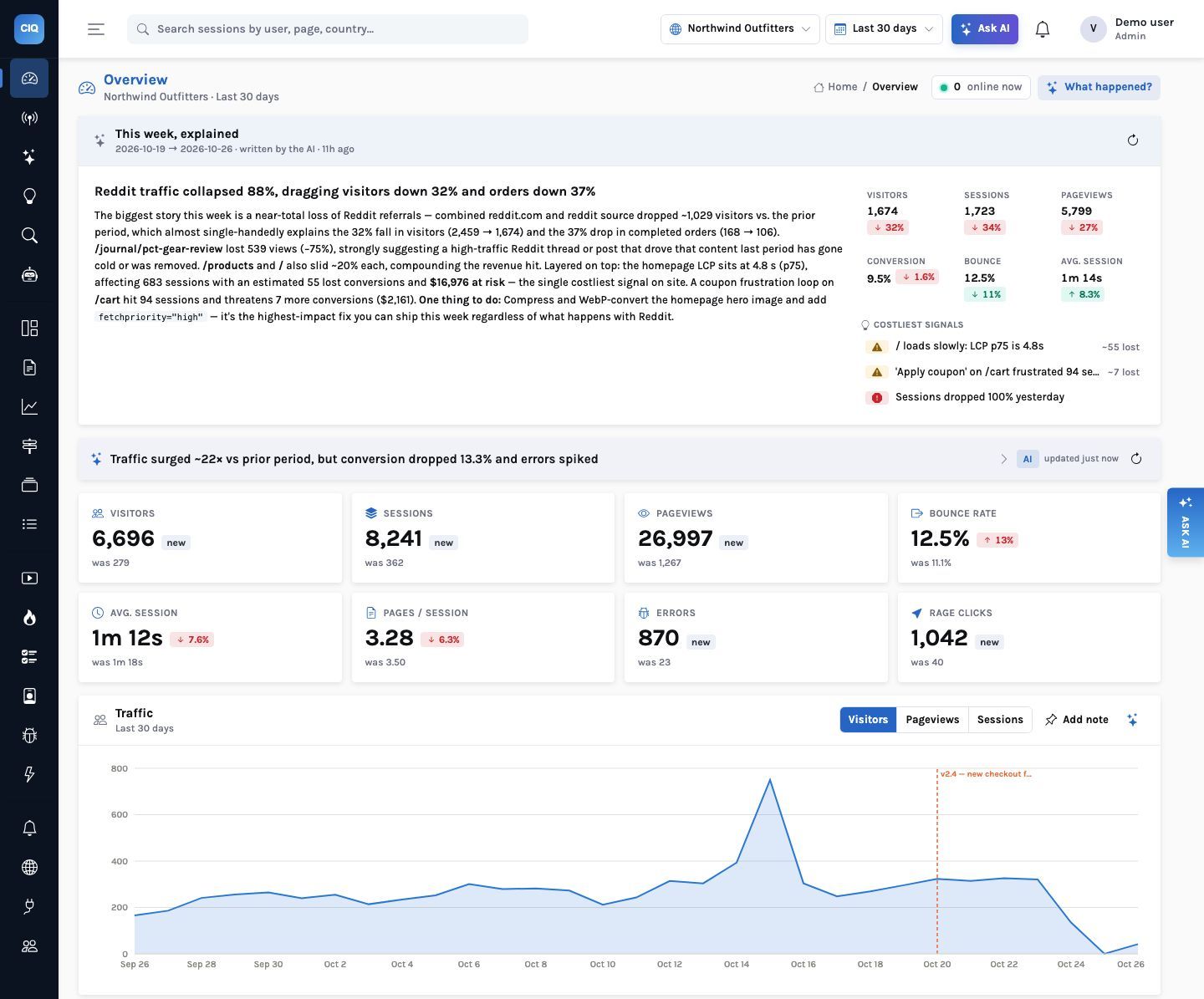
Three screens from the demo store, as they are
Northwind Outfitters is a demo shop with real browser traffic and two problems planted in it: a coupon button that does nothing and a checkout error after a release. This is what InsightClickIQ said about them without being asked.
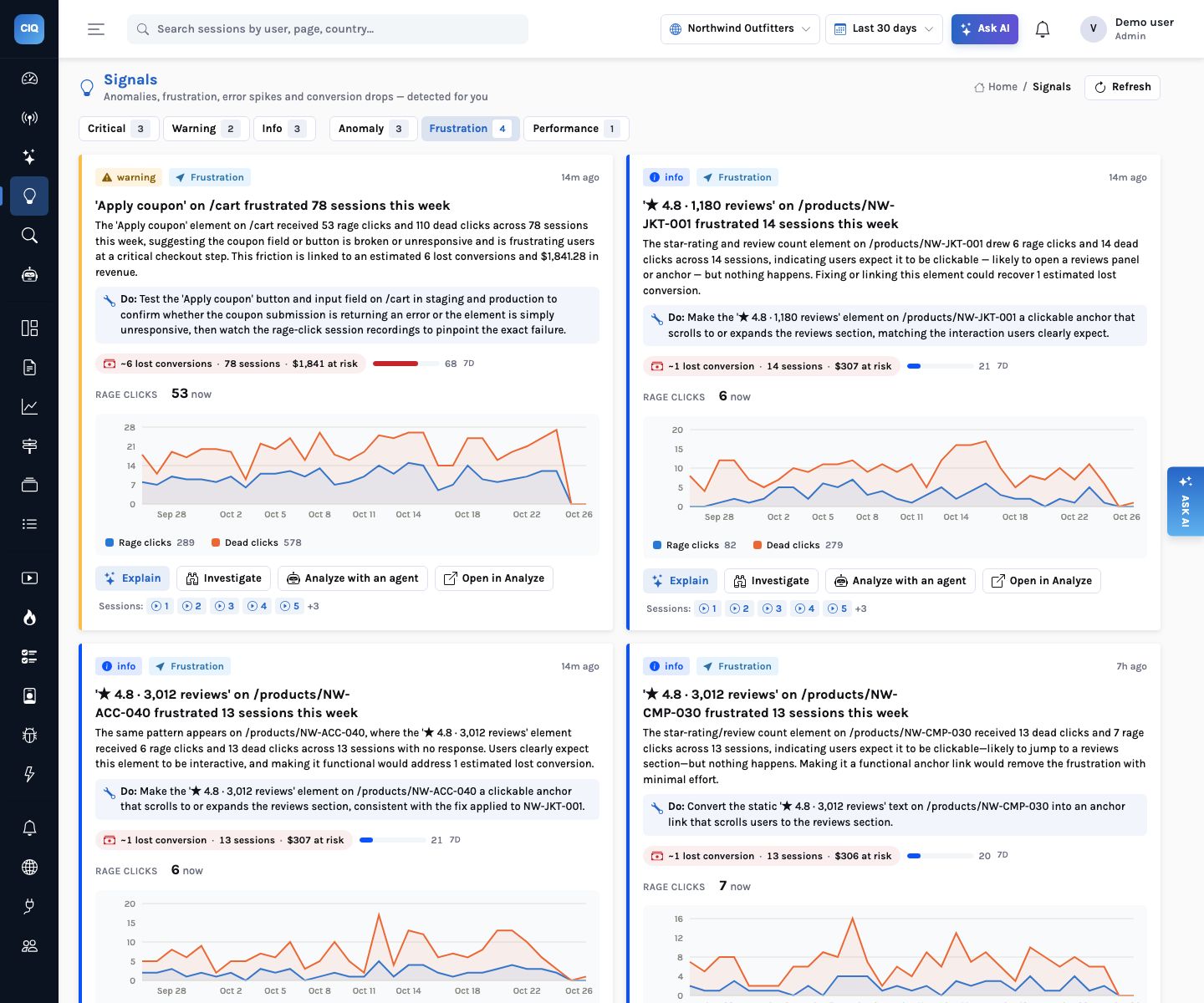
A cost on every problem
Signals are found statistically, then sized: sessions and people touched, conversions likely lost, revenue at risk when orders carry a value, and a 0–100 score that orders the list.
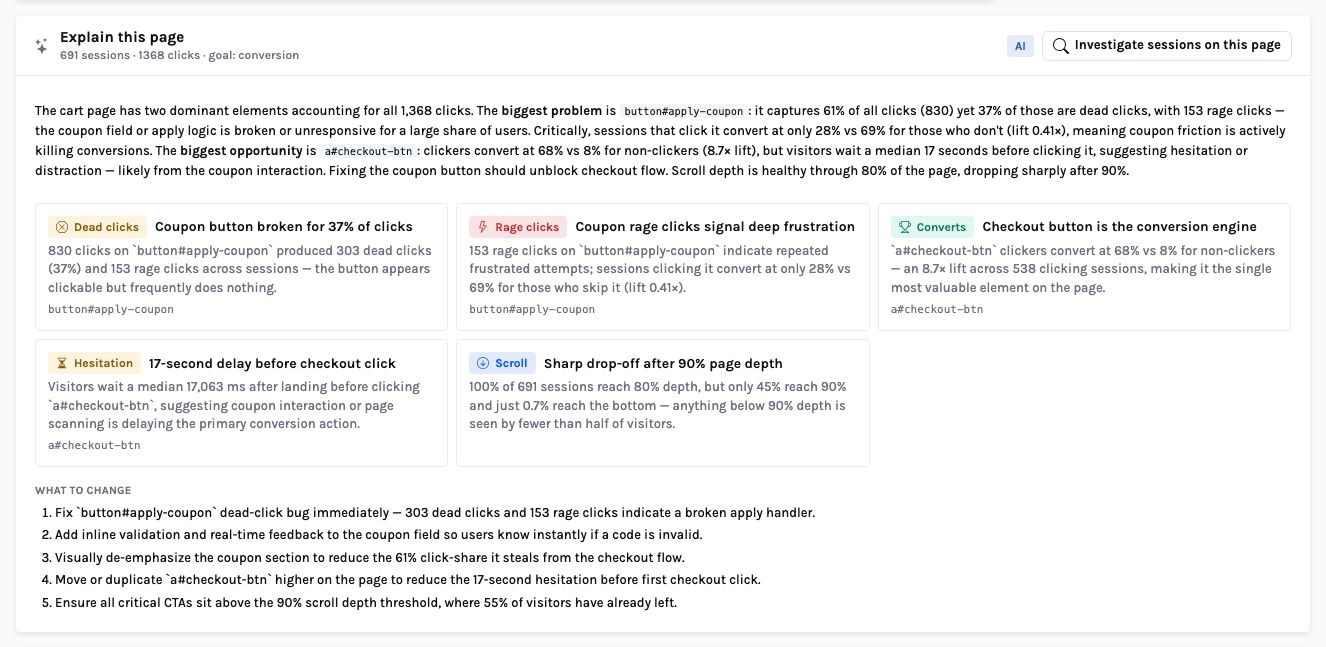
The element, not just the page
“Explain this page” reads the zone table for the cart and names the button that wastes the clicks, the one that earns them, and how long people hesitate before checkout.
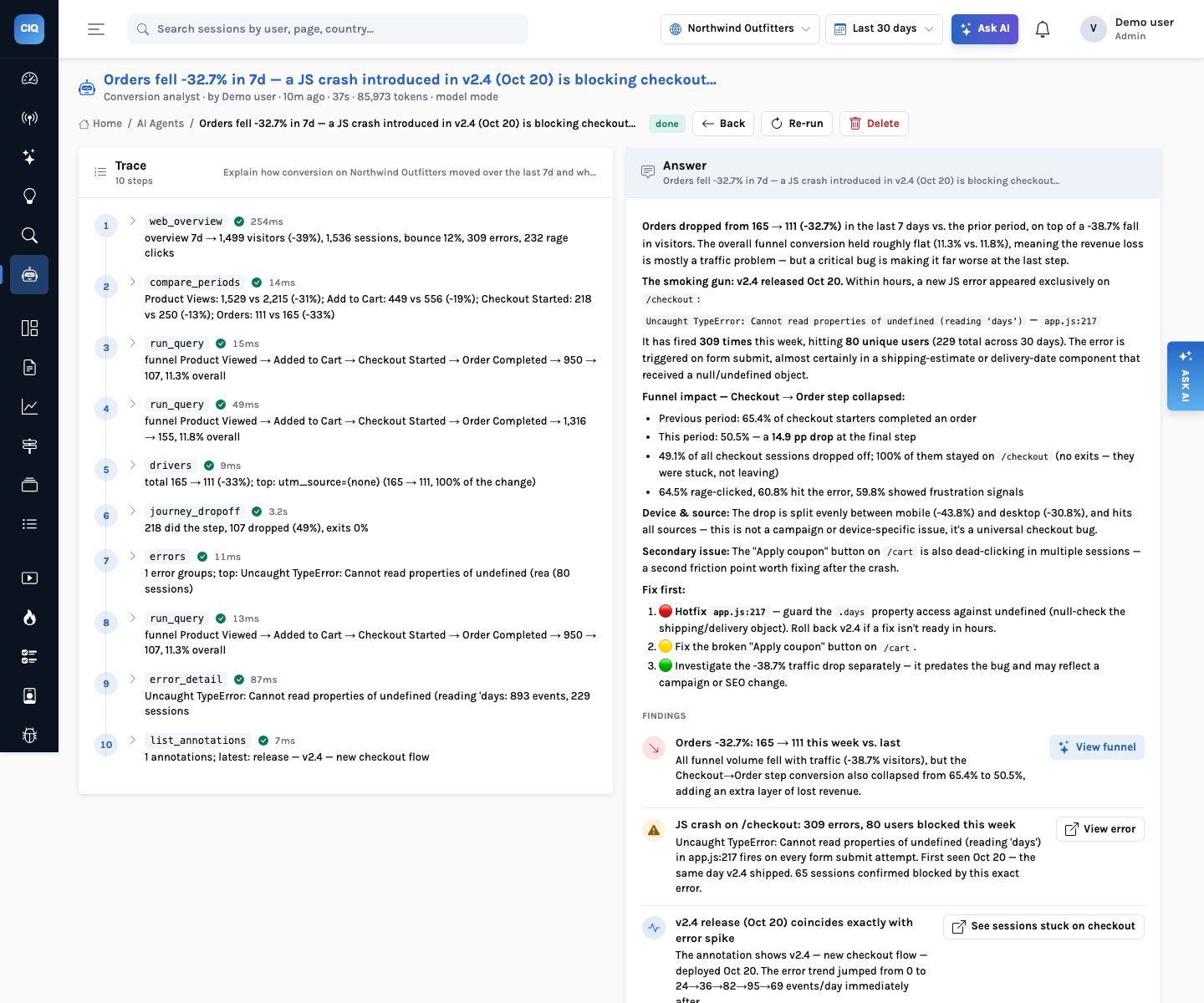
An analyst that shows its work
An agent run lists every tool it called, with the arguments, a one-line result and the time it took, beside the answer it reached.
What AI-first means here
Six rules the product is built on
Every analytics vendor has a chat box now. These are the properties that decide whether you can act on what it says.
Grounded
The model plans queries in a typed spec against your real event names; the engine validates and runs them; a second call words the actual numbers. Session ids, offsets and selectors it cites are checked against the data before they are shown.
Always on
Signals run every 30 minutes, the weekly digest once a day, scheduled agent playbooks daily or weekly. The console opens on what changed and what it costs.
From question to proof
An answer leads to the chart, the chart to the sessions, the sessions to an investigation, and the investigation to the replay at the second it went wrong.
Open to other agents
The MCP server gives Claude Code, Claude Desktop and Cursor the same tools the in-product agents use, under the caller’s organisation and role.
Agentic, with a trace
Agents record every step: the tool, its arguments, a summary of the result and the milliseconds. You audit the reasoning the way you would a colleague’s notebook.
Works without the model
Every AI surface has a rules path that returns the same shape. If the model is down or switched off, the insights, signals, digest and investigations still answer, and say they are rules.
The product
Product, web and experience analytics in one stream
Traffic and acquisition, trends, funnels, retention and paths on your own events, replay and heatmaps, errors and Core Web Vitals. One snippet, one store, one query language, and an AI layer over all of it.
AI insights & Ask
A digest that explains the week, an insight card on every screen, Explain on every chart, and answers in words with the numbers, the drivers and the sessions to watch.
Learn moreAgents
Nine playbooks and free-form goals. An analyst loop calls the same tools you use, shows every step it took, and ends with findings that link to the evidence.
Learn moreJourneys
Patterns mined from every session and tagged golden, loop, detour or exit; converted versus dropped; any drop-off opened down to the replays.
Learn moreHeatmaps & zones
Clicks, rage, dead clicks and scroll on a rebuilt page, a zone table with click rate, dead rate, reach and conversion lift, and “Explain this page”.
Learn moreForm analytics
Field-level drop-off, time, refills, empties and errors for every form, with the abandoning sessions attached. Field values never leave the browser.
Learn moreSession replay
Masked recordings with an AI summary of what the visitor wanted, what they did and where it went wrong; each highlight seeks the player.
Learn moreSegments & annotations
Audiences defined in plain English and usable in every query, widget, alert and session list; release markers on every trend.
Learn moreExecutive reports
Printable reports with AI-written summaries that cite the other panels' numbers, built from a template, a sentence or by hand, with a server-rendered PDF.
Learn moreMCP server
Claude Code, Claude Desktop and Cursor query your analytics through the same 37 tools the in-product agents use, under the caller's own access.
Learn moreMobile apps
React Native, iOS and Android SDKs: screens, tap heatmaps, mobile vitals and masked native replay in the same store, so journeys and funnels span web and app.
Learn moreFlags & experiments
Roll features out behind flags and run A/B tests on the same events; the AI readout says ship, keep running or stop, with the statistics behind it.
Learn moreSurveys
NPS and open-text surveys in your site; the AI groups the answers into themes and links each one to the sessions and replays behind it.
Learn moreComments & sharing
Notes pinned to the second of a replay, and scoped, expiring links that show one replay, report or dashboard to someone without an account.
Learn moreAI agent analytics
The model calls, tool calls and ratings of your own agents and copilots as events, with a dashboard, a weekly report and error and latency signals.
Learn moreData platform
Postgres or ClickHouse by configuration, Parquet export to your warehouse, session sampling at high volume, and email for alerts, reports and digests.
Learn more
How an answer is reached
From a question to the second it went wrong
Ask why orders fell. Every step after the question is something you can open and check.
Solutions
Where teams use it
The same product, instrumented for different questions.
Runs where your data lives
Your cloud, your database, your keys
Postgres by default, ClickHouse for the event table at large volume, and the object store and secret manager of the cloud you already run. Each is chosen by configuration, not code.
AWSRDS or Aurora PostgreSQL, S3, Secrets Manager; ClickHouse Cloud on AWS at scale
AzureDatabase for PostgreSQL Flexible Server, Blob Storage, Key Vault
Google CloudCloud SQL or AlloyDB, Cloud Storage, Secret Manager
OCIOCI Database with PostgreSQL, Object Storage, OCI Vault
On-premisesPostgres 16, MinIO or Ceph, ClickHouse OSS; a pilot fits on one VM
From the blog
Worked examples
What the features say on real demo data, and how they get there.

Heatmaps
Zones: click analytics that tells you which element costs you conversions
A heatmap shows where people click. It does not tell you whether those clicks helped. Zones turn every element on a page into a row of numbers — click rate, dead and rage clicks, time to first click, how far down the page it sits, and the conversion lift of the people who clicked it — and Explain this page reads that table for you. On Northwind’s cart page, the most-clicked button turned out to be the one costing the most orders.
Read article

AI
Your analytics as tools: connecting Claude and Cursor over MCP
InsightClickIQ is an MCP server. Claude Code, Claude Desktop, Cursor or anything else that speaks the protocol can call the same 37 tools the product’s own agents use — queries, sessions, journeys, zones, forms, errors — under your login and your organization’s walls. One command to connect, a worked session on real data, and exactly what an agent can and cannot reach.
Read article

Agents
Why did conversion drop? Watching an agentic analyst work
We started the conversion analyst on the Northwind demo store with one API call and no question. Thirty-seven seconds and ten tool calls later it had an answer: orders down a third, a checkout crash doing most of the damage, and what to fix first. Here is every step it took, what each one returned, and the one sentence in its answer the trace lets you push back on.
Read article