Click heatmaps have a reading problem. The red blob says “lots of clicks here”, and people read that as “this works”. Often it means the opposite: people click an element repeatedly because nothing happens. A heatmap of a broken button and a heatmap of a popular one look the same.
Zone-based analytics — what Contentsquare calls zoning and Amplitude calls zoning insights
— fixes the reading problem by turning the picture into a table. In InsightClickIQ every
element that was clicked on a page becomes a zone, grouped by its selector (or by a name you
give it), with the numbers that say whether the clicks were good ones. This post explains each
number and then reads the table for Northwind’s /cart page, the way the
Explain this page button does.
The numbers on each zone
Every rate is computed per page, per device, over the selected range, from events the snippet already sends — there is no tagging step:
| Column | Definition | What it is for |
|---|---|---|
| Clicks | Click events on the element (a dead or rage click is also sent as a click, so they are not added again) | Volume |
| Click rate | Sessions that clicked it ÷ sessions that viewed the page | Is it used at all? |
| Click share | Its clicks ÷ all clicks on the page | Where attention goes |
| Rage / dead | Rapid repeated clicks; clicks after which nothing changed. Dead rate = dead ÷ clicks | Does it respond? |
| Time to first click | Median, per session, from the page view to the first click on it | Do people hesitate or hunt for it? |
| Lift | Conversion of sessions that clicked it ÷ conversion of page sessions that did not | Does clicking it go with buying? |
| Reach | Share of sessions whose deepest scroll reached the element’s position | Is it seen at all? |
Conversion means the session’s converted flag (your project’s conversion
events) by default; pick any custom event as the goal instead and lift is measured against that
event, fired after the first click on the zone. Name an element in your markup with
data-clickiq-name="Hero CTA" and the zone is labelled by that name rather than a
selector, which survives redesigns.
Why two click totals?
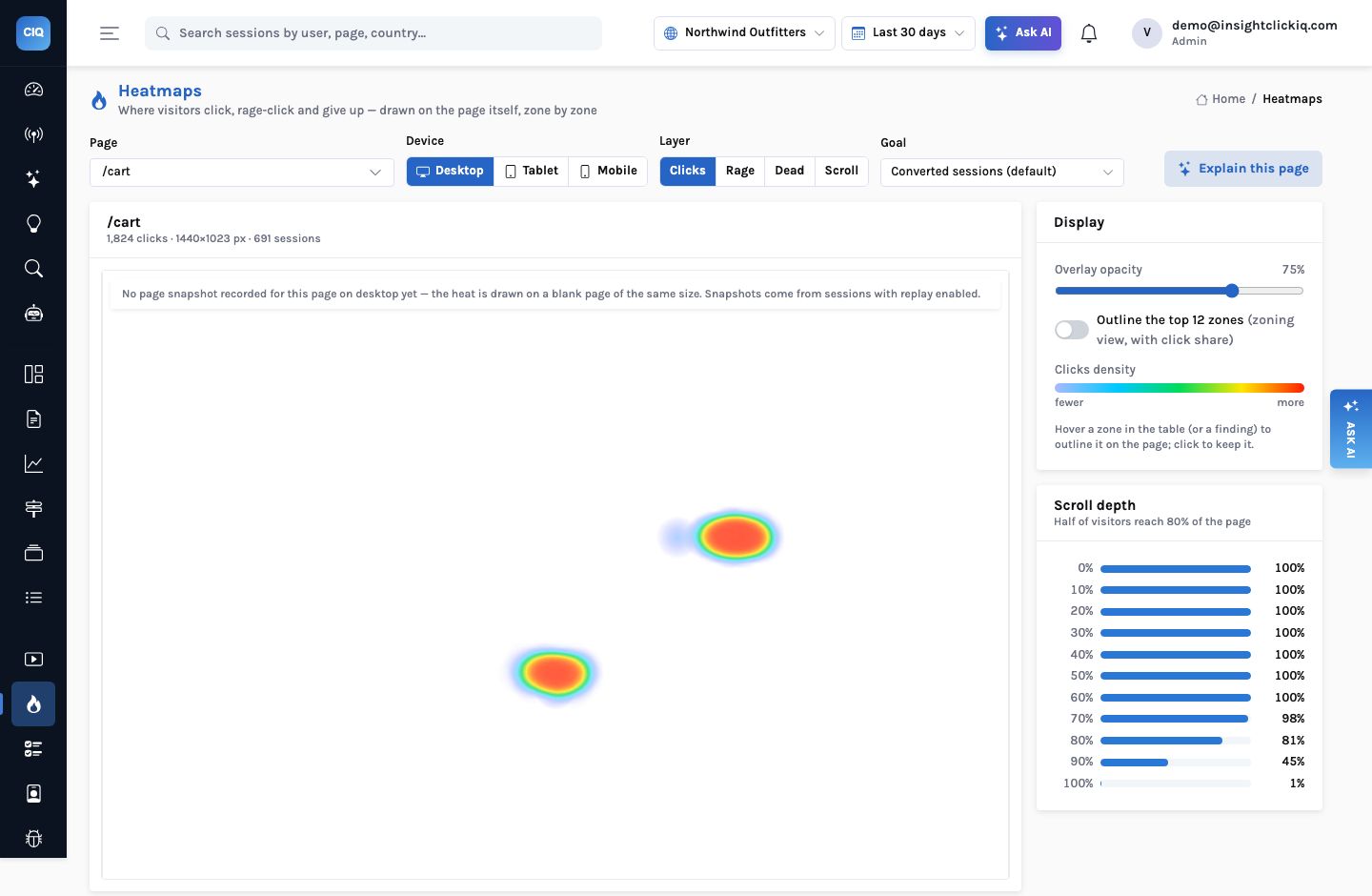
The cart page’s header says 1,824 clicks; the zone table adds up to 1,368. The header counts every click, rage-click and dead-click event, the way the original heatmap layer always has. The zone table counts click rows only, because a rage or dead click is already a click and counting it twice would inflate exactly the elements that are broken. The definitions are in the console’s column headers.
Northwind’s cart page
Over 30 days on desktop, 691 sessions viewed /cart and 55.0% of them went on to
convert. Two elements took every click on the page:
| Zone | Clicks | Click rate | Rage | Dead | To 1st click | Lift | Reach |
|---|---|---|---|---|---|---|---|
| Apply coupon (button) | 830 | 34.0% | 153 | 303 (37%) | 21 s | 0.41× | 100% |
| Checkout (link) | 538 | 77.9% | 0 | 0 | 17 s | 8.72× | 100% |
Read across the first row. The coupon button takes 61% of every click on the page. More than a third of those clicks are dead — nothing changed on the page afterwards — and there are 153 rage clicks on top. It is fully visible (reach 100%), so this is not a discoverability problem. And the visitors who click it convert at 28.1%, against 68.9% for the visitors on the same page who leave it alone: a lift of 0.41.
The second row is the opposite. Sessions that click Checkout convert at 68.4%; the ones that do not, at 7.8%. That 8.72× lift is partly arithmetic — you cannot order without checking out — but the median visitor still takes 17 seconds to make that click on a page with two things on it.
Lift is not cause
A lift of 0.41 does not prove the button loses orders. People hunting for a discount may be more price-sensitive to begin with. What makes this one convincing is the combination: low lift, a 37% dead rate, 153 rage clicks and a signal saying the same thing. When lift is low and the element responds normally, treat it as a question for a test, not a verdict.
Explain this page
The button at the top right of the Heatmaps page sends the zone table, the scroll bands and the page totals to the model, together with the flags a set of rules has already raised. The model writes a narrative of at most 160 words, up to eight findings and up to five recommendations. Its answer is then checked: every finding must be one of the known kinds and every selector it cites must exist in the table. If the check fails, or no model is configured, the rules answer is shown.
On this run its narrative opened: “The biggest problem is button#apply-coupon: it captures 61% of all clicks (830) yet 37% of those are dead clicks, with 153 rage clicks … clickers convert at only 28% vs 69% for non-clickers (lift 0.41×).” It named the opportunity in the same breath — the Checkout link with its 8.7× lift and 17-second wait — and suggested the two might be linked: the coupon interaction sits above Checkout and may be what delays it. Its recommendations, in order:
- Fix the coupon button so every click produces visible feedback — success, error or a loading state.
- Validate the code inline so the visitor sees acceptance or rejection at once.
- Move Checkout above the coupon field, or otherwise give it more prominence.
- Audit what sits below 80% of the page: 81% of visitors get that far, 45% reach 90%.
- Test collapsing the coupon field behind a “Have a code?” link.
The wording changes each time the card is regenerated; the numbers in it do not, because they are copied from the table. Without a model the rules give the same skeleton: a dead finding because the dead rate is above 30% with at least three dead clicks, a winner because Checkout’s lift is the highest above 1.2 with at least 30 clicking sessions, a hesitation if a call to action waits more than 8 seconds, and the scroll bands.
| Finding kind | Rule that raises it |
|---|---|
| dead | Dead rate above 30% with at least 3 dead clicks |
| rage | Any rage clicks (folded into the dead finding for the same zone) |
| winner | Highest lift, at least 1.2×, with at least 30 clicking sessions |
| hidden | A call to action that fewer than half of sessions scroll far enough to see |
| ignored | A call to action that 70%+ can see and fewer than 2% click |
| hesitation | A call to action with a median time to first click over 8 seconds |
| scroll | The share of sessions reaching 50% and 90% of the page |
A page with a snapshot: the review stars
Zones are drawn over a rebuilt snapshot of the page (from a recorded session’s DOM, not a screenshot), so you can see where each one sits. The cart page has no snapshot on desktop yet — the heat is drawn on a blank page of the same size — but the Ridgeline Shell Jacket page does, and it shows a second, quieter version of the same problem:
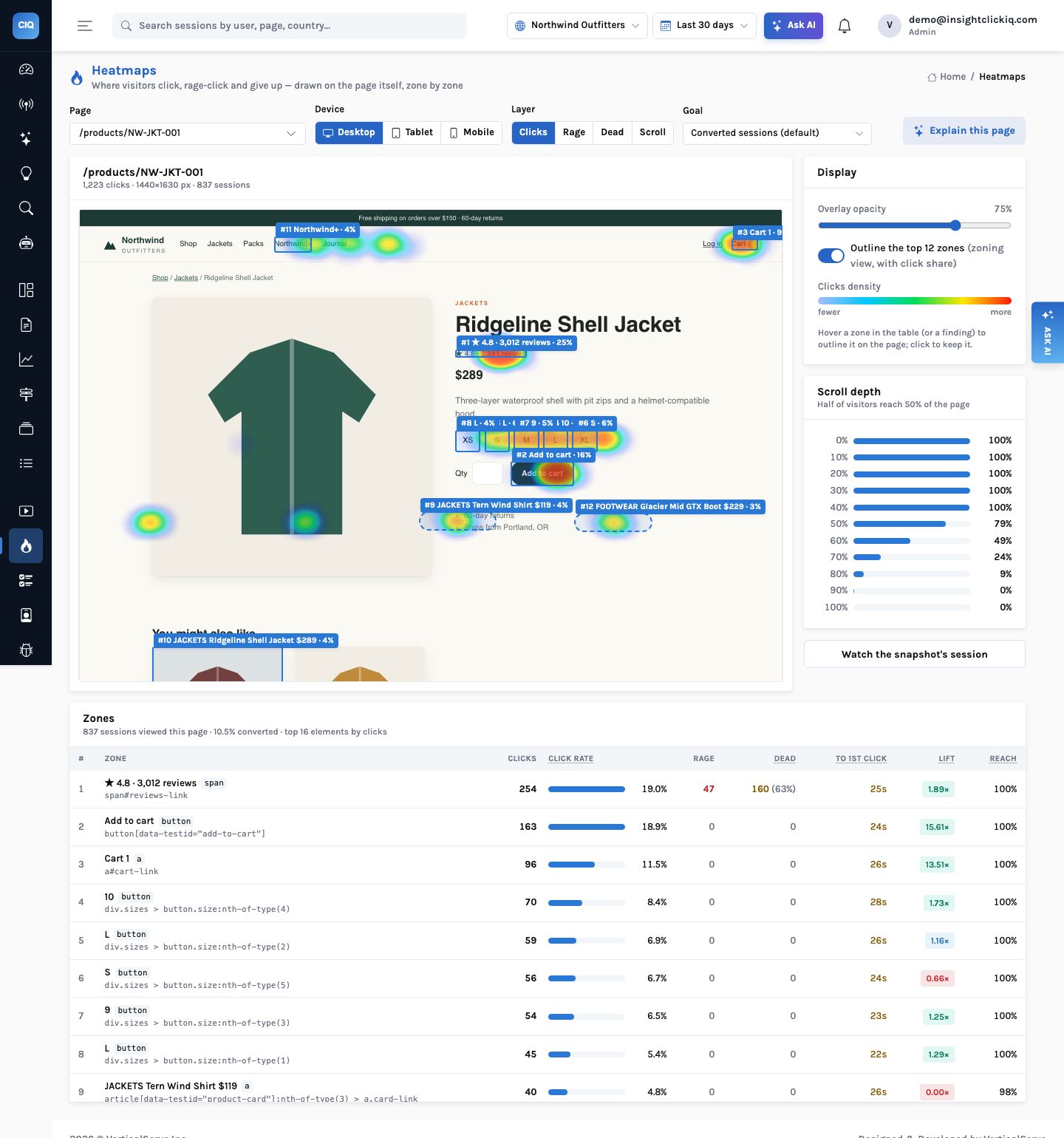
The most-clicked element on the page is not Add to cart. It is the star rating line, “★ 4.8 · 3,012 reviews”: 254 clicks from 19% of the page’s sessions, 160 of them dead (63%) and 47 rage. Visitors expect it to jump to the reviews. It does not. Unlike the coupon button its lift is above 1 (1.89×) — people who look for reviews are interested buyers — so this element is not losing orders on its own; it is wasting the attention of the most interested visitors. Add to cart, meanwhile, shows a 15.6× lift, as it should.
The same pattern on three product pages is also a signal on the Signals page, ranked by impact: 13 to 14 sessions a week each, about one lost conversion apiece. Small, cheap to fix, and found without anyone looking for it.
Lots of clicks. It looks like the most engaging element on the page.
The most-clicked element is broken, fully visible, and goes with buying less. That is a ticket, with its evidence attached.
From a zone to the sessions
The Explain card ends with Investigate sessions on this page, which opens a new
investigation of frustrated sessions on /cart: up to 40 sessions summarised and grouped
into themes with evidence that seeks the replay. On Northwind an investigation of six coupon
rage-clickers grouped them into two themes. The
coupon-button post follows that thread all the way to
the fix.
Getting good zones on your own site
- Put
data-clickiq-nameon the handful of elements you care about — primary calls to action, navigation, promo slots. Names survive class-name churn; selectors do not. - Mark conversion events in project settings so lift has something to measure, or pick a goal event on the page.
- Leave replay on for at least some sessions so pages get a snapshot to draw on.
- Read the table before the picture. Sort by dead clicks, then by lift. An element in the top five by clicks with a lift below 0.8 is the first thing to look at.
The most-clicked element on a page is either your best call to action or your worst bug. Lift and the dead-click rate tell you which.