
“AI-powered” has stopped meaning anything in analytics. It can mean a chat window over the help centre, a model that writes SQL against your warehouse and hopes, or a summary bolted onto a dashboard that was designed before anyone thought about language models. Each of these is a product that existed first, with AI added afterwards.
An AI-native product starts from a different question: if a model is going to read this data and talk about it to people who will act on what it says, what must be true for that to be safe? In InsightClickIQ the answer is four rules, and every AI feature in the console — Ask, the insight card on each page, signals, journeys, zones, forms, investigations, agents, reports — follows them:
- Grounded. The model plans against a catalogue of the project’s real event names, properties and values. It cannot ask for an event that does not exist.
- The model never writes SQL. It returns a
QuerySpec, a small JSON object. The engine validates it with the same code every chart uses, and compiles the SQL itself. - Every number comes from the engine. A second model call words the answer from the results that came back, under an instruction never to invent a figure, and the results travel with the answer so a reader can check them.
- There is always a rules path. With no model configured, a rule-based planner and writer answer the common questions with the same blocks. The product is never blank.
This post walks through each rule with a real question asked of the Northwind Outfitters demo store, and shows where the design is strict and where it still depends on judgement.
A question, answered
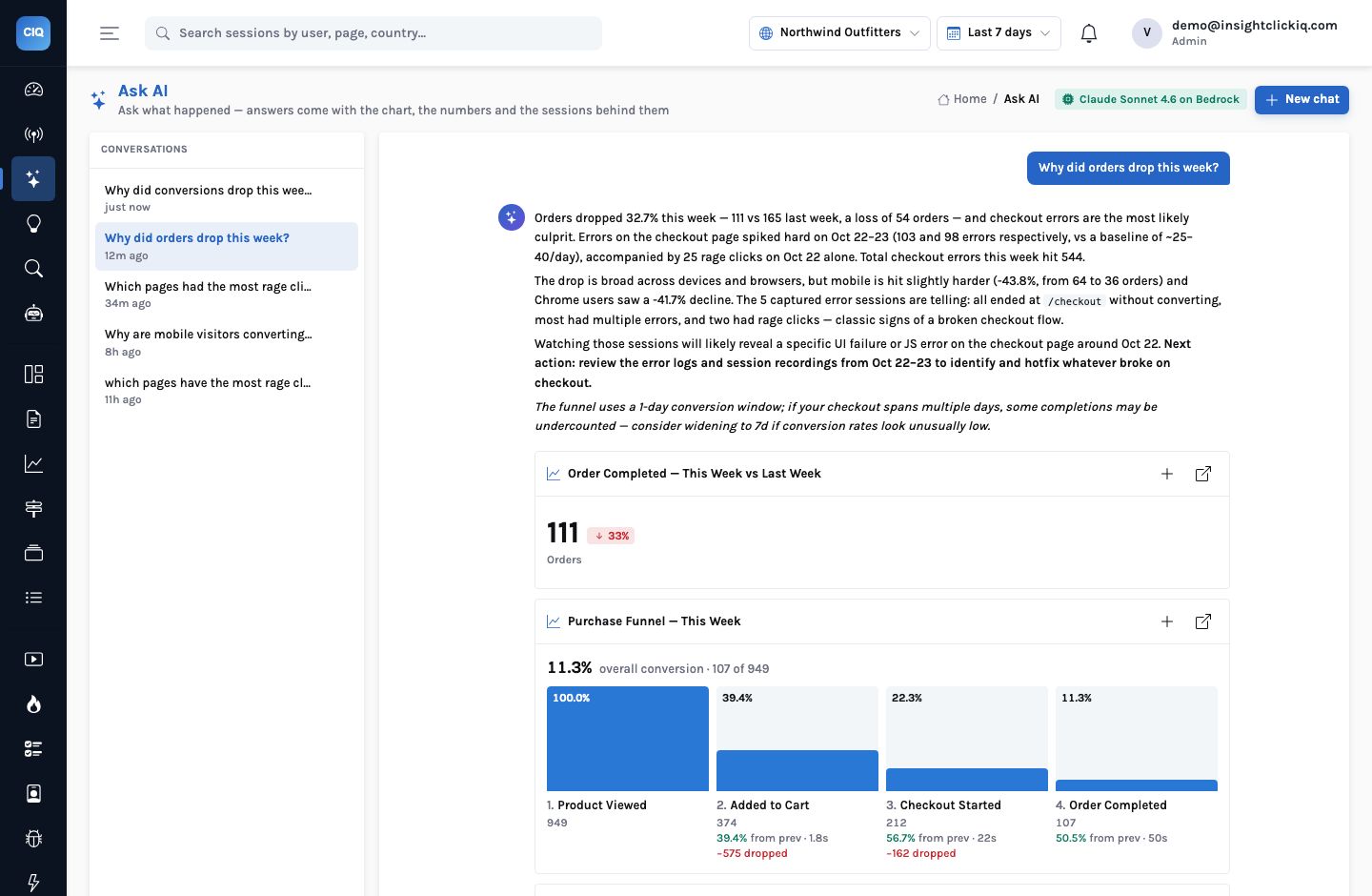
The question was “Why did orders drop this week?”, typed into Ask AI with the Northwind project selected. Thirteen and a half seconds later the console showed this:
The answer opens with the direct figure: orders fell 32.7%, from 165 to 111, a loss of 54. It names the likely cause — errors on the checkout page spiked on October 22 and 23 (103 and 98 errors against a baseline of roughly 25–40 a day, with 25 rage clicks on the 22nd) — and splits the drop by device and browser: mobile fell 43.8%, from 64 orders to 36, Chrome users 41.7%. It lists five checkout sessions with errors to watch, and suggests three follow-ups, including “Did the checkout error spike correlate with a deployment or code change on Oct 22?”.
Under the words are six blocks: the orders metric, the purchase funnel, orders by traffic source,
errors and rage clicks on /checkout by day, a week-over-week driver table by
dimension, and the sessions. Each chart is a block with its QuerySpec attached, so it can be added
to a dashboard or opened in Analyze and changed.
The block that came back empty
One of the six blocks, Orders by Traffic Source — Daily Trend, says “No data in this window”. The model planned a breakdown by utm_source, and Northwind’s orders carry no UTM source. The engine ran the spec and returned nothing, and the console shows that as it is rather than filling the gap. The narration did not mention sources, because there was nothing in the results to mention. That is the design working: an empty result is shown as empty, not described.
The pipeline behind it
Four steps run between the question and the answer. The model takes part in two of them and only ever sees two things: the catalogue going in and the compacted results coming back.
1. Plan against the catalogue
Before the model sees the question it is given the project’s catalogue for the last 30
days: every event name that has actually arrived (with counts), the custom properties and sample
values, the top pages, UTM sources, referrers and countries, and the person traits sent with
identify. It is also given the QuerySpec grammar — seven kinds (trends, metric,
table, funnel, retention, paths, web), the filter operators, the allowed maths — and asked to
return between one and four queries that together answer the question, plus an optional
drivers item when the question asks why something changed, and an optional session filter
when watching sessions would help.
The instruction is explicit: use only event names and properties that appear in the catalogue; if the question names something that is not there, choose the closest real one and say so in a note. That note is appended to the answer in italics. In the Northwind answer it reads: “The funnel uses a 1-day conversion window; if your checkout spans multiple days, some completions may be undercounted.” The assumption that changes the answer is stated where the reader will see it.
2. Validate with the engine’s own code
Every planned spec is passed through the engine’s normaliser — the same function that
validates a spec saved on a dashboard widget or posted to POST /api/query. Unknown
kinds, malformed filters and impossible ranges fail here. A spec that fails is dropped and logged;
it is not repaired by guesswork. The project id is set by the server, not by the model, so a plan
cannot reach another project’s data.
3. Run: the compiler writes the SQL
The engine compiles each valid spec through one module with bound parameters, on a database session pinned to the caller’s organisation with Postgres row-level security (or, on a ClickHouse deployment, a mandatory organisation predicate the dialect refuses to run without). A query that errors is left out of the answer rather than retried with a guess. The drivers analysis — which source, referrer, device, country, browser or page carried the change — is computed in code, not by the model.
4. Narrate the numbers that came back
A second model call receives the question, the plan’s intent and the compacted results (rows capped, timings removed) and writes the answer. Its rules: lead with the direct answer and the actual numbers, then what explains it from the drivers table, then what the sessions will show and one next action; never invent numbers, events, pages or causes that are not in the results; if the data is thin or empty, say so plainly; under 170 words.
| Step | Who does it | What it can get wrong | What catches it |
|---|---|---|---|
| Plan | The model | Picks an event that is close but not the one meant | The catalogue limits the choice; the note states the assumption |
| Validate | Engine code | — | Deterministic: same rules as every widget |
| Run | Engine code | — | Bound parameters, tenant-pinned session |
| Narrate | The model | Over-reads a pattern (“likely culprit”) | The blocks travel with the words; a reader can check every figure |
Why not let the model write SQL?
Because the failures are quiet. A model given a schema and asked for SQL will usually produce a query that runs. When it is wrong — the wrong join multiplying rows, a column that means something slightly different, a time zone forgotten — it still returns a number, formatted with confidence. Click data is especially unforgiving here: sessions, people and events are three different grains, and “users who clicked” versus “clicks” is exactly the kind of distinction a generated query gets subtly wrong.
Every join, aggregation and filter is decided in the moment. A wrong decision still runs and still returns a number. Nobody can tell which of its figures to trust without re-deriving them.
A QuerySpec says {kind: funnel, steps: […], window: 1d}. The engine knows what a funnel is, how sessions and people are counted and what the project’s time zone is. The model chooses the question; the engine owns the arithmetic.
The QuerySpec is also what makes the answer reusable. A chart in an AI answer is the same object as a chart on a dashboard. You can pin it, change its range, add a breakdown, set an alert on it. An answer built from generated SQL is a one-off; an answer built from specs becomes part of the product.
Evidence links, checked before they are shown
Numbers are one kind of claim. The other kind points at something: a session to watch, a moment in a replay, an element on a page, a console route. AI-native means those pointers are checked too, and each feature that produces them has its own check:
- Investigations group many session summaries into themes. Each theme’s evidence must cite a real highlight offset in a real session of the sample; anything else is dropped before it is saved.
- Explain this page on a heatmap may only cite zones that exist in the zone table it was given. A finding about a selector that is not there is rejected, and the rules answer is used instead.
- Insight cards on every screen may only link to known console routes, or carry a question for Ask. A made-up link fails the check.
- Agents must conclude through a
finishcall whose evidence is a list of the step numbers they actually ran; the run page draws those steps’ results as the evidence blocks.
The effect for a reader is that a link in an AI answer goes somewhere. A chip that says 0:37 Place order JS error opens that session’s replay at the 37th second, because the offset was in the session’s own highlights.
Always on, not only on request
Ask is the part people demo. Most of the AI in the product runs without being asked. The same four rules apply to each:
| Feature | Computed in code | Worded by the model | Without a model |
|---|---|---|---|
| Signals | Anomalies (z-scores), frustration hot spots, error spikes, slow pages, impact | Narrative and recommendation | A rule per kind |
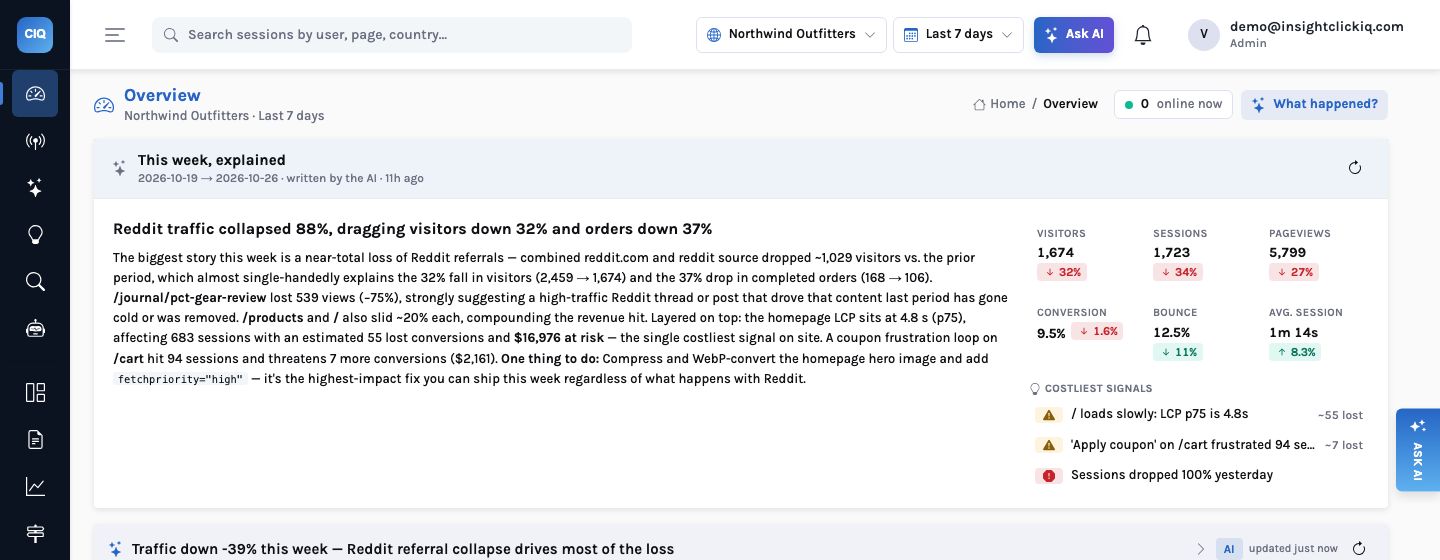
| Weekly digest | KPIs vs the previous week, movers, top three signals by impact | Headline and a ≤180-word narrative | Rules composition |
| Insight cards (17 surfaces) | The facts each screen rests on | Headline, findings, questions | A template per surface |
| Journeys, zones, forms | Patterns, zone tables, field funnels | Narrative and findings | Threshold rules |
| Investigations | The sample, each session’s timeline summary | Themes over the summaries | Grouping by outcome and problem |
| Agents | Every tool result | The plan of which tool next, and the conclusion | The playbook’s fixed plan |
The rules path is a feature, not a fallback
Set CLICKIQ_AI=false, or lose the model provider for an afternoon, and Ask still
answers. The rules planner reads the question for keywords — conversion, checkout, funnel,
rage, error, slow, source, country, device, retention, paths — and picks a fixed set of specs
for each. “Why did orders drop” becomes the project’s purchase funnel, the last
step over time, conversions by source, a drivers analysis on the last step (because the question
says why and drop) and the non-converting sessions with replays. The rules
writer then produces sentences of the form “Conversion funnel: 950 started, 107 finished
— 11.3% overall. The biggest drop is into Added to Cart (575 lost).”
That answer is plainer than the model’s, and it will not connect the error spike to the funnel. But every number in it is the engine’s, the blocks are identical, and the answer is marked rules so nobody mistakes it for the model. For a regulated customer who has not yet approved a model provider, this is how the product is used on day one.
Where it still needs a person
Grounding constrains what the model can claim; it does not make every claim right. In the answer above, “checkout errors are the most likely culprit” is an inference from two series moving together. It happens to be correct — the agent run on the same week traced it to a TypeError introduced with the v2.4 release — but the Ask answer did not prove it, and it says “likely”. The design gives a reader what they need to check: the series, the sessions, the spec. It does not remove the need to look.
The honest list
The model can choose a reasonable but wrong event when two have similar names; the note helps, a clean taxonomy helps more. It can over-read a correlation; the blocks under the words are the remedy. And the catalogue is only as good as your instrumentation — a conversion that is never tracked cannot be analysed by anything, AI or not. The client-360 post is about getting that part right.
The model chooses the question. The engine owns the arithmetic. The reader gets both.
What to try first
Install the snippet on one site, name two or three business events with
clickiq("track", …), mark one of them as the project’s
conversion event, and wait a day. Then ask the question you would normally send to an analyst.
Open each block under the answer in Analyze and compare it with what you expected. That ten
minutes is the fastest way to decide whether you trust it — which is the point.


