
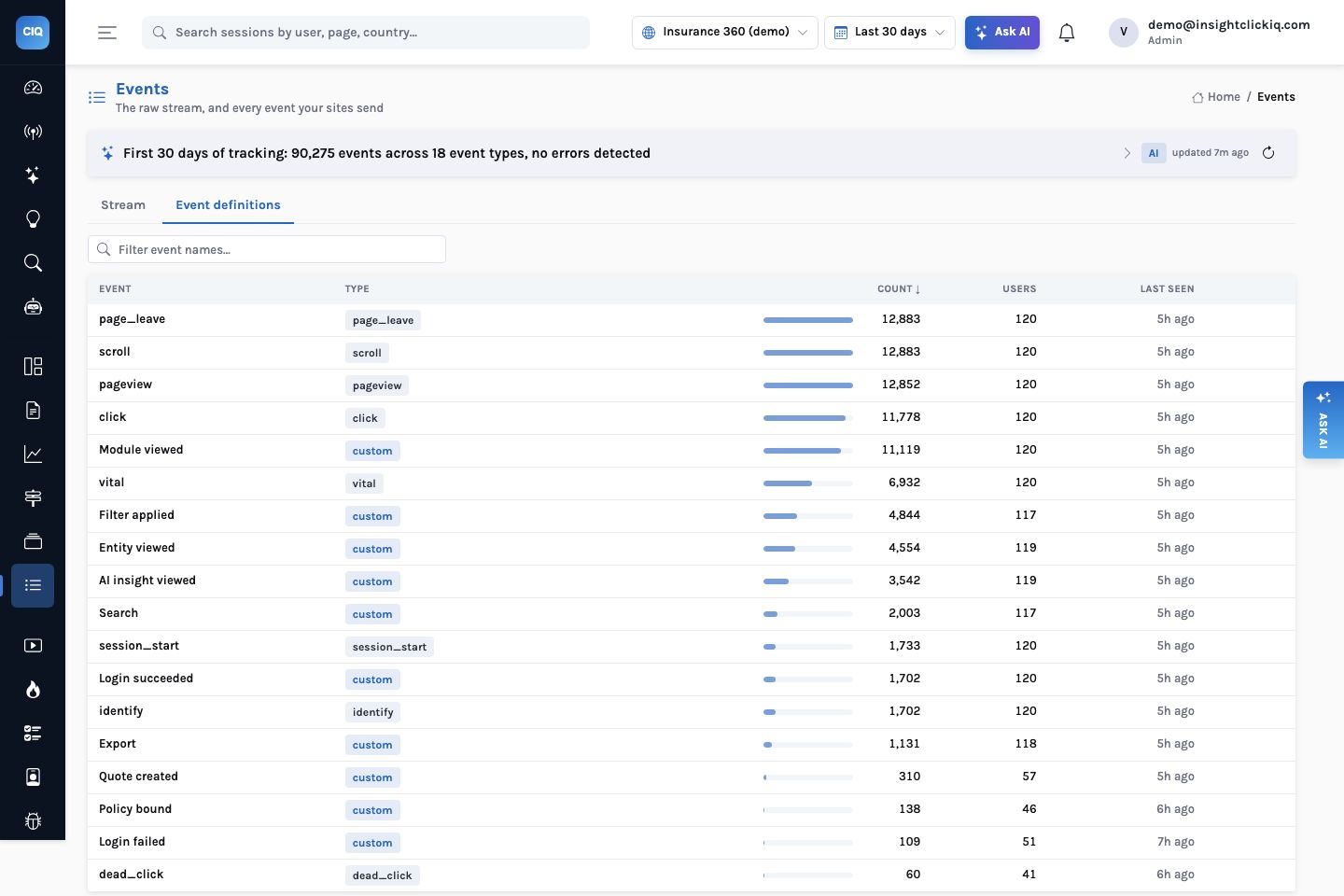
Analytics products are designed around shops: a visitor arrives, browses, adds to a cart, pays. An insurer’s client-360 application is nothing like that. Its users are employees who log in every morning, move between a search page, client and broker dashboards, policy pages, claims and renewals, filter by division and line of business, read the AI insights on a client, export to Excel and, occasionally, create a quote. The people funding it want to know whether it is being used, by whom, for what — and they want it on one page every week.
This post is the instrumentation that answers those questions, taken from the guide we give the application’s developers. Everything in it is live in the Insurance 360 (demo) project, which carries 30 days of exactly this shape, so every number below is one you can reproduce.
Automatic versus named
One snippet (or npm install @insight/clickiq) captures the mechanics with no code:
pageviews on every React Router navigation, clicks with the element’s text and position, rage
and dead clicks, scroll depth and time on page, form timings (never values), JavaScript errors, Core
Web Vitals, sessions, device and browser, and session replay with inputs masked. What the SDK cannot
know is your product’s vocabulary. It sees /clients/C-10729; it does not know that
is the Client dashboard for Northgate Logistics, a Property account. Those moments
you name.
The taxonomy
Event names are sentences in title case, properties are snake_case, and values come from
closed lists. That last rule matters more than it looks: the report breaks down by these strings, so
Property and property become two bars.
| Event | Properties | Answers |
|---|---|---|
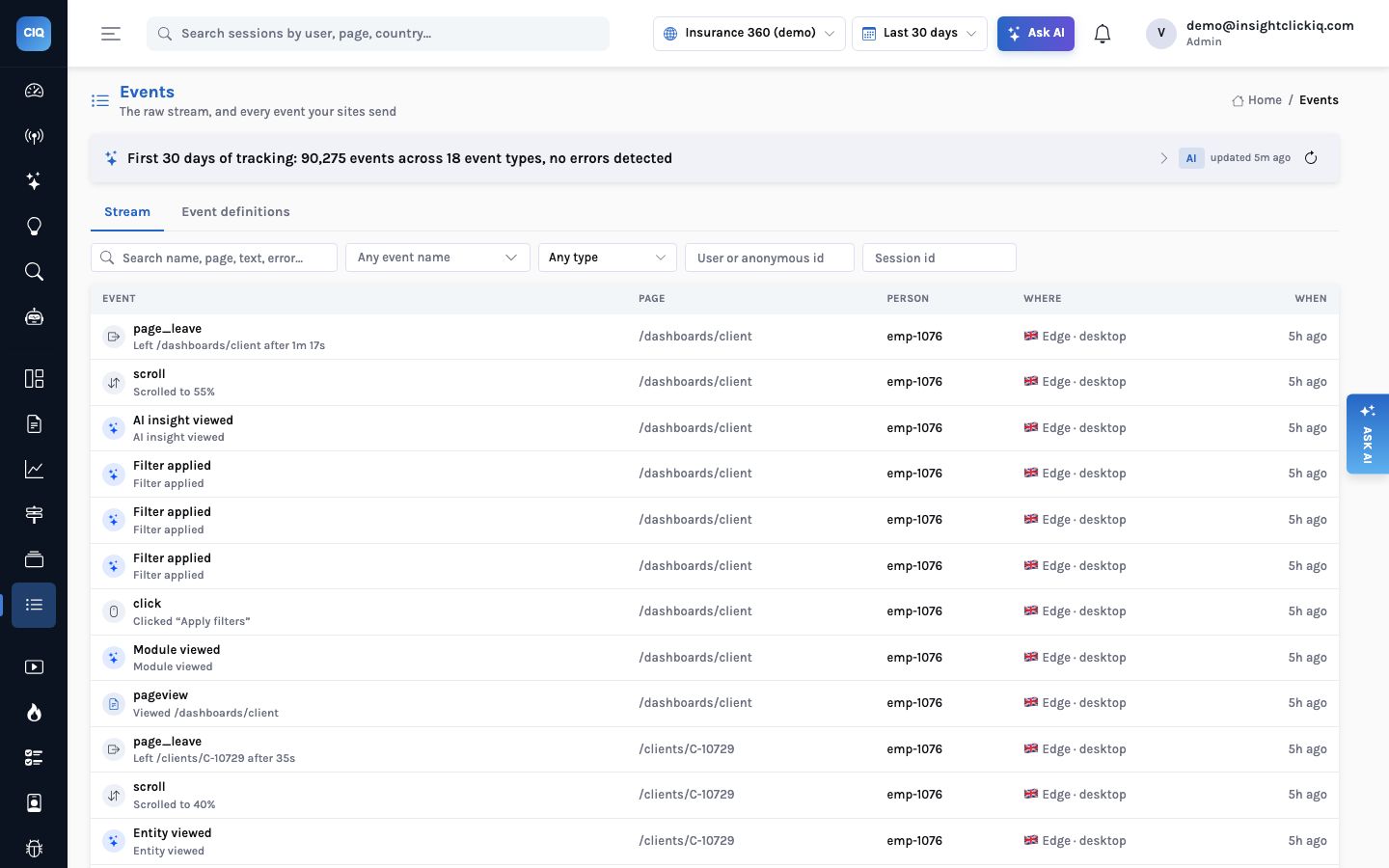
Module viewed | module: Search, Client dashboard, Broker dashboard, Executive dashboard, Policy page, Claims, Renewals, Reports | Which modules are used, by whom |
Search | entity_type: client, broker, policy · results | Search volume; zero-result searches |
Entity viewed | entity_type, entity_id, entity_name, lob, product | Top clients and brokers; products and lines |
Filter applied | filter: country, product, lob, division, department, branch, state · value | Which filters people actually use |
AI insight viewed | insight_type: renewal_risk, cross_sell, claims_trend, broker_performance | Which insights are read, per team |
Export | format: pdf, xlsx | Exports per module and user |
Quote created | lob, product, entity_id | Conversion: sessions that led to a quote |
Policy bound (server) | premium (also sent as value), lob, product | Bound premium by team, branch, line |
Login succeeded / Login failed (server) | method: sso, password · reason: bad_password, locked, mfa_timeout | Daily actives; failed-login rate; who fails repeatedly |
identify | name, email, manager, team, division, department, branch, role | Every breakdown by person or team |
Quote created and Policy bound are marked as the project’s conversion
events, so sessions that produce one are flagged converted and journeys, zones and lift work
against them.
The React side
A small loader module loads the SDK only when a key and host are configured and makes every helper a
no-op otherwise, so the application never depends on analytics being reachable. Two helpers do most
of the work. identify runs after every login, because traits change:
identify(me);   // id = stable employee id, never the email
// sends: name, email, manager, team, division, department, branch, role
Modules come from a route table, one event per route change (the SDK sends the pageview for the same navigation itself):
const MODULES = [[/^\/search/, "Search"], [/^\/clients\//, "Client dashboard"],
  [/^\/brokers\//, "Broker dashboard"], [/^\/policies\//, "Policy page"],
  [/^\/claims/, "Claims"], [/^\/renewals/, "Renewals"], [/^\/reports/, "Reports"]];
useEffect(() => {
  const module = MODULES.find(([rx]) => rx.test(pathname))?.[1];
  if (module) track("Module viewed", { module, path: pathname.replace(/\/[A-Z]-?\d[\w-]*/g, "/:id") });
}, [pathname]);
Filters send one event per filter in the applied set, debounced so a user adjusting three dropdowns
sends three events, not thirty. Insights send an impression when one is rendered in view, once per
insight per page. And four attributes in the JSX handle privacy and naming:
data-clickiq-block around claims notes and documents (never captured, removed from
replay), data-private on a rendered policyholder name (masked),
data-clickiq-form on the quote form, and data-clickiq-name="Export" for
a stable heatmap zone.
The Python side: what the browser cannot see
Three things only the server knows. A failed login never reaches a logged-in page, and the reason — a bad password, a locked account, an MFA timeout — is on the server. A bound policy and its premium come from the binding service. And the user’s real location: the application sits behind a VPN, so every browser reaches the analytics endpoint from one exit, and the map would show one dot.
A sender of about forty lines posts to the same ingest endpoint on a daemon thread with a
four-second timeout, never on the request path, keyed by the same user_id the React app
identifies with:
clickiq_service.track(attempted_user.id, "Login failed",
                      {"method": "password", "reason": "bad_password"}, branch=attempted_user.branch)
clickiq_service.track(user.id, "Policy bound",
                      {"premium": policy.premium, "lob": policy.lob, "product": policy.product},
                      value=policy.premium, branch=user.branch)
The branch argument maps to a country, region and city (Dallas, Chicago, Atlanta, Toronto,
London, Sydney) and is sent as geo on the event, which wins over edge headers and the
browser’s time zone. That is what puts Chicago and Dallas, not the VPN exit, at the top of the
report’s city panel.
Privacy, by construction
No policyholder data goes into events. entity_name is a commercial client or a broker firm, a business; for personal lines, send the account id and leave the name out. Search queries are the likeliest leak (people type names and policy numbers), so the guide sends the entity type and result count and the query only after a privacy review says yes. Employee traits are workforce data, fine for an internal tool with the usual notice; keep them out of a customer-facing project. Retention is per project, default 395 days.
Thirty days of it
With traits on every event, the questions an operations lead actually asks become one query each.
These came from POST /api/query — Ask AI produces the same specs from the
sentence:
| Question | QuerySpec (abridged) | Answer, 30 days |
|---|---|---|
| Why do logins fail? | Login failed by props.reason | MFA timeout 71 (38 people), locked 31 (25), bad password 7 (6) |
| How do people sign in? | Login succeeded by props.method | SSO 1,448, password 254 |
| Who fails most? | Login failed by user.name | Omar Castillo 9, Lara Ibrahim 7, Beatriz Reyes 6 |
| Which manager’s team is most active? | $any by user.manager | Priya Natarajan: 29,046 events, 25 people; next Mei-Lin Chen 14,866, 20 |
| Which AI insights get read? | AI insight viewed, users, by props.insight_type | Renewal risk 118, claims trend 115, cross-sell 113, broker performance 106 |
| What do people search for? | Search by props.entity_type | Clients 1,214, brokers 490, policies 299 |
| Where is premium bound? | Policy bound, sum of value, by props.lob | Casualty $1.71M (62 policies), Workers Comp $543K, Marine $445K |
The login row is the one that tends to start a conversation. Two-thirds of failures are MFA timeouts, not wrong passwords — a usability problem with the second factor, not a security one — and a handful of people account for a disproportionate share. That is an IT ticket with a list of names attached, produced by a breakdown nobody had to build a dashboard for.
What it feeds
With this taxonomy in place, the executive usage report template keeps all fourteen of its panels and renders with no further configuration: an AI-written summary, top users, daily actives, top clients and brokers, four filter panels, module engagement and geography. The executive report post shows what it wrote about last week.
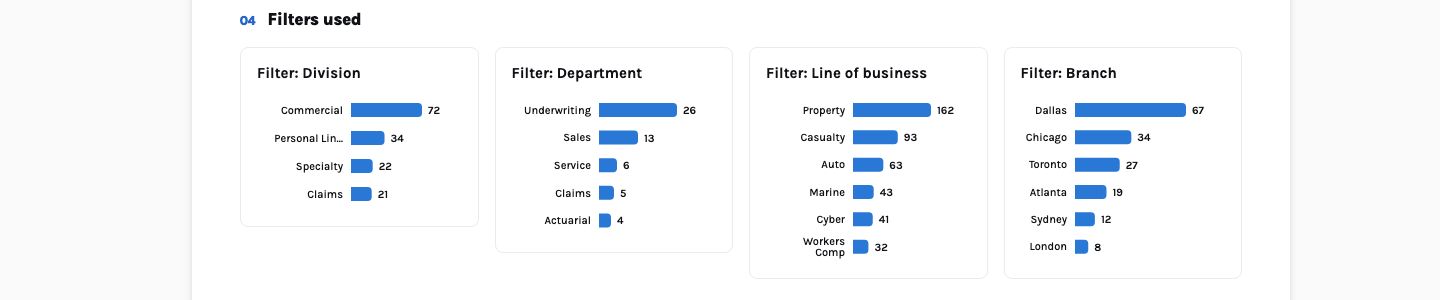
Filter applied event, four panels. Each is the same event broken down by value, filtered to one filter. A typo in a value would be a fifth bar here, which is why the values come from closed lists.The mechanics feed the rest of the product unchanged: heatmaps and zones on the client dashboard (is the Export button found?), form analytics on the quote form, journeys from search to quote, signals when errors spike after a release, and agents that can be asked “which teams adopted the renewal-risk insight this month?” and answer from the same events.
/clients/C-10400 466 views. Which module, which client, which team, which line of business, and why did 51 people fail to log in? Not in the data.
Client dashboard 3,753 views; Northgate Logistics the most viewed client; Priya Natarajan’s team the most active; MFA timeouts behind most failed logins. Each a one-line query.
Traits also make audiences cheap. A segment such as “Claims Operations, mobile” is a
filter on user.team plus a device, saved once and usable in every chart, alert, session
list and AI answer — and it can be described in a sentence and drafted by the AI against the
project’s real traits before anyone saves it.
A checklist for your developers
- Install the loader; confirm the first event on the project’s Sites & apps page.
- Call
identifyafter every login with the stable employee id and the traits;reseton logout. - Add the module route table and the named events, with values from closed lists.
- Send logins, bound policies and
geofrom the back end. - Wrap anything a policyholder would recognise in
data-clickiq-blockordata-private. - Mark
Quote createdandPolicy boundas conversion events. - Create the executive usage report from its template and compare it with the demo, panel by panel.
The SDK sees paths and clicks. Your product has modules, clients and teams. Name the second, and every AI feature can talk about your business in its own words.


