
Somebody in every organisation spends Monday morning turning a dashboard into something an executive will read: screenshots pasted into a slide, three bullet points written from memory, numbers copied by hand. The dashboard has the data. What it lacks is the paragraph at the top that says what the data means, and a format that survives being forwarded.
InsightClickIQ reports are that format. A report is a printable document — sections of panels over one date range — built from a template, described to the AI in a sentence, or assembled by hand. Its summary panels are written by the model from the results of the report’s other panels, so the paragraph at the top cannot mention a number the charts below do not show. This post renders the executive usage report for Insurance 360, the demo client-360 application for an insurer’s underwriters, brokers and claims staff.
The report
The report was created from the executive_usage template, which reads the
project’s catalogue and keeps only the panels its events support. Insurance 360 is instrumented
for all of them (the instrumentation post explains how),
so it has six sections and fourteen panels:
| Section | Panels | What they read |
|---|---|---|
| 01 Executive summary | Summary (AI) | Every other panel’s result, this period and the previous one |
| 02 Users | Top users · Daily active users | Events by user.name; distinct users per day |
| 03 Clients and brokers | Top viewed clients · Top viewed brokers | Entity viewed by props.entity_name, per entity type |
| 04 Filters used | Division · Department · Line of business · Branch | Filter applied by value, one panel per filter |
| 05 Modules | Module engagement | Module viewed by props.module |
| 06 Where people are | Country · State / region · City · Location map | Users by geography, and a choropleth |
Every panel except the summary is a QuerySpec — the same object as a dashboard widget — with a visual: a horizontal bar for ranked categories, a line for daily actives, a map for location. Rendering a report runs all of them for the chosen range and, for comparison, the range before it.
What the AI wrote about last week
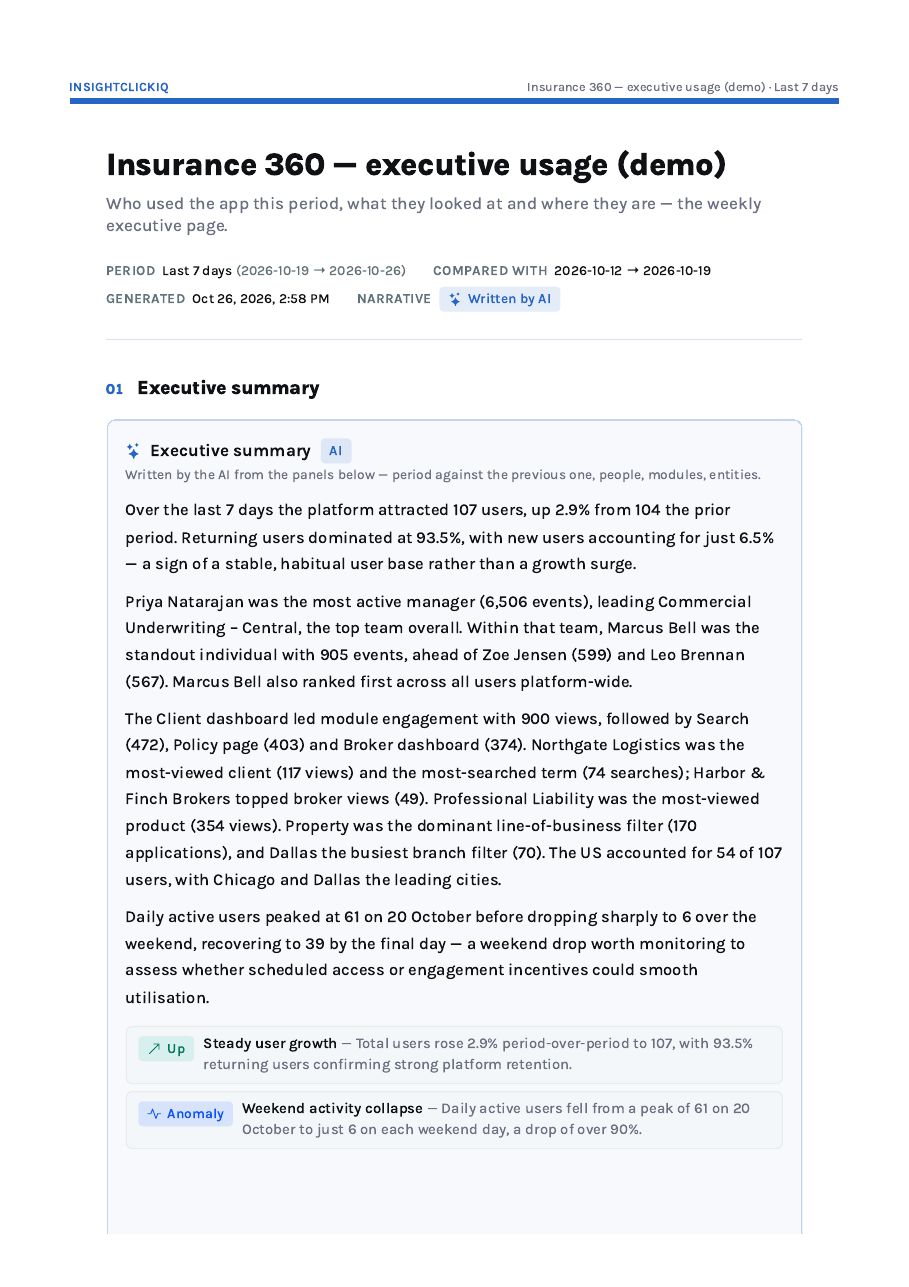
Here is the first page of the PDF for the last seven days (October 19–26, compared with October 12–19), exactly as the server printed it:
The summary opens:
Over the last 7 days the platform attracted 107 users, up 2.9% from 104 the prior period. Returning users dominated at 93.5%, with new users accounting for just 6.5% — a sign of a stable, habitual user base rather than a growth surge.
Executive summary, Insurance 360, week of October 19
It goes on to the people: “Priya Natarajan was the most active manager (6,506 events), leading Commercial Underwriting – Central, the top team overall. Within that team, Marcus Bell was the standout individual with 905 events, ahead of Zoe Jensen (599) and Leo Brennan (567).” Then the work: the Client dashboard led module use with 900 views, followed by Search (472), Policy page (403) and Broker dashboard (374); Northgate Logistics was the most-viewed client (117 views) and the most-searched (74 searches); Harbor & Finch Brokers topped broker views (49); Property was the most-used line-of-business filter (170) and Dallas the busiest branch filter (70). Then the shape of the week: daily actives peaked at 61 on October 20 and dropped to 6 on each weekend day.
Two findings sit under the paragraphs, each with a kind: Up — Steady user growth and Anomaly — Weekend activity collapse (“a drop of over 90%”).
Every sentence traces to a panel
The summary panel’s prompt says what to cover — period against the previous one, people, modules, entities — and the model is given the computed result of every other panel, never the events. Some figures need a computation no chart shows, such as the most active manager’s team and its most active user, or new versus returning; those are computed in code for the summary and passed in the same way. The trace for the paragraphs above:
| Sentence | Comes from |
|---|---|
| 107 users, up 2.9% from 104 | Distinct users this period and the previous one, computed for the summary |
| 93.5% returning, 6.5% new | First-seen dates of this period’s people, computed for the summary |
| Priya Natarajan’s team, Marcus Bell 905 events | Events by user.manager, then by user.name within that team |
| Client dashboard 900, Search 472… | Module engagement |
| Northgate Logistics 117 views | Top viewed clients |
| Property 170, Dallas 70 | Filter: Line of business; Filter: Branch |
| Peak of 61 on October 20, 6 at weekends | Daily active users |
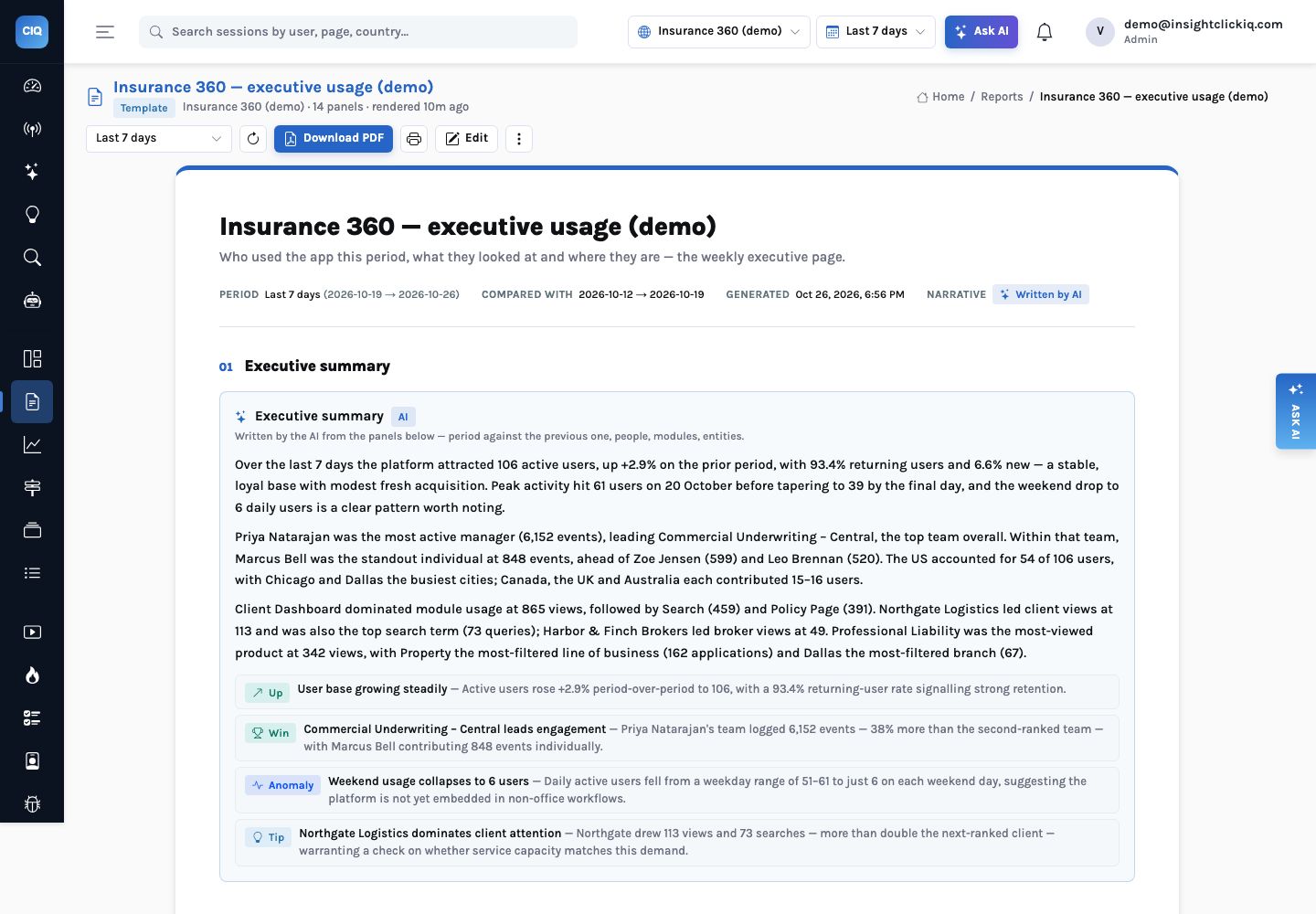
The console render above was made later the same day, over a seven-day window that had moved, and the numbers moved with it: 106 users, Marcus Bell at 848 events. It also produced four findings instead of two, including “Northgate Logistics recorded 114 client views and 73 searches — more than twice the next closest client — suggesting a major account review or renewal in progress”. That last clause is an inference, worded as one. The count it rests on is in the Top viewed clients panel; the reason is a question for the account team.
When the data is thin, it says so
Rendered over 30 days instead of 7, the same report covers the project’s first month of data, with no previous period to compare against. The summary did not invent one. It said “prior-period comparison is unavailable as no baseline was captured”, flagged that all 120 users appearing as new “likely reflects a first full measurement window rather than genuine churn and warrants a data-quality check”, and closed by recommending the baseline be established now. That is the behaviour you want from a paragraph an executive will read without the charts.
The rest of the document
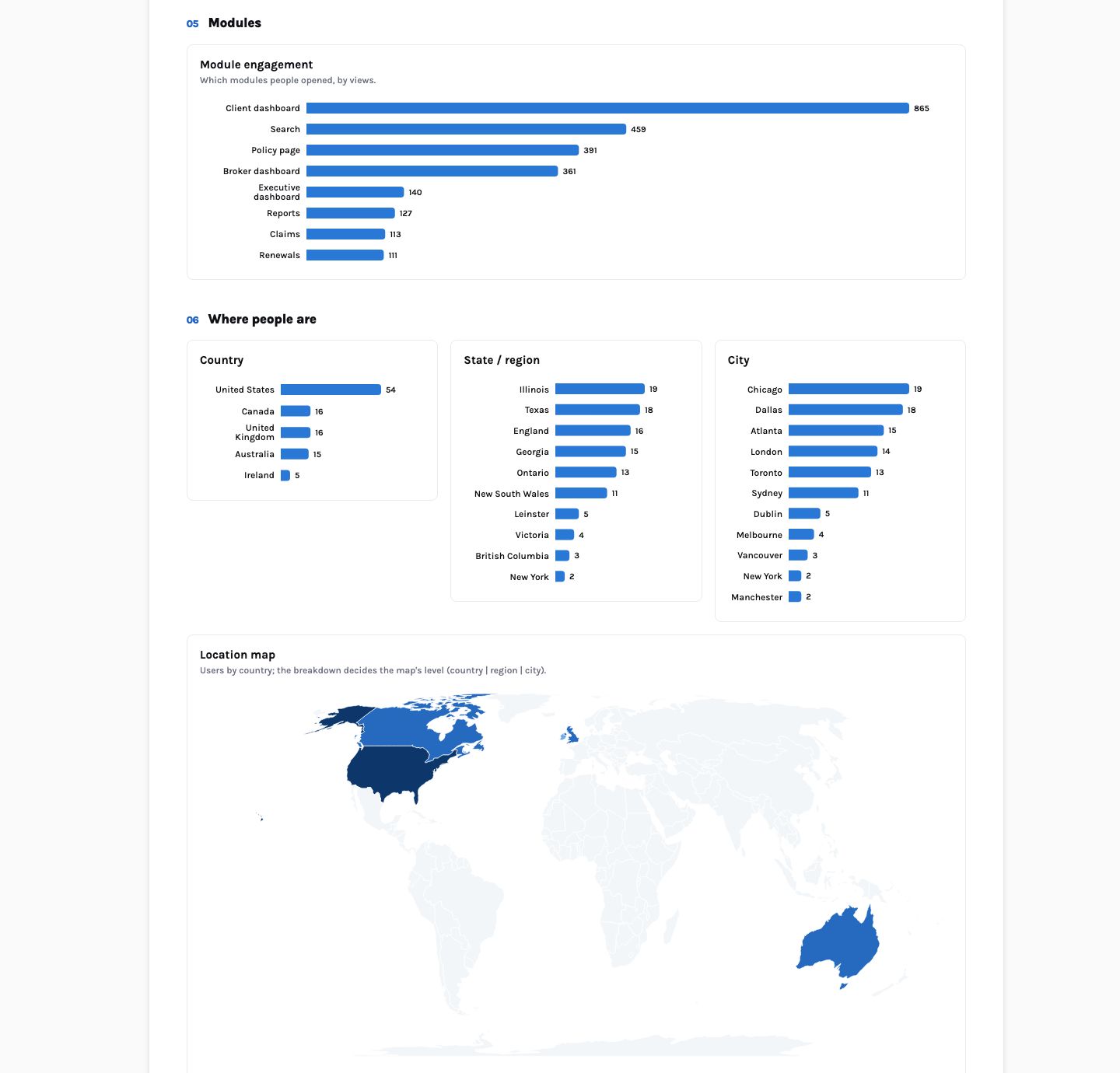
Below the summary the report is ordinary, which is a compliment: ranked bars for the top users, clients, brokers, filters and modules; a line for daily actives; bars and a choropleth for country, state and city. The geography is right because the app’s back end sends each user’s branch location with its events — the app sits behind a VPN, and without that every user would appear at the VPN’s exit.
From page to PDF
Download PDF calls GET /api/reports/{id}/pdf. The server opens the report’s
print route in headless Chromium, with the caller’s token, A4 print styles, light colours forced
and a page break before any section that would split badly. The page counts each panel’s first
paint and sets data-report-ready="true" on the body when the last one, including the
map, has drawn; only then does Chromium print. The seven-day report is five A4 pages. Where Chromium
is not installed the endpoint answers 501 with a reason, and the console falls back to the
browser’s own print dialog on the same route.
Keeping what was sent
Because a render reflects the data at the moment it runs, the report has snapshots:
POST /api/reports/{id}/snapshots {"range": "7d"} keeps the rendered
document and its PDF in the object store, listed with when it was made. When someone asks in three
months what the board was told about week 43, the answer is the snapshot, not a re-render. Reports
are generated on demand; a weekly snapshot is one scheduled curl, and
POST /api/reports/{id}/email sends the report to a list with the PDF attached.
Forty minutes, numbers copied from a dashboard, a summary written from memory, nothing that records which range it covered or what the screenshots said at the time.
The summary is written from the panels below it; the period and comparison are printed; the PDF is kept with its date. The forty minutes go into reading it.
Building your own
- TemplateStart from executive usage, weekly product, acquisition or UX quality
POST /api/reports/from-template. The template keeps only the panels your events support. - DescribeOr describe it in a sentence
POST /api/reports/generatebuilds sections and panels from your catalogue, a summary panel first — QuerySpecs only. - AddAdd a panel from a sentence
“Top brokers viewed by the Claims team, horizontal bar” becomes one panel through
/panels/suggest. - SendDownload, print, snapshot
The PDF from the server, the browser print as a fallback, the snapshot as the record.
A report also carries its own theme — title, subtitle, brand colour and logo — and its own filters and segment, so the same template can produce one page for the whole organisation and another for a single division. Editing is in place: reorder sections, change a panel’s width out of twelve columns, write a text panel by hand, and save the document with one action.
Agents and MCP clients can do the same through list_reports and
render_report, which is how a weekly-review agent can attach this week’s report to
its findings.


