- contact@insightclickiq.com
- Every click, every session, explained by AI

Form analytics
See which field loses the customer, never what they typed
Every <form> is analysed automatically, field by field. Only timings, counts and a length bucket are sent; the values stay in the browser.
Form detail
The field funnel, the slow fields and the one people stop at
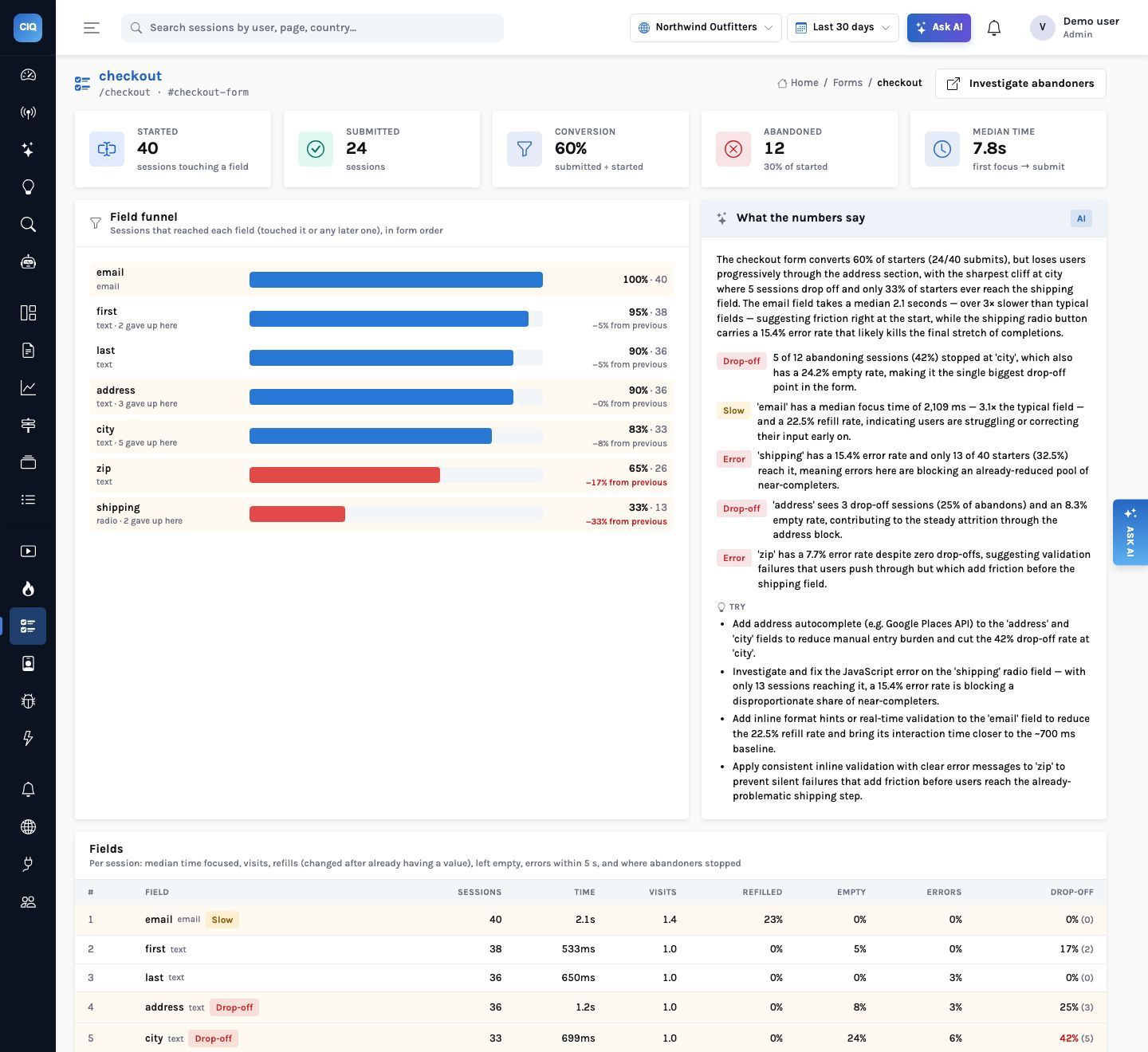
Starts, submits, abandons, conversion and median time for the form, then each field in order: sessions that touched it, median focus time, average visits, refill rate, empty rate, the share of abandoners whose last field it was, and the error rate (an error within five seconds of leaving the field).
On the demo checkout form, 40 sessions started and 24 submitted (60%). Five of the 12 abandoning sessions stopped at city, which is also empty 24% of the time; email takes about three times as long as a typical field, with a 22.5% refill rate.
Privacy by construction
What is sent for a field, and what is not
| Sent | Never sent |
|---|---|
| Field name (name, id, aria-label or placeholder-derived), type and position | The value, or any part of it |
| Focus time for this visit, number of visits, changed, refilled, empty | Password fields and anything marked autocomplete="cc-*" or card-like |
| Length bucket: 0, 1–10, 11–50, 50+ | Hidden, submit and file inputs |
| On submit: fields touched and duration; on abandon: the last field | Anything inside [data-clickiq-block] |
How it works
Form analytics: from a field's blur to a finding about it
What you can ask
Questions this answers
Type them into Ask, give them to an agent as a goal, or send them through MCP from your own assistant.
Which field do people abandon the checkout form at?The drop-off field with its share of abandons
Which fields are slow or get re-typed?Focus time and refill rate, with the findings
Do errors follow the shipping field?Error rate per field
Show me sessions that abandoned the signup formAbandoning sessions with replays
Run the Form doctorAn agent run over the worst form
How long does the form take to complete?Median duration, first focus to submit
Outcomes
What teams do with it
Shorter forms, decided by data
Drop a field that is mostly left empty, or move it after the step people abandon at.
Better validation
Refill and error rates point at the fields whose format people get wrong.
Privacy review passed
There is no field value to leak, so there is nothing to mask after the fact.
Where it stops. Form analytics reads the DOM of web forms; native app forms are tracked with your own events. The error rate is a timing association (an error within five seconds), not proof the field caused it.