- contact@insightclickiq.com
- Every click, every session, explained by AI

Docs
Integrate, query and run InsightClickIQ
From the snippet to your own deployment. Everything here matches the product as it ships; examples use clickiq.example.com for your InsightClickIQ host.
Start in three steps
- Create a project in Sites & apps. It gets a public write key (
ciq_…), like a Mixpanel token: it can only send events, and the project’s allowed origins decide which sites may use it. - Paste the snippet into the
<head>of every page, or install the npm package or a mobile SDK. - Watch it arrive. The project’s install page shows the snippet and confirms the first event live, with the events of the last 24 hours.
<script>
  !function(w,d,k,h){if(w.clickiq)return;var q=[],t=w.clickiq=function(){q.push(arguments)};t.q=q;
  var s=d.createElement("script");s.async=1;s.src=h+"/sdk/clickiq.js";s.setAttribute("data-key",k);
  s.setAttribute("data-host",h);d.head.appendChild(s)}(window,document,"ciq_YOUR_KEY","https://clickiq.example.com");
</script>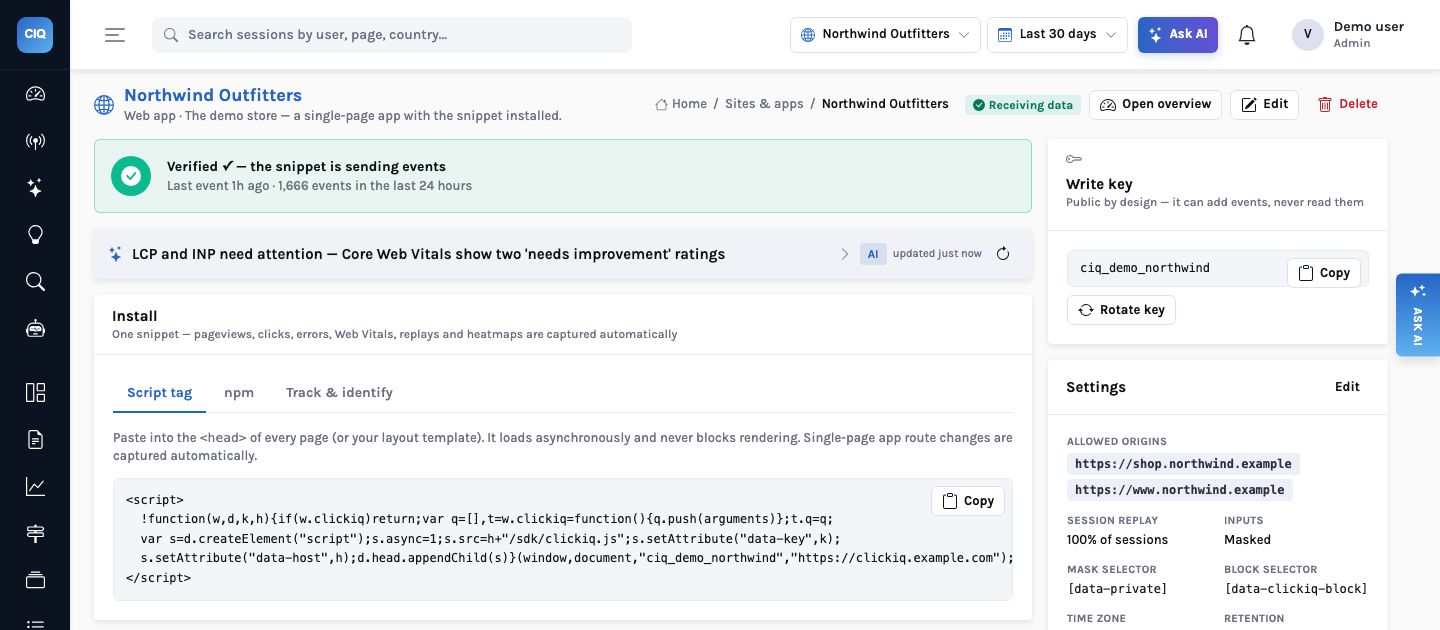
Guides
Web SDK
Snippet or npm, autocapture, SPA routes, forms, errors, vitals, replay, feature flags, surveys, sampling and privacy attributes.
ReadMobile SDKs
React Native, iOS (Swift) and Android (Kotlin): screens, taps for heatmaps, mobile vitals, masked replay and its privacy setup, flags, crashes.
ReadServer-side and Python
The Python SDK (track, identify, AI agent traces, a LangChain handler) or plain HTTP from any back end.
ReadQuerySpec & API
The one query language behind every chart, widget, alert, AI answer and MCP tool.
ReadMCP server
Connect Claude Code, Claude Desktop or Cursor to your analytics.
ReadReports
Report structure, templates, PDF printing and the client-360 instrumentation.
ReadDeploy & operate
Docker Compose, configuration, the event store, warehouse exports, email, sampling, retention and erasure.
ReadSecurity & privacy
Tenancy, roles, masking, consent, residency and the AI’s boundaries.
ReadConcepts
| Term | Meaning |
|---|---|
| Organisation | Your tenant. Every row carries it; row-level security in Postgres enforces it |
| Project | One website or app (or several sharing a funnel): a write key, allowed origins, timezone, conversion events, retention |
| Event | One of pageview, page_leave, click, rage_click, dead_click, form_submit, form_field, form_abandon, scroll, error, vital, identify, custom, session_start |
| Session | 30 minutes of inactivity ends one; a new UTM campaign starts one. Folded from the stream with counts, entry and exit, frustration (0–100) and whether it converted |
| Person | Every anonymous id and the user id from identify, with traits usable as user.<trait> in any query. Queries count people across devices by default: a person’s browser, phone and server events count once |
| Flag and experiment | A boolean or multivariate flag with targeting and a rollout; an experiment adds a goal event and reads $flag_exposure events |
| Survey | Questions shown by the SDK; answers are Survey shown, Survey responded and Survey dismissed events on the session |
| Conversion events | The events that mark a session as converted (for example Order completed), set per project |
| QuerySpec | The typed query every chart, widget, alert, AI answer and MCP tool runs. The AI plans these; it never writes SQL |
The console API
Every console endpoint answers the envelope {status: "SUCCESS"|"FAIL", data, error_message, error_code} and needs Authorization: Bearer <access token or API key>. Ingest endpoints are public and keyed by the write key. Scope is project_id (or omitted for all projects) and range (24h | 7d | 30d | 90d | 12m) or explicit from/to. Every rate, share and change in any answer is a fraction: 0.42 means 42%. The API publishes its OpenAPI docs at /docs.
Roles
| Role | Can |
|---|---|
| admin | Projects, keys, users, retention health |
| analyst | Dashboards, saved queries, reports, segments, annotations, alerts, flags, surveys, exports, share links; run agents and investigations |
| viewer | Read everything in the organisation, and comment on replays, reports and dashboards |
| auditor | Read the audit trail |