- contact@insightclickiq.com
- Every click, every session, explained by AI

Surveys
Ask the visitor, then watch the session that answered
A survey tells you what people say; the session tells you what happened to them. InsightClickIQ keeps the two together: every answer is an event on the session that gave it, and every AI theme links to the replays behind it.
Results
NPS, then what people actually wrote, grouped
Build a survey of up to ten questions (NPS 0–10, a 1–5 rating, single or multiple choice, open text), target it, and the snippet shows it with no extra code. Results give the response and dismiss rates, the NPS with promoters, passives and detractors, the distribution, and the same numbers by device, country or any person trait.
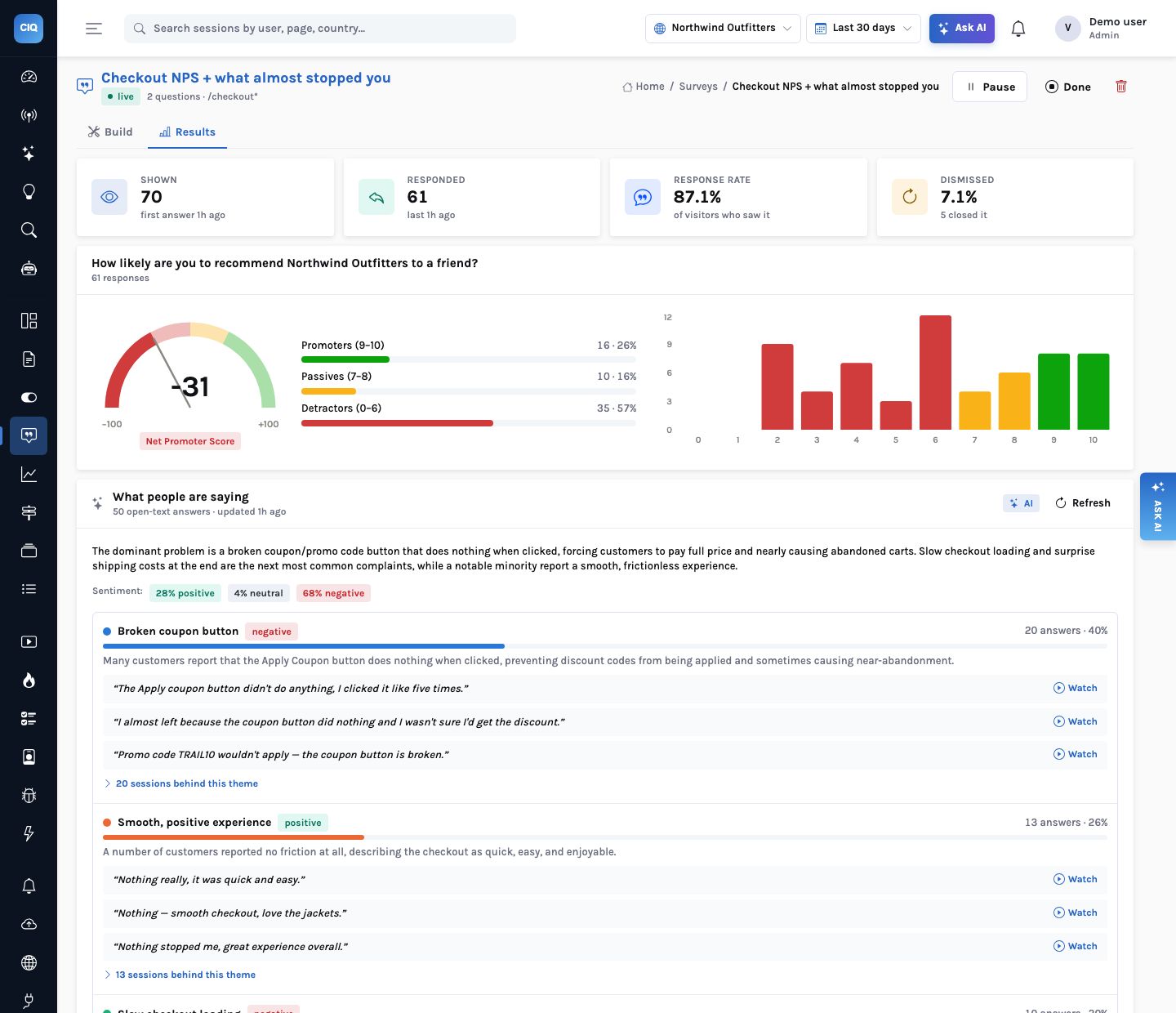
On the Northwind checkout survey, 61 of 70 visitors answered (87.1%) and NPS is −31: 16 promoters, 10 passives, 35 detractors. The AI read the 50 open-text answers to “What almost stopped you from buying today?” and put the coupon first: “Broken coupon button”, 20 answers (40%), then slow checkout loading (10) and surprise shipping costs (5). 18 of the 20 coupon sessions have a replay.
Targeting
Shown to the right people, once
| Setting | Behaviour |
|---|---|
| Pages | Globs on the path (/checkout*), re-checked on every route change |
| After an event | Only after a custom event is tracked on the page (Order completed) |
| Delay | 0–600 seconds on the page before it appears |
| Sample | A fraction of visitors, drawn once per visitor and kept |
| Audience | Person traits, country, device type and platform, evaluated by the server |
| Once per person | On by default: a shown, answered or dismissed survey does not return |
| Widget | About 3 KB gzipped, loaded only when a survey is about to appear; a labelled dialog, keyboard accessible, styles scoped in a shadow root |
How it works
A survey answer: from the widget to a theme that links to replays
What you can ask
Questions this answers
Type them into Ask, give them to an agent as a goal, or send them through MCP from your own assistant.
What do detractors complain about on checkout?Themes from the open-text answers, with quotes
Show me the sessions behind the coupon theme20 sessions, replays first
What is NPS on mobile versus desktop?The segment table: −24 on mobile, −35 on desktop
Promoters per weekA trend on Survey responded with answer ≥ 9
Did NPS move after the v2.4 release?NPS by week next to the release annotation
Which surveys are live and how are they doing?The list_surveys tool, with response rates and NPS
Outcomes
What teams do with it
From a complaint to a fix
The coupon theme and its replays point at the same dead button the zone table flags.
Feedback with context
Every answer carries the session, device, country and the person’s traits.
No second tool
Answers are events, so funnels, segments and dashboards use them as they are.
Where it stops. Native apps get the list of live surveys and the event helpers, and render the questions themselves; there is no native survey UI yet. Open-text answers are stored as written and shown to your team; only the redacted text reaches the model.