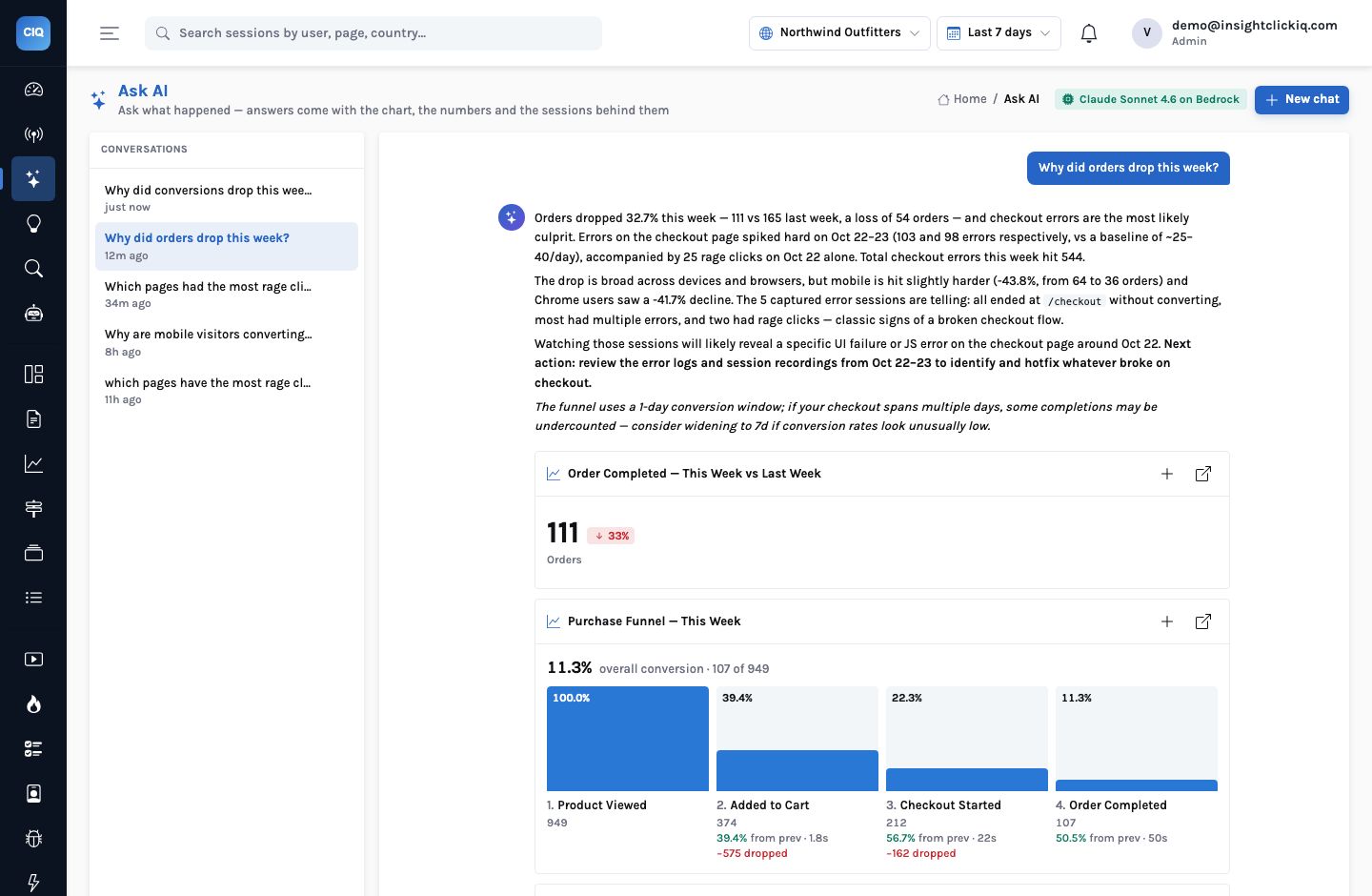
A chat assistant answers the question you asked, in one pass: plan some queries, run them, describe the result. That is useful when you already know where to look. “Why did conversion drop?” is not that kind of question. An analyst answering it does not run four queries and stop; they look at the overall picture, find the step that moved, check whether a segment explains it, go and look at the sessions, check for an error, check what was released, and only then write it up.
InsightClickIQ’s agents work that way. An agent is given a goal, a toolbox of 31 tools (the same registry the MCP server exposes to Claude, Cursor and other external agents), a budget, and rules: never state a number that did not come from a tool, go broad before going deep, and finish with evidence. Every tool call it makes is recorded and streamed to the run page as it happens. This post is one real run, start to finish.
Starting the run
Nine playbooks ship with the product — conversion analyst, frustration hunter, traffic analyst, page audit, journey explorer, error triage, form doctor, weekly review and install health. A playbook is a goal template, a hint about which tools matter, and a deterministic plan for when no model is available. We started the conversion analyst on Northwind with nothing but the project id:
POST /api/agents/runs
{"playbook": "conversion_analyst", "project_id": "f2d35484-…"}
The request returned at once with a queued run whose goal had been rendered from the template: “Explain how conversion on Northwind Outfitters moved over the last 7d and why. Compare the period with the previous one, find the funnel step, device, source or page that carries the change, and prove it with sessions. End with what to fix first.” The same run can be started from the Agents page, from a conversion-drop signal’s Analyze with an agent button, from Ask with Deep analysis switched on, or on a daily or weekly schedule.
The ten steps
The run finished in 37 seconds, used 85,973 model tokens and made ten tool calls. Here they are exactly as the trace recorded them:
| # | Tool | Time | What came back |
|---|---|---|---|
| 1 | web_overview | 254 ms | 1,499 visitors (−39%), 1,536 sessions, bounce 12%, 309 errors, 232 rage clicks |
| 2 | compare_periods | 14 ms | Product views 1,529 vs 2,215 (−31%); add to cart 449 vs 556 (−19%); checkout started 218 vs 250 (−13%); orders 111 vs 165 (−33%) |
| 3 | run_query (funnel) | 15 ms | This week: 950 → 375 → 212 → 107, 11.3% overall |
| 4 | run_query (funnel) | 49 ms | The week before: 1,316 → 441 → 237 → 155, 11.8% overall |
| 5 | drivers | 9 ms | Orders 165 → 111; no source carries it (orders carry no UTM source) |
| 6 | journey_dropoff | 3.2 s | 218 started checkout, 107 never ordered (49%); none of them left /checkout |
| 7 | errors | 11 ms | One error group: Uncaught TypeError: Cannot read properties of undefined (reading ‘days’) |
| 8 | run_query (funnel) | 13 ms | The funnel again (a repeat; see below) |
| 9 | error_detail | 87 ms | 893 events, 229 sessions over 30 days; stack at app.js:217, on form submit |
| 10 | list_annotations | 7 ms | One annotation: release — v2.4 — new checkout flow, October 20 |
Read the trace as an analyst’s notebook and the reasoning is visible in the order of the calls:
- Breadth first. Steps 1 and 2 establish the size of the problem: visitors down 39%, orders down 33%. Most of the fall in orders is a fall in traffic.
- Is it only traffic? Steps 3 and 4 run the purchase funnel for this week and the week before, with explicit dates for the previous period. Overall conversion barely moved (11.3% vs 11.8%) — but the step-by-step figures tell a different story. Add-to-cart actually improved (39.5% of product viewers against 33.5%). The last step, checkout started to order completed, fell from 65.4% to 50.5%.
- Is it one segment? Step 5 asks the drivers analysis which dimension carries the change. It finds no single source — Northwind’s orders carry no UTM source, so the whole change sits under “(none)” — and the device split is even (mobile 64 → 36, desktop 91 → 63). So not a campaign, not a device.
- Prove it with sessions. Step 6 looks at the 218 sessions that started checkout: 107
never ordered, and not one of them left
/checkout. They did not wander off; they were stuck. 64.5% rage-clicked, 60.8% hit an error. - What error? Steps 7 and 9 find a single error group — a TypeError reading
daysof undefined atapp.js:217, fired on form submit — and its detail. - What changed? Step 10 reads the annotations: v2.4, a new checkout flow, released on October 20.
Step 8 is a repeat
The agent ran the same funnel a second time. The harness refuses an identical call and points the model at the earlier step; this one differed in a detail of its arguments, so it ran — in 13 milliseconds. It cost nothing that matters, but we show it because the trace shows it. An agent that hides its wasted steps is harder to trust than one that leaves them in.
The answer
The run ends when the model calls finish with a headline (at most 90 characters), an
answer (at most 300 words), up to six findings, the step numbers whose results should be shown as
evidence, and up to three follow-up questions. The headline here was “Orders fell
−32.7% in 7d — a JS crash introduced in v2.4 (Oct 20) is blocking checkout”.
The answer’s core paragraph:
The overall funnel conversion held roughly flat (11.3% vs. 11.8%), meaning the revenue loss is mostly a traffic problem — but a critical bug is making it far worse at the last step.
The conversion analyst, run 5295fd3b
It then lists the funnel impact (65.4% → 50.5% at the final step, a 14.9-point drop), notes
that the drop is spread across mobile and desktop and every source — “not a campaign or
device-specific issue” — flags the dead Apply coupon button on
/cart as a second friction point it saw in the session summaries, and ends with an
ordered list: hotfix app.js:217 (guard the .days access, or roll back
v2.4 if a fix is hours away), then fix the coupon button, then investigate the traffic fall
separately.
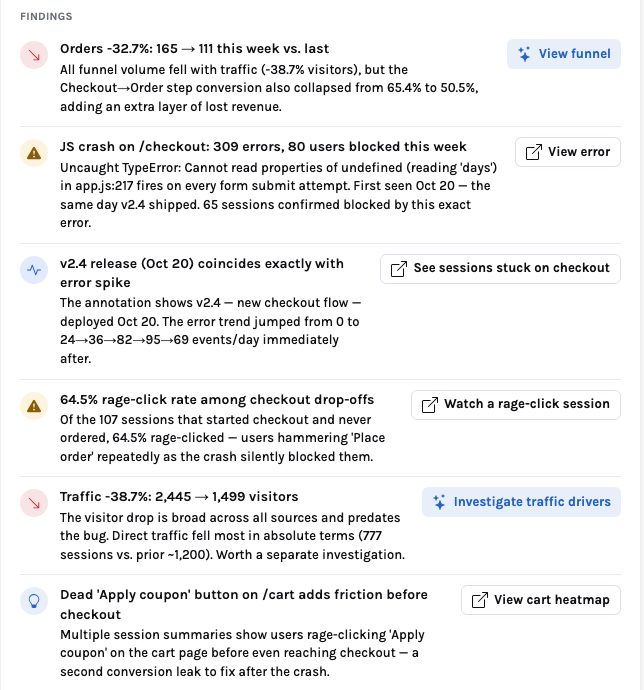
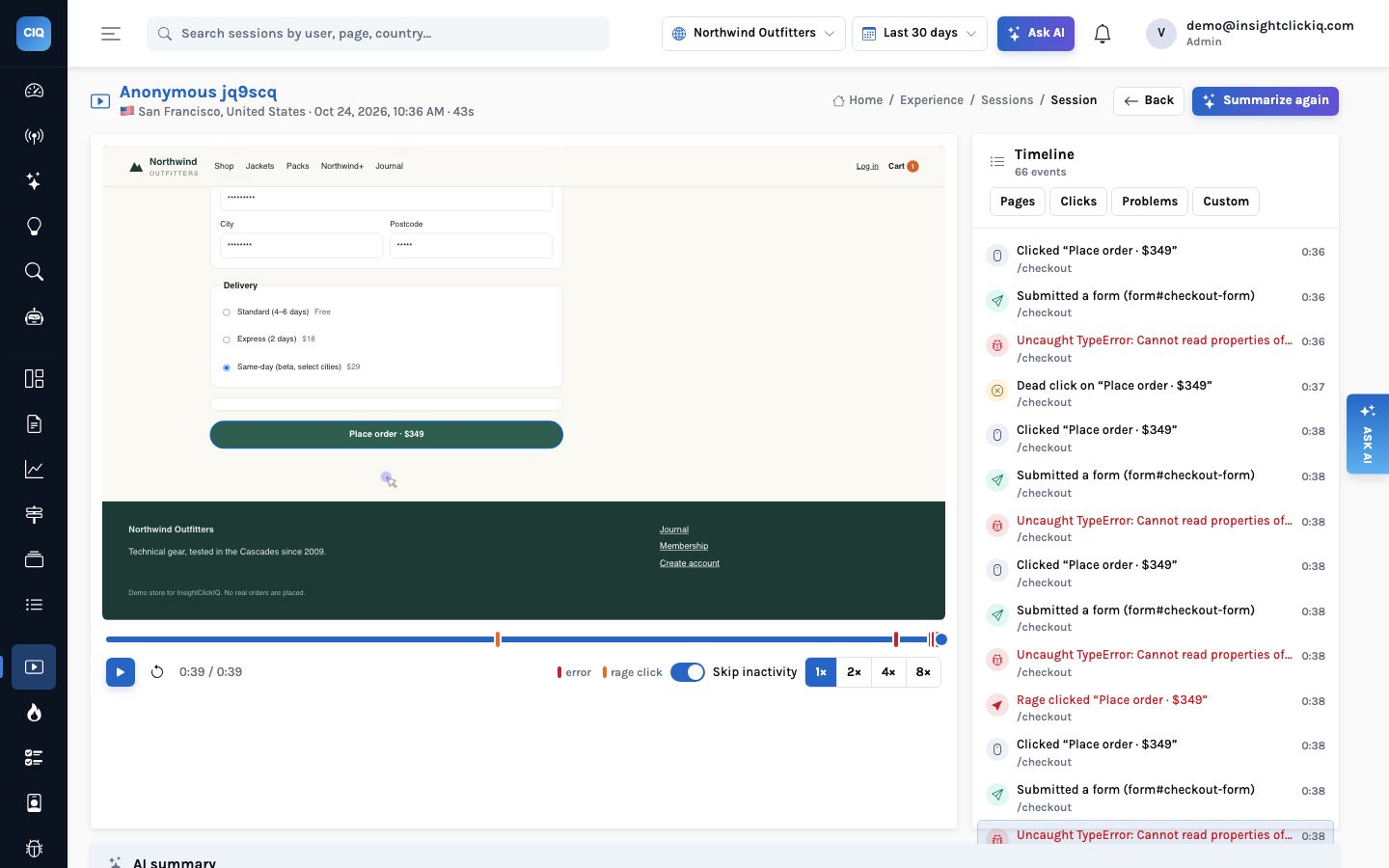
Each of the six findings carries an action. “See sessions stuck on checkout” and “Watch a rage-click session” open specific replays the drop-off step returned. One of them is a Safari session from Tokyo whose AI summary reads, in part: “On the checkout page they filled in all form fields and attempted to place a $59 order, but every submission triggered an uncaught TypeError … The session ended with repeated failed order attempts and a rage click.”
The sentence to push back on
The headline says the crash was introduced in v2.4, and one finding says the error was “first seen Oct 20 — the same day v2.4 shipped”. Expand step 9 in the trace and the error detail says otherwise: this fingerprint was first seen on September 25, and the project’s daily error count ran at roughly 15–40 for the whole month. What changed after the release is the rate. Errors went from 23 on October 20 to 41, then 103 and 98 on October 22 and 23, while orders went from 24 a day to 14 and then 7.
| Day | Errors | Orders | Note |
|---|---|---|---|
| Oct 19 | 19 | 23 | |
| Oct 20 | 23 | 24 | v2.4 released (annotation) |
| Oct 21 | 41 | 27 | |
| Oct 22 | 103 | 14 | |
| Oct 23 | 98 | 7 | |
| Oct 24 | 37 | 11 |
So the accurate sentence is “an existing checkout error became several times more frequent
two days after v2.4, and orders fell with it”. The recommendation does not change —
guard app.js:217, or roll back — but a reader writing the incident review should
use the trace’s numbers, not the headline’s word. This is the point of showing every
step with its result: the agent’s conclusion is an argument, and the trace is the evidence you
can check it against. A chat answer gives you the conclusion alone.
Asked “why did orders drop this week?”, Ask (without Deep analysis) found the error spike on October 22–23 and the mobile split in 13 seconds. It did not run the previous week’s funnel, did not look at the release annotation and did not open the error’s detail.
Ten calls, each chosen after reading the last. It found that add-to-cart improved while the last step collapsed, that stuck sessions never left the checkout page, and the release. It also overstated one date — and left the step that shows it.
What keeps an agent honest
An agent with tools can do more than a chat box, which is exactly why the guardrails matter more. The harness enforces these, in code:
| Guard | What it does |
|---|---|
| Tenant-pinned tools | Every tool runs on a database session pinned to the caller’s organisation; the agent cannot read another tenant’s data |
| Writes need an editor | Tools that create something (investigations, dashboards, segments, annotations, alerts) require the editor role; a viewer’s agent cannot write |
| No SQL | The agent queries through run_query with a QuerySpec, like Ask; the engine validates it |
| Budgets | At most 12 tool calls by default (20 at most) and 150 seconds; past either, only finish is offered |
| No identical repeats | An identical call is refused with a pointer to the step that already has the answer |
| Evidence by step number | The answer’s charts and session lists are drawn from the results of the steps it names, not from anything it writes |
| Rules path | If the model fails, the playbook’s fixed plan runs the same tools and rule findings are read off the results; the run is marked rules |
Running it every week
A playbook can be scheduled per project — daily or weekly — with one call
(PUT /api/agents/playbooks/conversion_analyst/schedule {"every": "week"})
or a toggle on the Agents page. The background loop starts at most one scheduled run per project
per hour and records it like any other, so Monday’s run is waiting with its trace when the
team arrives. A conversion-drop signal does the same on demand: its Analyze with an agent
button starts this playbook with the signal attached as context.
- SignalConversion drop detected
Computed statistically in the background, with a cost on it (see signals with a price tag).
- AgentConversion analyst runs
Ten steps, 37 seconds; the trace and the answer are on the run page.
- ProofInvestigate the stuck sessions
An investigation of frustrated, non-converting sessions: twenty replays summarised and grouped.
- FixGuard app.js:217, fix the coupon button
The decision is a person’s. Next week’s scheduled run is how you check it worked.
The model reads, chooses and writes; the engine counts; the trace records. When the three agree you can act quickly. When they do not — as with one date above — you can see exactly where, which is more than most analysts’ write-ups offer.