
Most teams do not lack alerts. They lack an order. Monday morning brings a slow page, a spike in errors, a frustrated button and a traffic dip, each flagged in a different tool, each marked “warning”. Which one first? The usual answer is whichever someone noticed, or whichever belongs to the loudest team.
InsightClickIQ’s signals are found without setup — nobody configures a threshold — and each one carries an impact: the sessions and people it touched, an estimate of the conversions lost, the revenue that represents when purchases carry a value, and a 0–100 score. The Signals page is sorted by that score. This post shows the arithmetic behind each number, then the weekly digest that turns the top of the list into a paragraph.
What gets detected
A background round runs every 30 minutes. Detection is statistical and computed in code; the model is only asked to word what was found.
| Kind | Detected when | Sessions it “touched” |
|---|---|---|
| Anomaly | A daily series (visitors, sessions, pageviews) falls far outside its recent range (a z-score) | Every session in the last 24 hours |
| Conversion drop | Conversion falls against the previous period | Every session in the last 7 days |
| Frustration | An element draws rage and dead clicks | Sessions with a rage or dead click on that element, 7 days |
| Error spike | An error fingerprint jumps above its usual rate | Sessions with that error, 24 hours |
| Performance | A page’s LCP p75 is above the 2.5 s ‘good’ line | Sessions that viewed the page, 7 days |
| Traffic source | A new source sends a meaningful number of visitors | Sessions from that source, 24 hours |
The arithmetic of a price tag
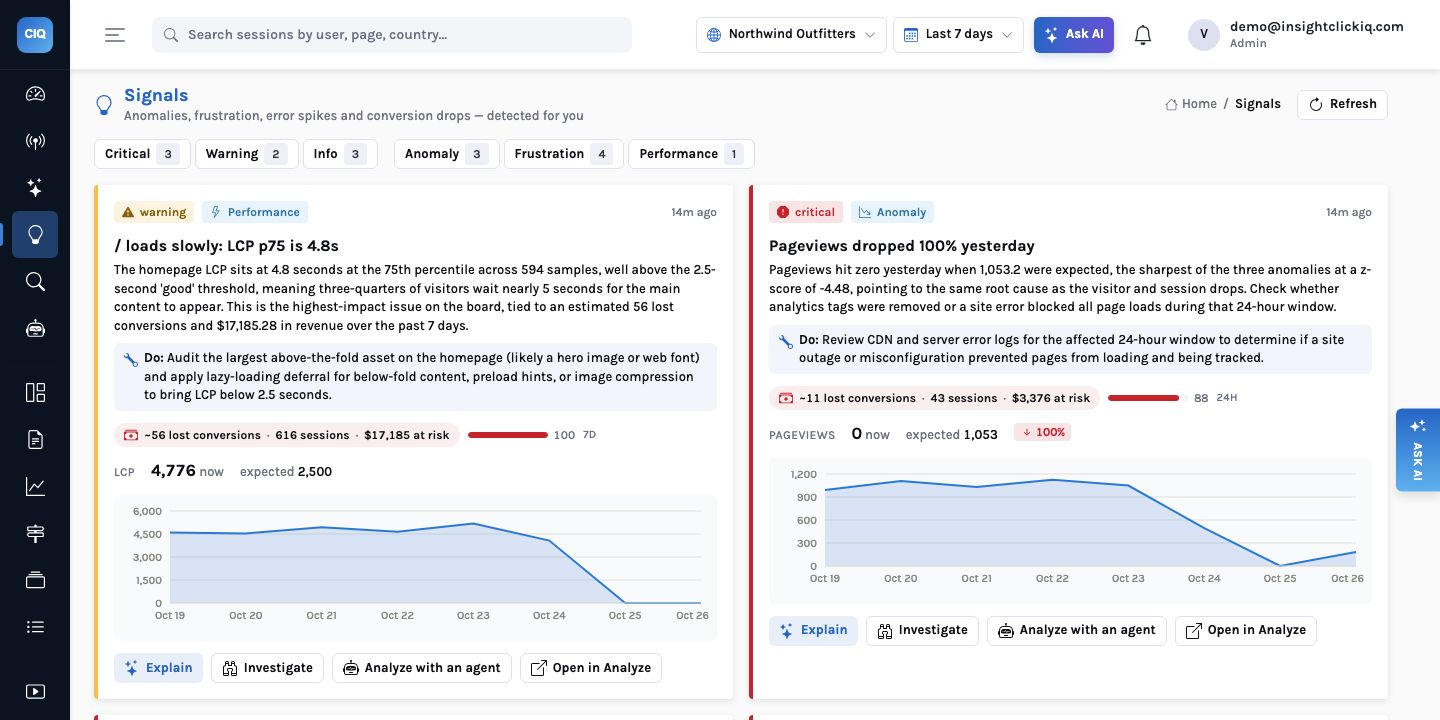
Take the top signal on Northwind this week: “/ loads slowly: LCP p75 is 4.8s”, from 594 samples, against a 2.5-second target.
- Touched. 616 sessions (609 people) viewed the homepage in the last seven days.
- Baseline. The project’s conversion rate over the same window: 10.48%.
- Lost conversions. The touched sessions that did not convert, multiplied by the baseline: about 56. In words: if these sessions had converted at the site’s normal rate, 56 more of them would have bought.
- Revenue. Lost conversions times the average value of a purchase-like event over 30 days
(on Northwind,
Order completedcarries the order total, averaging $306.88): $17,185.28. When purchases carry no value, revenue is left empty rather than guessed. - Score. Severity weight (critical 3, warning 2, info 1) times log(1 + sessions), scaled so the project’s largest signal is 100. This one is a warning on 616 sessions: 100.
What the estimate means, and what it does not
“56 lost conversions” is not a claim that the slow page caused 56 lost orders. It is an upper-bound style estimate of what is at stake on the sessions the problem touched, computed the same way for every signal so they can be compared. That comparability is the point: it puts a slow homepage, a broken button and an outage on one scale. Use it to choose the order of work, then measure the fix directly.
The logarithm in the score is a deliberate choice. Without it a problem on every page view would always outrank a severe one on fewer sessions. With it, a critical outage touching 43 sessions (score 88) sits just below a warning touching 616 (100), and well above a minor annoyance touching 14 (21).
This week on Northwind
| Signal | Severity | Sessions | Lost conv. | At risk | Score |
|---|---|---|---|---|---|
| / loads slowly: LCP p75 is 4.8s | warning | 616 | 56 | $17,185 | 100 |
| Pageviews dropped 100% yesterday | critical | 43 | 11 | $3,376 | 88 |
| Visitors dropped 100% yesterday | critical | 43 | 11 | $3,376 | 88 |
| Sessions dropped 100% yesterday | critical | 43 | 11 | $3,376 | 88 |
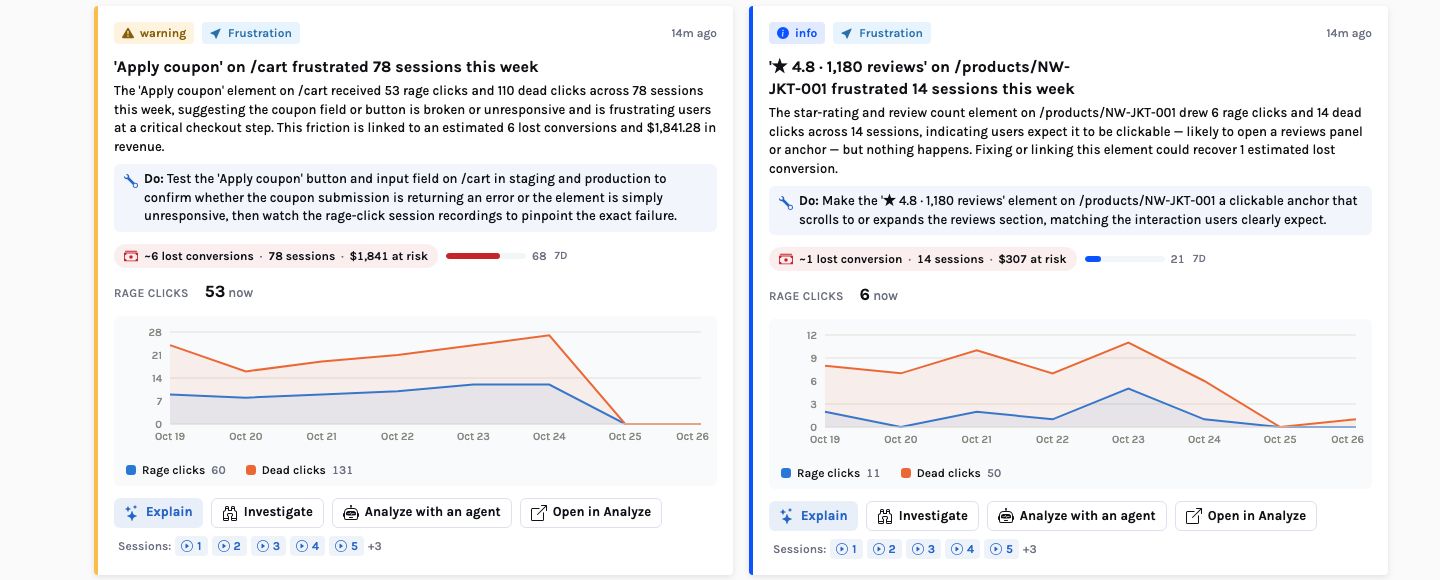
| ‘Apply coupon’ on /cart frustrated 78 sessions | warning | 78 | 6 | $1,841 | 68 |
| ‘★ 4.8 · 1,180 reviews’ on NW-JKT-001 | info | 14 | 1 | $307 | 21 |
| ‘★ 4.8 · 3,012 reviews’ on NW-ACC-040 | info | 13 | 1 | $307 | 21 |
| ‘★ 4.8 · 3,012 reviews’ on NW-CMP-030 | info | 13 | 1 | $306 | 20 |
Three of those are one event: the demo store received no traffic on October 25, so visitors, sessions and pageviews all fell to zero against an expected 327, 329 and 1,053. On a real site that is a removed tag, a broken deploy or an outage, and the recommendations say exactly that — “Check your tag manager and deployment history for changes made the day of the drop”. Ranking puts them second, not first, because they touched 43 sessions; the slow homepage touched 616 every week.
The coupon signal is the one that matters most per session. Its narrative: “The ‘Apply coupon’ element on /cart received 53 rage clicks and 110 dead clicks across 78 sessions this week, suggesting the coupon field or button is broken or unresponsive and is frustrating users at a critical checkout step.” Its recommendation is to test the button in staging and production, then “watch the rage-click session recordings to pinpoint the exact failure” — and the card lists those sessions as numbered links.
The recommendations come from the same narration call that words the narrative, which sees the signal’s figures and nothing else; without a model, a fixed rule per kind writes one. Every card also has Analyze with an agent, which starts the matching playbook with the signal as context: a frustration signal starts the frustration hunter, an error spike the error triage, a conversion drop the conversion analyst, a slow page the page audit on that path.
The four buttons on every card are the next steps, in increasing depth. Explain opens an AI reading of the signal’s chart against the previous period. Investigate opens an investigation on the sessions behind the signal, so the AI watches them and groups what went wrong. Analyze with an agent starts a playbook. Open in Analyze hands the signal’s query to the builder, where it can be changed, saved to a dashboard or turned into an alert. A signal can also be dismissed; dismissed signals are kept for 90 days and then removed.
The week, explained
Once a day the background loop writes each project’s weekly digest; it appears at the top of the Overview as This week, explained. The week is the last seven full days ending at the project’s local midnight. The facts are computed first: the six KPIs against the week before, the top three pages and sources up and down, the top conversion event, and the top three signals by impact. The model then writes a headline and at most 180 words, and is told to end with one thing to do.
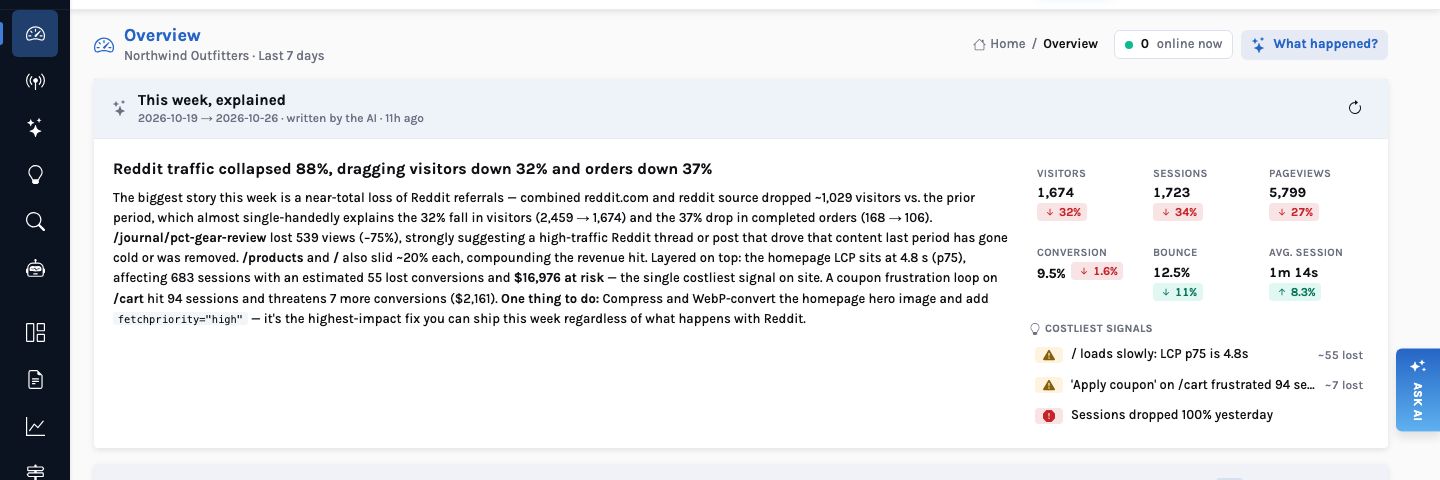
For October 19–26 the headline was “Reddit traffic collapsed 88%, dragging visitors down 32% and orders down 37%”. The facts behind it:
| Fact | This week | Week before | Change |
|---|---|---|---|
| Visitors | 1,674 | 2,459 | −31.9% |
| Orders (Order completed) | 106 | 168 | −36.9% |
| Conversion | 9.47% | 9.62% | −1.6% (relative) |
| Visitors from reddit.com | 70 | 589 | −88.1% |
| Views of /journal/pct-gear-review | 181 | 720 | −74.9% |
| Average session | 1m 14s | 1m 08s | +8.3% |
The narrative connects them the way an analyst would: the lost Reddit referrals “almost
single-handedly” explain the fall in visitors, the review article that Reddit was sending
people to lost 539 views, and conversion itself barely moved. Then it turns to cost: the slow
homepage, “affecting 683 sessions with an estimated 55 lost conversions and $16,976 at
risk — the single costliest signal on site”, and the coupon loop on the cart. It ends
with one action: compress the homepage hero image and give it fetchpriority="high",
“the highest-impact fix you can ship this week regardless of what happens with
Reddit”.
Why the digest says 683 and the card says 616
The digest is written for a fixed week (October 19–26) and cached, so Monday’s figures do not shift under you. The Signals page is recomputed every 30 minutes over a rolling seven days. Both are right for their windows; the digest states its dates at the top.
Visitors down, pageviews down, orders down. The reader has to work out that one referrer explains most of it and that the costliest problem is a slow page nobody changed.
Reddit explains the traffic; conversion held; the slow homepage is the costliest thing you control; fix the hero image. Every number traceable to the facts beside it.
What runs where
- Signals:
GET /api/ai/signals, sorted by impact score, then severity. Agents and MCP clients get the same list throughlist_signals. - Digest:
GET /api/ai/digest?period=week(orday), cached per project and period;refresh=trueregenerates it. - Without a model: signals are still detected and priced; a rule per kind words them. The digest is composed from the same facts by rules. Every number is identical; only the prose is plainer.
A signal without a cost is a notification. With one, it is a priority.


