
Ask a product team how many session replays they watched last week and the honest answer is usually “a few”. Not because replays are not useful — one good replay can end an argument — but because watching is slow, and choosing which of 295 frustrated sessions to watch is a guess. The ones you pick are the ones you remember. The pattern across all of them is the thing nobody has time to see.
An investigation in InsightClickIQ does the watching. You describe a set of sessions with the same filters the Sessions page uses — frustrated, not converted, with errors, on a path, from a country, on a device — or hand it explicit session ids, such as the ones behind a signal. It samples up to 40, summarises each one, groups them into themes, and checks every piece of evidence before saving it. You get themes with replay links that open at the second that matters, and you watch one replay instead of twenty.
Creating one
From the Investigations page, New investigation opens a dialog: a title, an optional question, and the filters. The same dialog opens prefilled from a journey row, a form’s Investigate abandoners, a heatmap’s Investigate sessions on this page, a signal, or a session list. Through the API it is one call:
POST /api/ai/investigate
{"project_id": "f2d35484-…",
 "title": "Frustrated sessions that did not convert",
 "filters": {"range": "30d", "frustrated": true, "converted": false},
 "sample": 20}
The call is synchronous. On Northwind it returned in 14.2 seconds: 295 sessions matched the filters, 20 were sampled, and the investigation was saved with status done and mode model. (Most of the 20 had been summarised before by other features, and summaries are cached; a cold run summarises four sessions at a time and takes longer.)
How the sample is chosen
The sample is the session search sorted by frustration, with sessions that have a replay first. A session’s frustration score is simple arithmetic — 15 points per rage click, 10 per error, 6 per dead click, capped at 100 — and “frustrated” means 30 or more. On this run the twenty sampled sessions scored 100, except one at 98. Each had three to five JavaScript errors, two to four rage clicks and two to six dead clicks. They lasted from 33 seconds to three and a half minutes, came from ten desktops, seven phones and three tablets, in nine countries.
That choice is deliberate and worth knowing: an investigation of “frustrated sessions” looks at the most frustrated first. It answers “what is the worst thing happening here?”, not “what does a typical frustrated session look like?”. For the second question, pass explicit session ids or narrow the filters.
What it found
One theme covered the whole sample:
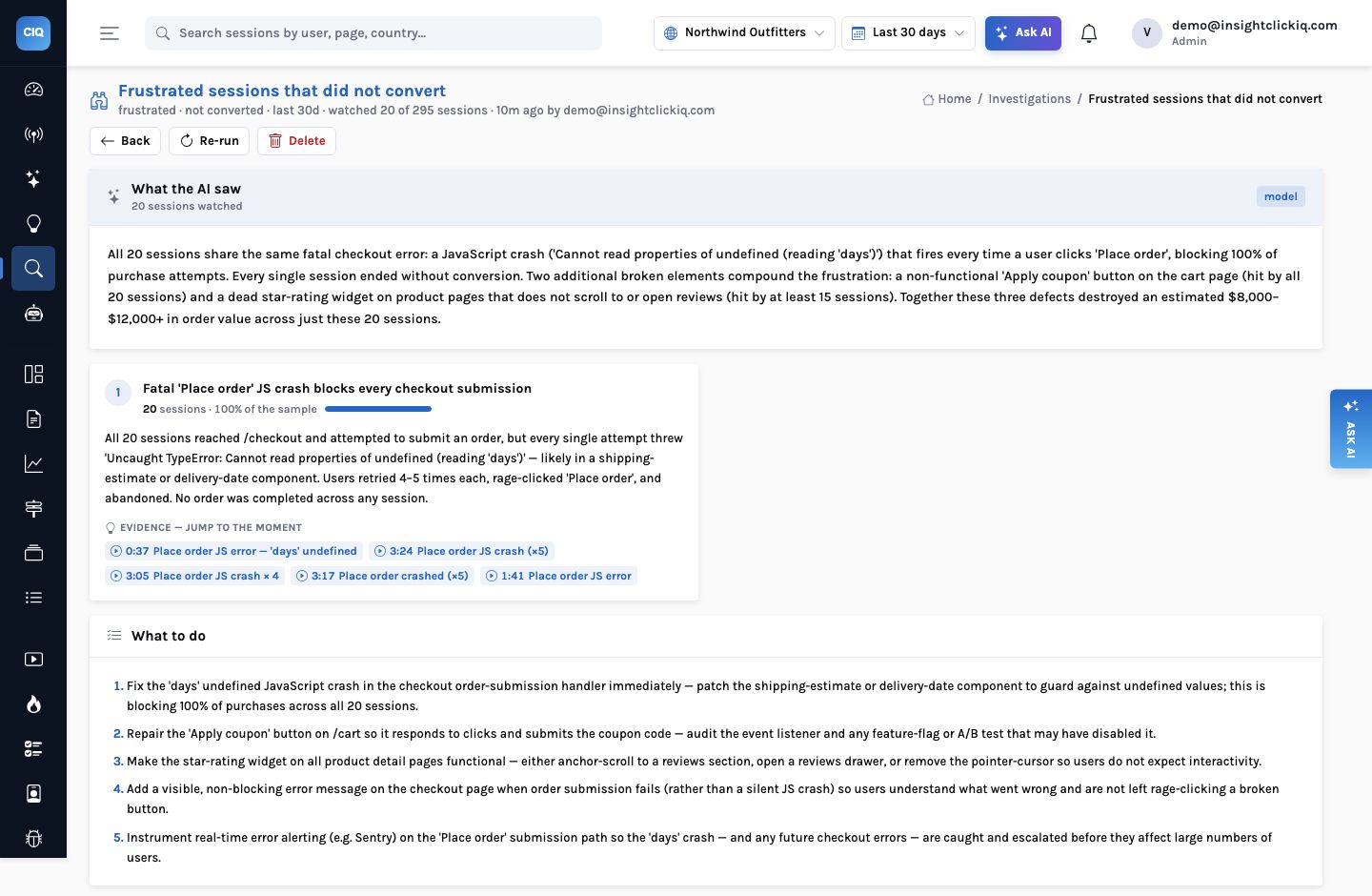
Fatal ‘Place order’ JS crash blocks every checkout submission. All 20 sessions reached /checkout and attempted to submit an order, but every single attempt threw ‘Uncaught TypeError: Cannot read properties of undefined (reading ‘days’)’ — likely in a shipping-estimate or delivery-date component. Users retried 4–5 times each, rage-clicked ‘Place order’, and abandoned.
Theme 1 of 1 · 20 sessions · 100% of the sample
Under it, five evidence chips: 0:37 Place order JS error — ‘days’ undefined, 3:24 Place order JS crash (×5), 3:05 Place order JS crash × 4, 3:17 Place order crashed (×5) and 1:41 Place order JS error. Each is a session id and an offset in seconds.
The overall narrative went further than the theme. It noted two other defects that appeared across the sample without forming their own theme: the Apply coupon button on the cart, which it says all twenty sessions hit, and the star-rating line on product pages that does not open the reviews, hit by at least fifteen. And it made five recommendations, starting with “Fix the ‘days’ undefined JavaScript crash in the checkout order-submission handler immediately”, then the coupon button, then the star rating, then “Add a visible, non-blocking error message on the checkout page when order submission fails”, so that people are not left rage-clicking a button that silently fails.
The sentence we would cut
The narrative ends with an estimate: the three defects “destroyed an estimated $8,000–$12,000+ in order value across just these 20 sessions”. That range is the model’s own arithmetic on cart values mentioned in the summaries, not a figure the engine computed, and it is the kind of sentence that gets pasted into a slide. Evidence offsets are checked; free-text estimates inside a narrative are not. When you need the cost, use the signal’s impact figure, which is computed (see signals with a price tag).
Evidence that cannot point at nothing
The step that makes investigations trustworthy is unglamorous. Each session’s summary is built from its event timeline — pages, clicks, errors, form events — and comes with highlights: labelled moments at specific offsets. When the model groups the summaries into themes, every piece of evidence it cites must name a session in the sample and an offset that matches one of that session’s highlights. Anything else is dropped before the investigation is saved.
So a chip like 0:37 is not a plausible-sounding number. It is a moment the summariser found
in session f91a1a1f — a 43-second visit from San Francisco on October 24 —
and the link opens /sessions/f91a1a1f…?t=37, which seeks the replay and scrolls
the timeline to it:
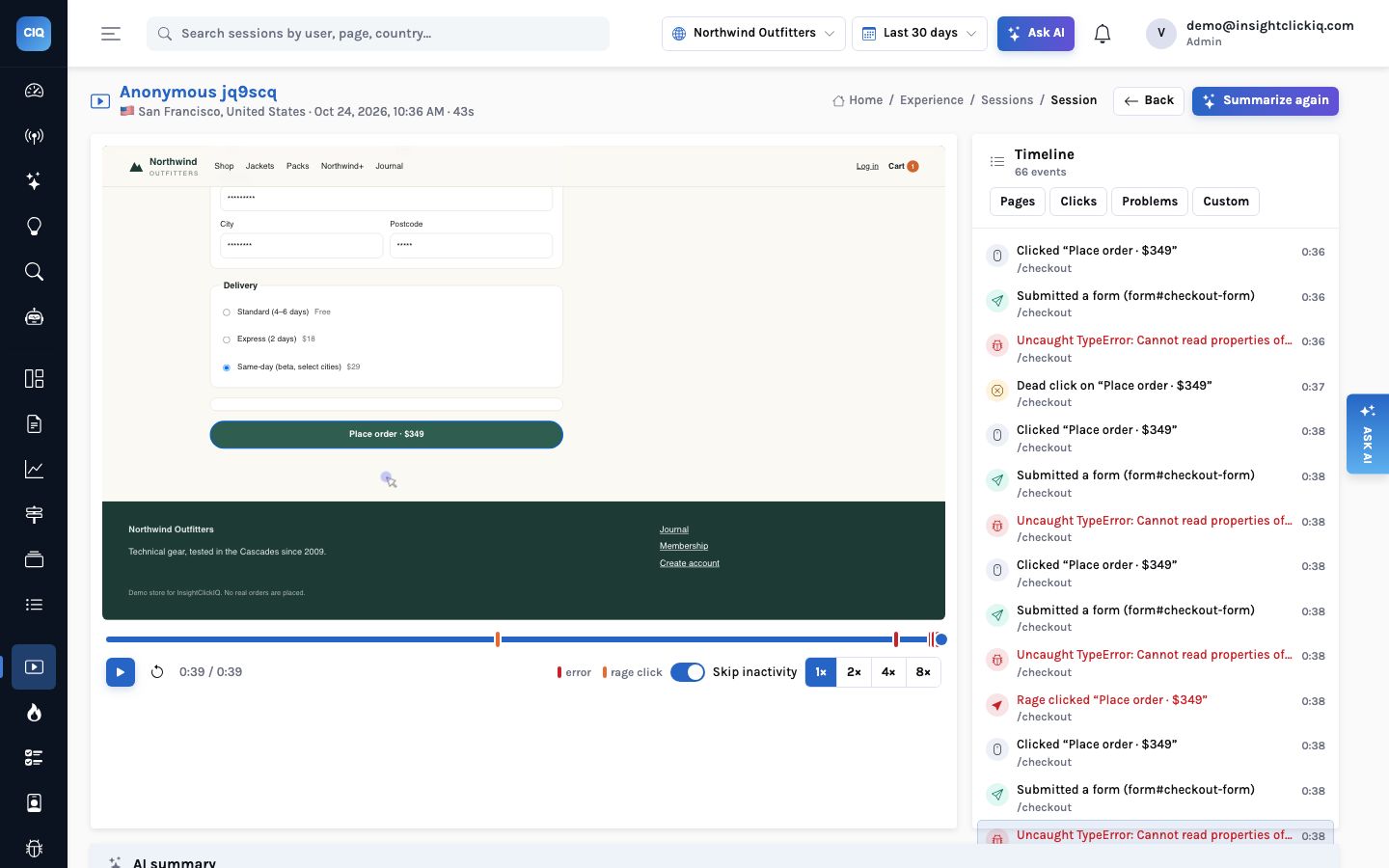
That is the whole workflow for the person on the other end: read one theme, click one chip, watch forty seconds, file the bug with the link.
A smaller one, from a signal
Investigations can also start from an explicit list. Earlier the same day, the Apply coupon frustration signal’s Investigate button opened one on the six sessions behind that signal. With a smaller, different sample, the grouping was different too: two themes, three sessions each.
| Theme | Sessions | Example evidence |
|---|---|---|
| ‘Place order’ JavaScript crash blocks checkout | 3 (50%) | 1:35 Place order JS crash |
| ‘Apply coupon’ button completely unresponsive on cart page | 3 (50%) | 0:18 Rage-clicked ‘Apply coupon’ — button broken |
Its narrative connects them: all six visitors hit the dead coupon button, three went on to the checkout crash, and the other three gave up earlier, “likely discouraged by the broken coupon flow”. The word “likely” is doing honest work there; the replays are how you find out.
Asking it a question
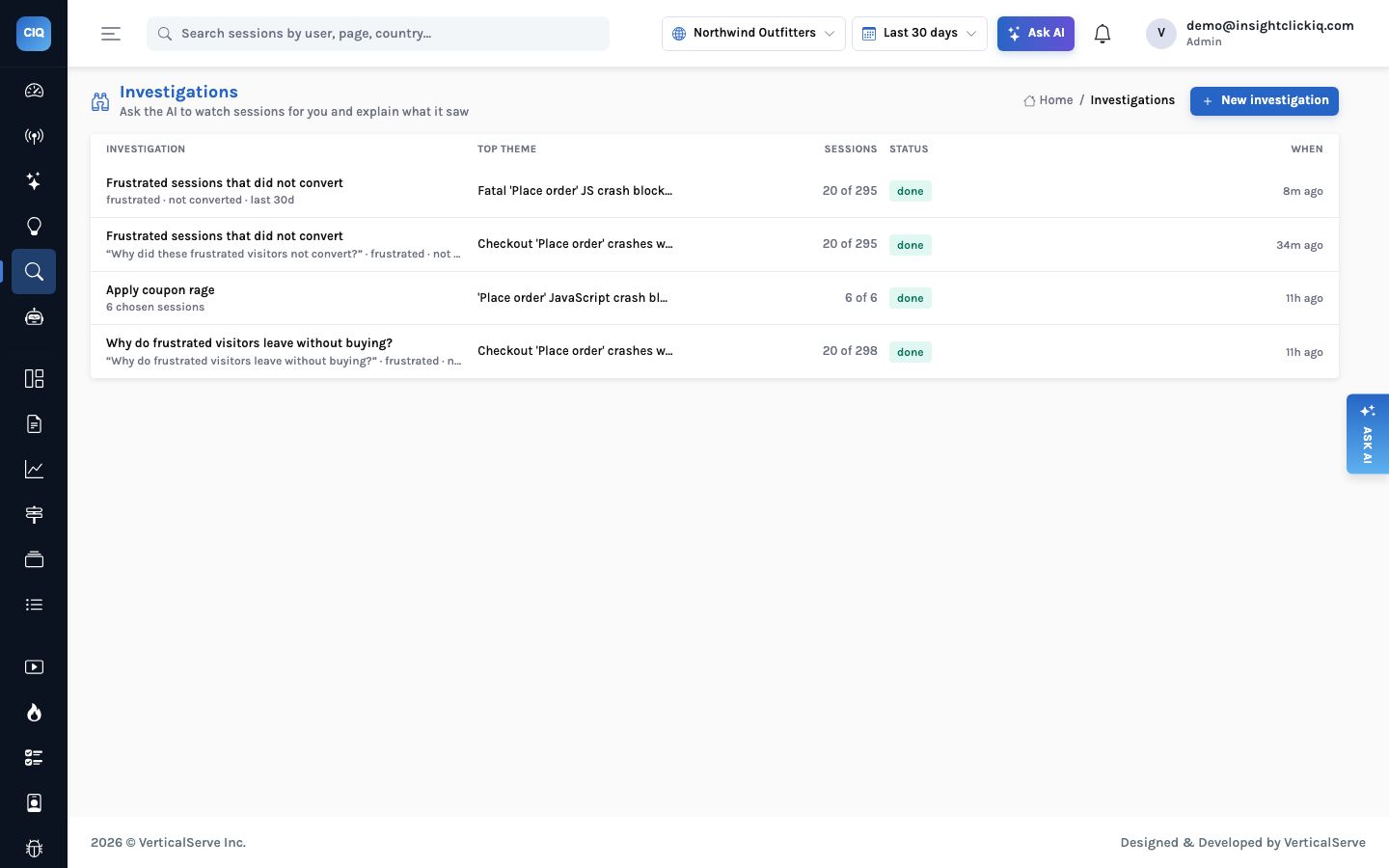
The dialog has an optional question field. Leave it empty and the investigation describes what the sessions have in common. Fill it in — “why do frustrated visitors leave without buying?”, “do mobile users fail at a different step?” — and the grouping call also writes an answer to that question from the same summaries, shown above the themes. One of the four investigations on Northwind was created that way, on 298 matching sessions, and reached the same checkout crash from the other direction.
Three habits make investigations more useful:
- Keep the filter narrow enough to share a cause. “Frustrated, not converted, on /checkout, mobile” groups better than “everything frustrated”.
- Use explicit ids when the set already exists — a signal’s sessions, a journey row, a list you built by hand.
- Re-run after a fix. The same filters on the sessions since the release should no longer produce the theme. If they do, the fix did not work, and you have the replays to show why.
Without a model
With CLICKIQ_AI=false the investigation still runs. Sessions are summarised by rules
from their timelines, and grouped by outcome plus dominant problem — the element with the most
rage clicks, the most frequent error, the dead-clicked element, or the exit page. On a sample like this one, where every session hit the same error, that puts them in one group named after it, with the sessions attached. It cannot write “users retried 4–5 times each”; it can tell you which
twenty sessions share which problem, which is most of the value.
Twenty sessions at two to three minutes each is the best part of an hour, and the sessions you pick are the ones that look interesting in a list.
Fourteen seconds on Northwind. One theme, five checked moments, recommendations; you watch the 40 seconds that matter in one replay.
Where investigations fit
- NoticeA signal, a journey row, a form, a heatmap
Something is wrong with a set of sessions. Every one of those screens has an Investigate button.
- WatchThe investigation
Up to 40 sessions summarised and grouped; themes with checked evidence.
- ConfirmOne replay
The evidence chip opens the replay at the moment, with the timeline beside it.
- ActThe fix, then a re-run
Re-run the investigation after the release: the same filters, the sessions since. The theme should be gone.
Agents use the same mechanism. The investigate tool is in their toolbox (editors only,
because it saves something), and an agent that has narrowed a problem down to a set of sessions will
often finish by investigating them — the run page then shows the investigation as a block in
its evidence.


