
Most ecommerce bugs that cost money do not throw errors. A button with no click handler renders, takes focus, changes colour on hover and does nothing at all. No exception reaches your error tracker, no alert fires, the page passes every synthetic check that only asks whether it loaded. The only evidence is in the behaviour of the people who tried to use it: they click, click again, click five times in a second, and leave.
Northwind Outfitters is the outdoor-gear store we ship as the InsightClickIQ demo. It has
real browser sessions recorded by the snippet and thirty days of history, and it has a few
planted problems so the analytics have something to find. One of them is exactly that
button: Apply coupon on /cart. This post follows it from the first
signal to the fix, step by step, quoting what the product actually said at each step.
Step 1 — the signal nobody asked for
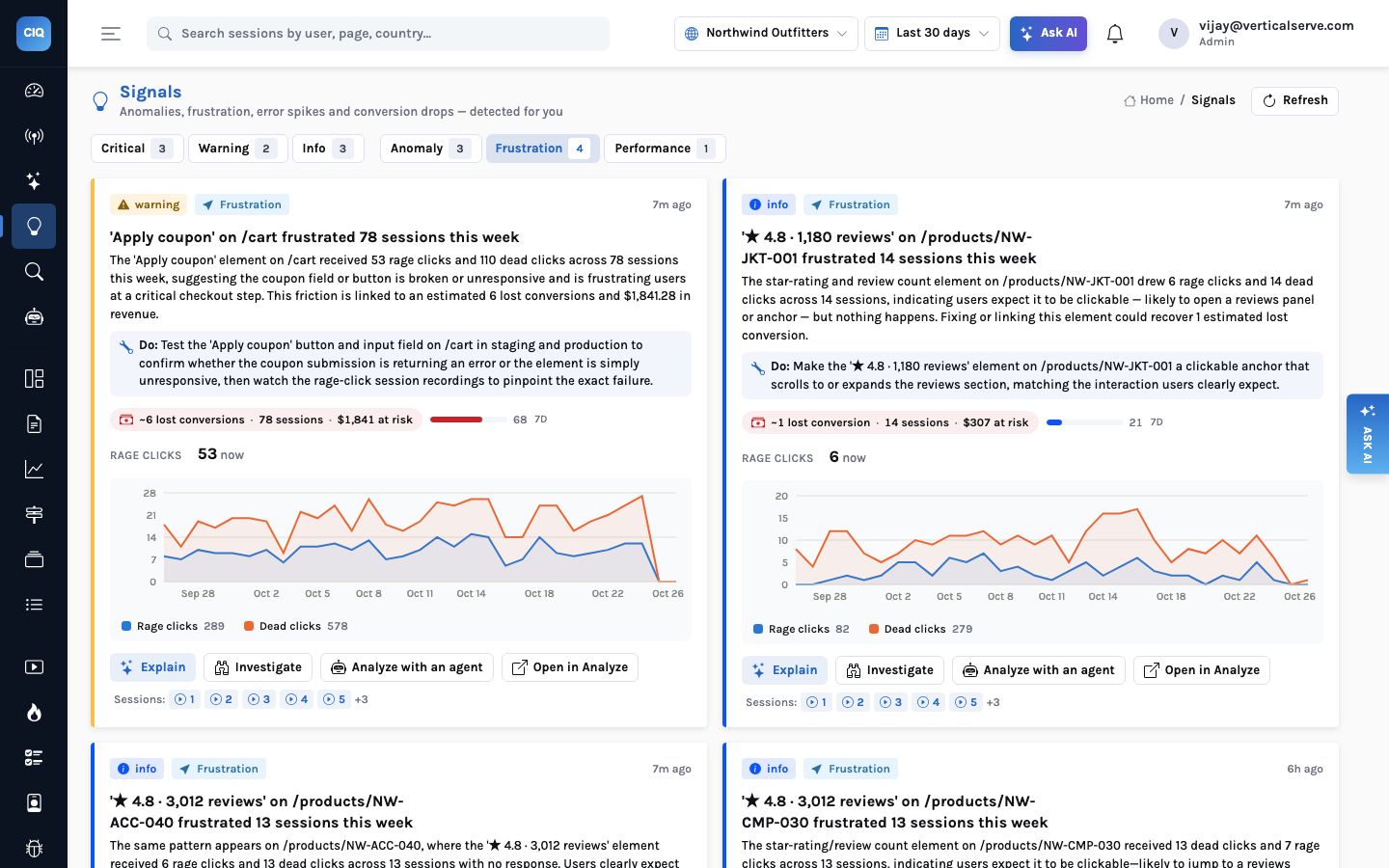
Nobody on the Northwind team went looking for a coupon problem. Every thirty minutes a background round computes signals: traffic and conversion anomalies, new traffic sources, slow pages, error spikes and frustration hot spots. A frustration signal is an element that collected rage clicks (three or more clicks within 700 ms in a 30-pixel circle) or dead clicks (a click on something interactive followed by no DOM change, no URL change and no network request for a second). The detection is statistics. The model is only asked to word it.
The card says: “The ‘Apply coupon’ element on /cart received 53 rage clicks and 110 dead clicks across 78 sessions this week … This friction is linked to an estimated 6 lost conversions and $1,841.28 in revenue.” Those last two numbers are the part that changes what happens next, and they are worth unpacking because they are arithmetic, not opinion:
| Figure on the card | How it is computed | Northwind value |
|---|---|---|
| Sessions touched | Sessions in the last 7 days with a rage or dead click on that element | 78 |
| Baseline conversion | The project’s conversion rate over the same window | 10.48% |
| Lost conversions | Touched sessions that did not convert × the baseline rate | ~6 |
| Revenue at risk | Lost conversions × the average value of Order completed over 30 days | $1,841.28 |
| Impact score | Severity weight × log(1 + sessions), scaled so the project’s largest signal is 100 | 68 |
The average order value behind that revenue figure is about $307, and it comes from the
revenue property the store sends with clickiq("track", "Order
completed", {...}). A store that sends no order value gets the lost-conversion
estimate and no dollar figure, rather than an invented one. Signals are sorted by impact
score, so the coupon button sits near the top, behind only a slow home page (LCP p75 4.8 s)
and a tracking gap.
An estimate, and labelled as one
“Lost conversions” assumes the frustrated sessions would have converted at the site average. Some coupon hunters were never going to buy. The number is for ranking, not for the board pack; step 4 gives you a better one.
Step 2 — let the AI watch the sessions
A frustration signal carries the session ids behind it. The Investigate button on the card opens an investigation pre-filled with them. An investigation summarises each session once (from the event timeline, not the video pixels), then makes one model call that groups the summaries into themes. The rule that matters: every theme’s evidence has to cite a real highlight offset from a real session. Anything the model cannot point at is dropped before you see it.
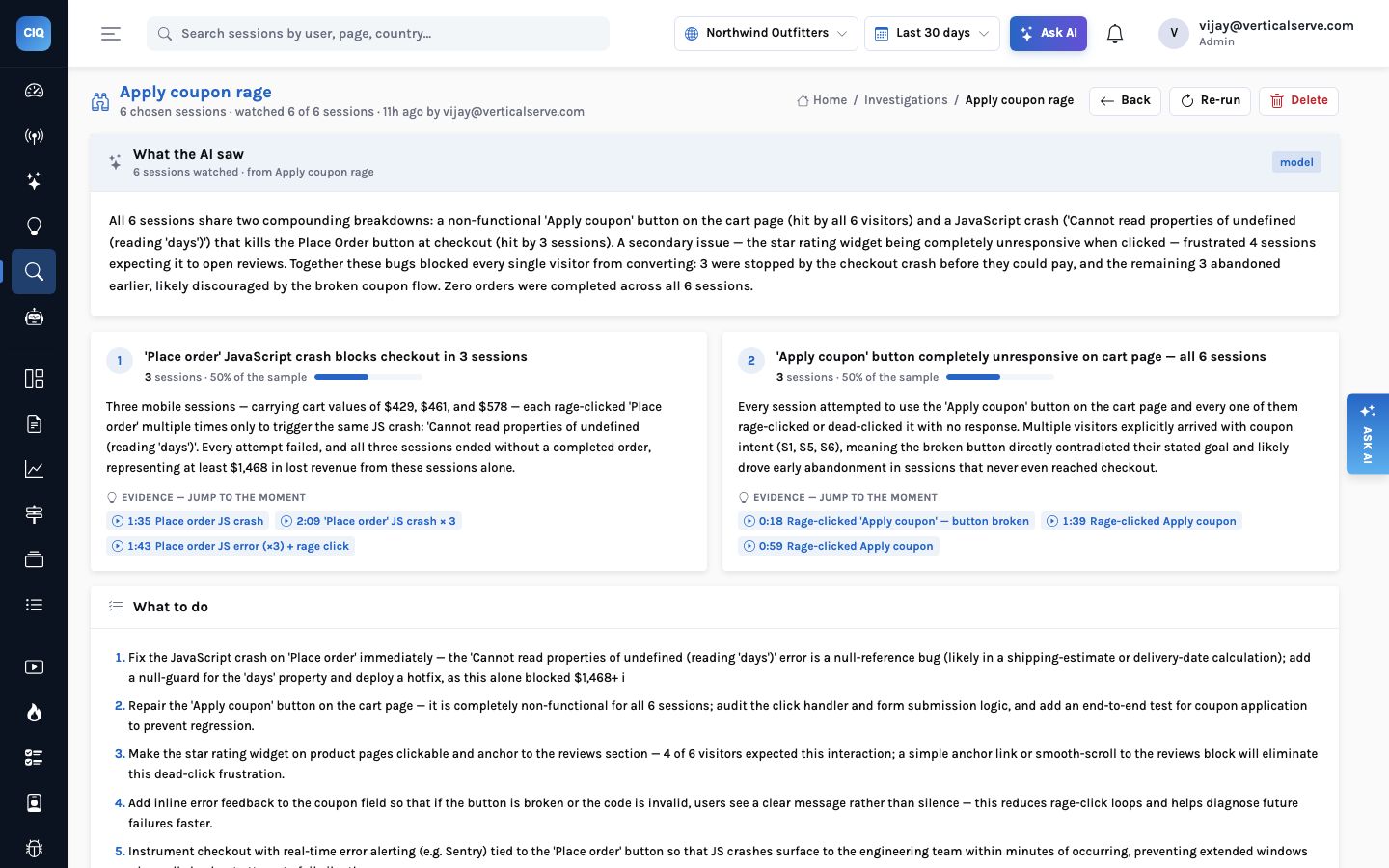
The six sessions came back as two themes, and the second one is the reason to run an investigation rather than just reading the signal:
- ‘Apply coupon’ completely unresponsive — all 6 sessions. Every visitor in the sample tried it and every one rage- or dead-clicked it. Three of them had arrived with an obvious coupon intent.
- ‘Place order’ JavaScript crash blocks checkout — 3 sessions. Three
mobile visitors with carts of $429, $461 and $578 got past the coupon, reached checkout,
and hit
Cannot read properties of undefined (reading 'days')on every press of Place order.
The narrative put it plainly: “Together these bugs blocked every single visitor from converting … Zero orders were completed across all 6 sessions.” The signal had found one problem. Watching the people found two, and showed that they compound: the coupon button costs you the price-sensitive visitor at the cart, and the checkout crash costs you the one who pressed on.
Check the crash against the release log
The checkout error is not new — 870 occurrences in 223 sessions over 30 days, first seen on 27 September. But its daily count ran in the 20s and 30s until a release annotation, “v2.4 — new checkout flow”, on 20 October, then went 41, 103, 98. The annotation sits on the Overview and Analyze trend charts as a dashed marker, so that jump has a label on it. In the demo the throw comes from the “Same-day (beta)” shipping option.
Step 3 — the replay, at the second it went wrong
Watching a five-minute session to find a three-second problem is the reason replay tools go
unused. The evidence chip removes that: it opens /sessions/<id>?t=18,
which seeks the player to 0:18 and scrolls the timeline to the same moment.
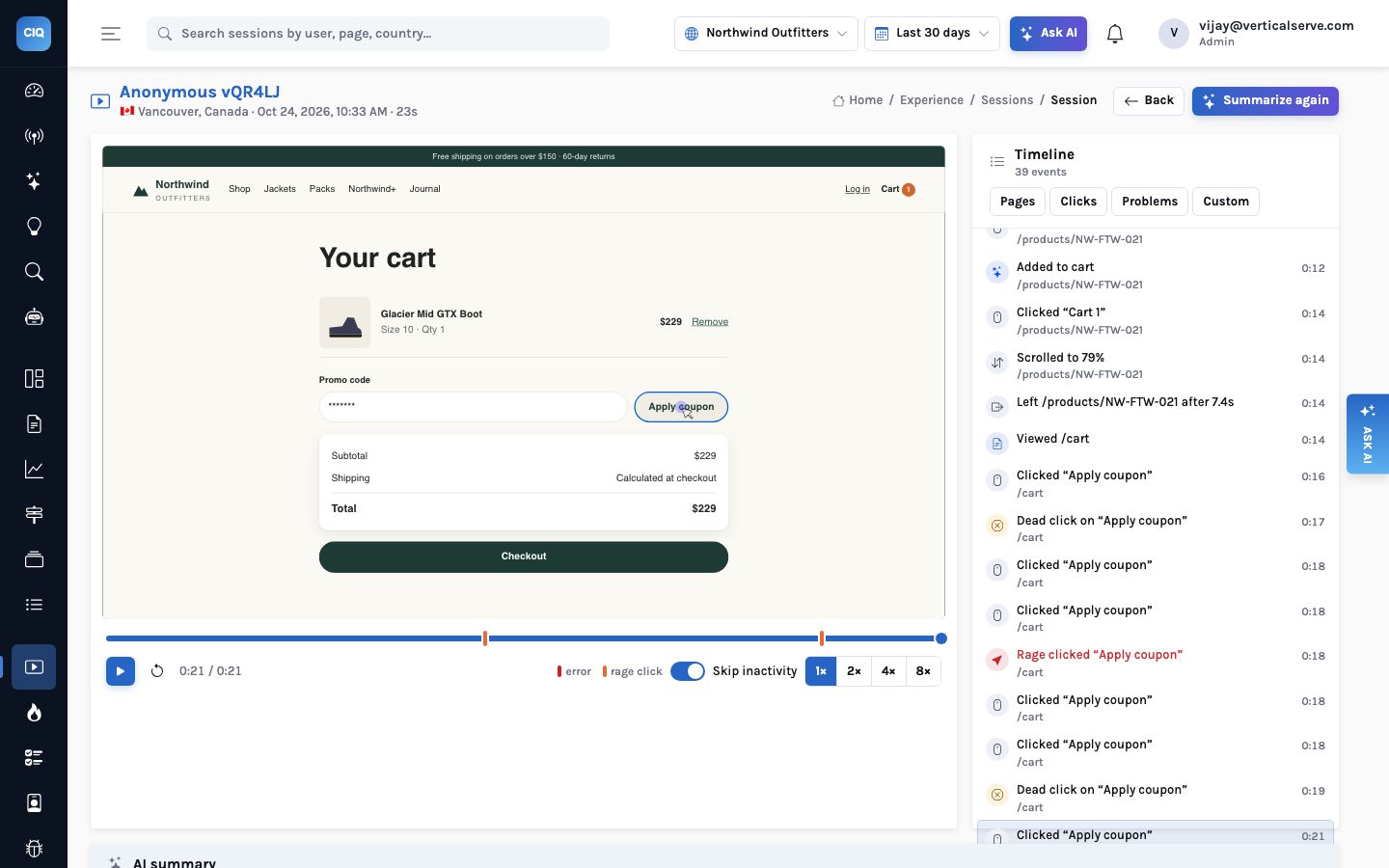
The session summary for this visitor, written from the timeline, reads: intent “find and buy hiking boots with a coupon”, outcome “abandoned”. Arrived from Reddit at 0:00, picked the Glacier Mid GTX Boot ($229) at 0:06, rage-clicked the star rating at 0:09 (another planted dead element), added size 10 at 0:12, viewed the cart at 0:14, and from 0:16 made “at least 8 attempts over ~6 seconds” on Apply coupon. The session ends there, 23 seconds in.
The replay also shows what the counts cannot: the visitor typed a code first. They had a code and the page would not take it. How replay summaries and seekable highlights work →
Step 4 — zones: from six sessions to a month of traffic
Six sessions are a story. Before anyone schedules engineering time you want the size of the
problem across all traffic, and you want to know what the button is doing to conversion. The
Heatmaps page for /cart has a zones table: one row per element, grouped
by its CSS selector, with clicks, the share of page sessions that clicked it, rage and dead
counts, median time to first click, conversion lift of clickers against everyone
else, and how far down the page it sits relative to how far people scroll.
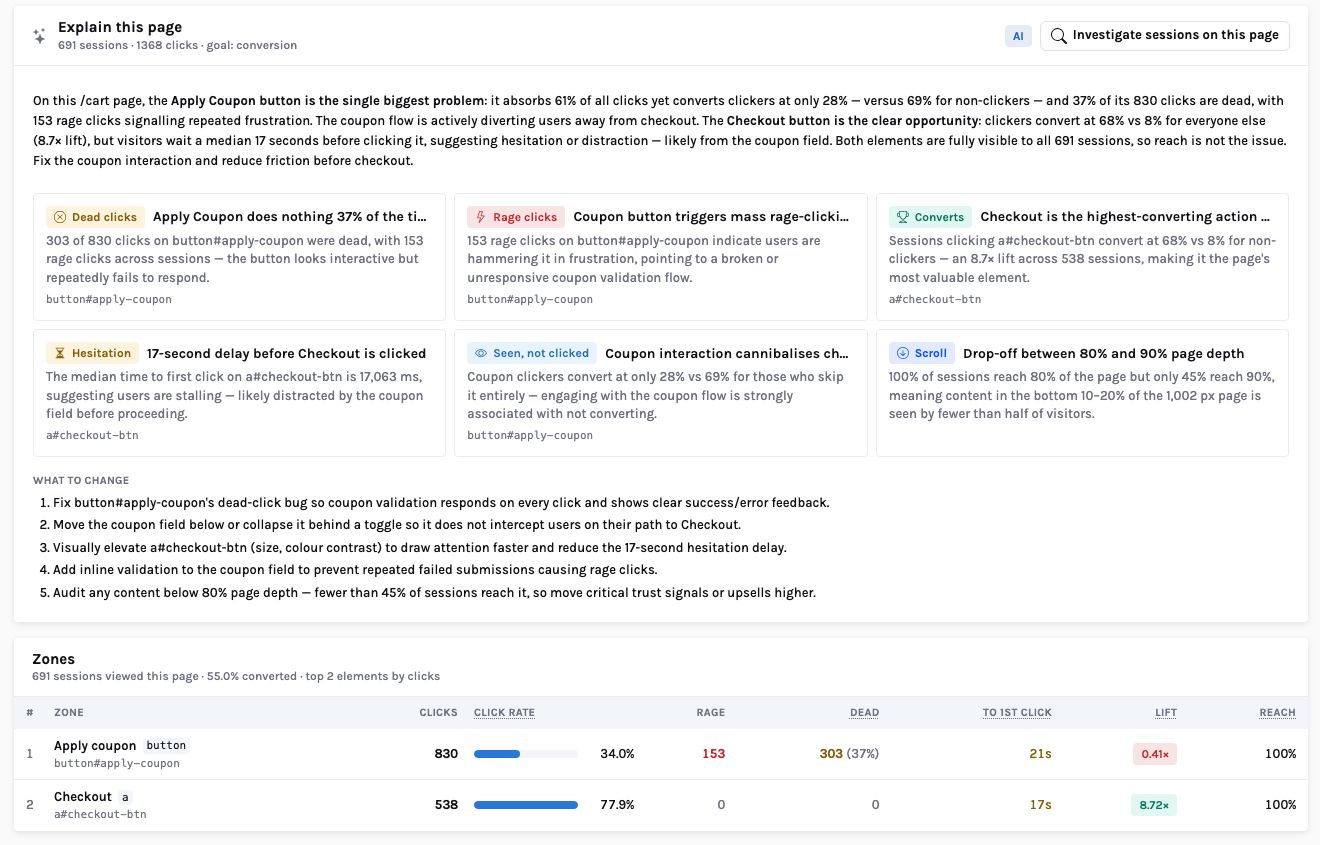
Over 30 days on desktop the numbers are stark. 691 sessions viewed the cart. Apply coupon took 830 of the page’s 1,368 clicks — 61% — from 235 sessions, and 303 of those clicks were dead, a 37% dead rate, with 153 rage clicks on top. Sessions that clicked it converted at 28%; sessions that did not converted at 69%. Checkout, by contrast, was clicked by 538 sessions, who converted at 68% against 8% for everyone else.
Explain this page turns that table into findings. The model receives the zone table, the scroll bands and the rule flags, and may only cite them; its answer is checked against the table (known finding kinds, selectors that exist) before it is shown. Its first finding was the dead button — “303 of 830 clicks on button#apply-coupon were dead, with 153 rage clicks across sessions” — and its first recommendation was to “fix button#apply-coupon’s dead-click bug so coupon validation responds on every click and shows clear success/error feedback.” With no model configured, the rules produce the same finding, because a dead rate above 30% with at least three dead clicks is a rule, not a judgement.
One caution the page itself will not make for you. The 0.41× lift is a correlation: people who look for a coupon box are, on average, more price-sensitive than people who do not, and some of them would have left anyway. What the lift does tell you is that the button is sitting on your least committed visitors at the exact moment they are deciding. That is the worst place for a dead control.
Read without behaviour, the same numbers support a pricing conclusion: coupon hunters are bargain browsers, maybe stop advertising codes. That conclusion is wrong, and it is the one a weekly dashboard would have led to.
37% of clicks dead, rage bursts of eight clicks in six seconds, a code typed in the field before each burst. The fix is an engineering ticket, not a pricing decision.
Step 5 — the fix, and how you know it worked
The engineering change is small: the button had no click handler. Bind one, call the coupon
endpoint, and show the outcome inline — a success line with the new total, or
“that code has expired” — so a wrong code produces a message instead of
silence. The second bug is a null guard on the shipping option’s days
property. Neither is the interesting part. The interesting part is closing the loop, because
a fix nobody verifies is a fix nobody believes.
- Mark the release. Add an annotation — kind
release, the version, a link to the change — so every trend chart carries a dashed marker at the moment the fix shipped. Editors create them from the Segments page or with one API call. - Put an alert on the symptom, not the code. An alert is a metric spec plus a
condition. Dead clicks on
/cartover 24 hours, above a threshold you choose, to the in-app inbox, an email list or a webhook. If someone breaks the button again in six months, you hear it from the alert, not from the quarter’s numbers. - Re-read the zones. After a week of traffic, the Apply coupon row should show a dead rate near zero and a lift moving toward 1×. If the lift stays low with no dead clicks, you have learned something different: the button works and coupon hunters really are less likely to buy.
- Watch the signal stop. The frustration signal is recomputed every 30 minutes over the last 7 days. When the element stops collecting rage and dead clicks it drops off the board on its own.
POST /api/alerts
{
  "name": "Dead clicks on /cart",
  "project_id": "<Northwind>",
  "spec": { "kind": "metric", "series": [{ "event": "dead_click",
            "filters": [{ "property": "path", "op": "eq", "value": "/cart" }] }] },
  "condition": { "op": "above", "threshold": 10 },
  "window": "24h",
  "channels": { "in_app": true, "email": ["web-team@northwind.example"] },
  "enabled": true
}
The cart had been producing 15 to 27 dead clicks a day; a threshold of 10 per 24 hours is quiet after the fix and loud if the regression returns. Test on the alert runs the check once and tells you the current value, so you can see it would have fired before you rely on it.
Why the order of the steps matters
Any analytics product can count dead clicks on an element you already suspect. The difference is the direction of travel: this starts with evidence the system found on its own and a cost to rank it by, and asks a person to decide only at the end.
| Step | Who does the work | What it gives you | Model needed? |
|---|---|---|---|
| Signal | Background statistics every 30 min | That something is wrong, where, and what it costs | No — the model only words it |
| Investigation | One summary per session + one grouping call | Themes with evidence offsets; the second bug | Rules group by outcome and dominant problem without it |
| Replay at ?t= | The player | The moment itself, with inputs masked | No |
| Zones + Explain | SQL over 30 days of clicks | Size of the problem and its link to conversion | No — rule findings without it |
| Fix + verify | A person, an annotation and an alert | Proof that it worked, and a tripwire | No |
The last column is deliberate. Every AI step in InsightClickIQ has a rules path, so if the
model provider is down or switched off (CLICKIQ_AI=false) the signal still
fires, the zones still flag the dead button, and the investigation still clusters the
sessions. The model makes the words better. It is not what finds the bug.
The button did not throw an error. It just took 830 clicks and gave nothing back. The people who clicked it were the alert — the product’s job was to notice them.
What this needed from the store
- The snippet, which captures clicks with an element descriptor, rage and dead clicks and errors without any tagging.
- Four custom events —
Product viewed,Added to cart,Checkout started,Order completedwith a revenue value. These define conversion and the dollar figure. On Northwind the funnel over 30 days runs 4,066 → 1,470 → 825 → 524, an overall 12.9%. - Replay switched on for a sample of sessions, with inputs masked (the default).
How signal impact is calculated → · Investigations in depth → · Zone-based click analytics →


