
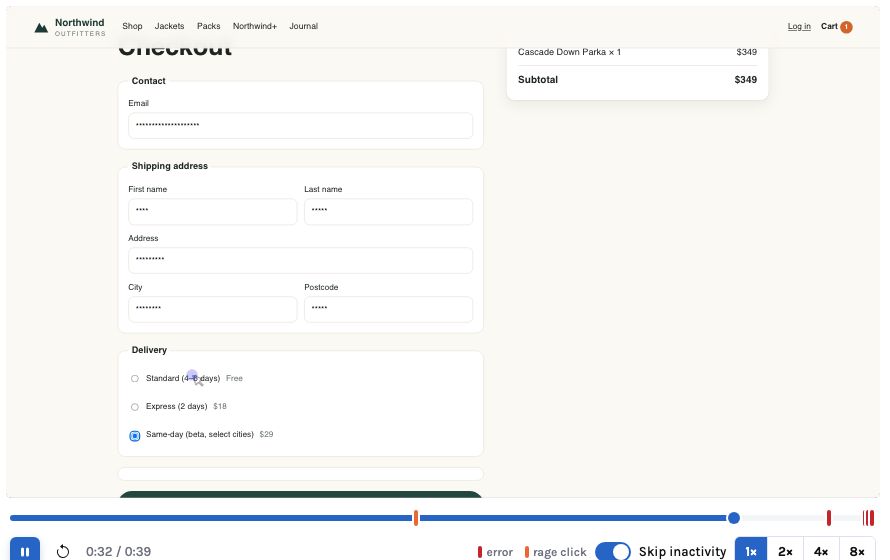
The privacy question about a click analytics tool is not whether it has a settings page. It is what happens on the day nobody remembered to configure it. A snippet that records every keystroke until someone adds a masking rule will, sooner or later, record a password, a card number or a diagnosis typed into a free-text box. The only reliable answer is a product whose defaults are already the safe ones, and whose unsafe options have to be chosen on purpose.
This post walks through InsightClickIQ layer by layer — the browser, ingest, storage, and the AI — and says at each layer what is stopped, what is masked, and what is kept. It finishes with the things the product does not do for you, because a privacy review that only lists the controls is a sales document.
1. In the browser: values never leave
The browser SDK never reads the value of an input, textarea or select. That is not a masking
rule applied on the way out; the code does not read the value in the first place. A submit
button reports its label, because the label is page text, not something the visitor typed.
Clicks carry the element’s tag, its visible text and a CSS selector, so “Apply
coupon” is recorded as a click on button#apply-coupon, and the coupon code
typed beside it is not recorded at all.
Form analytics is the place where this is easiest to get wrong, because the whole point is to
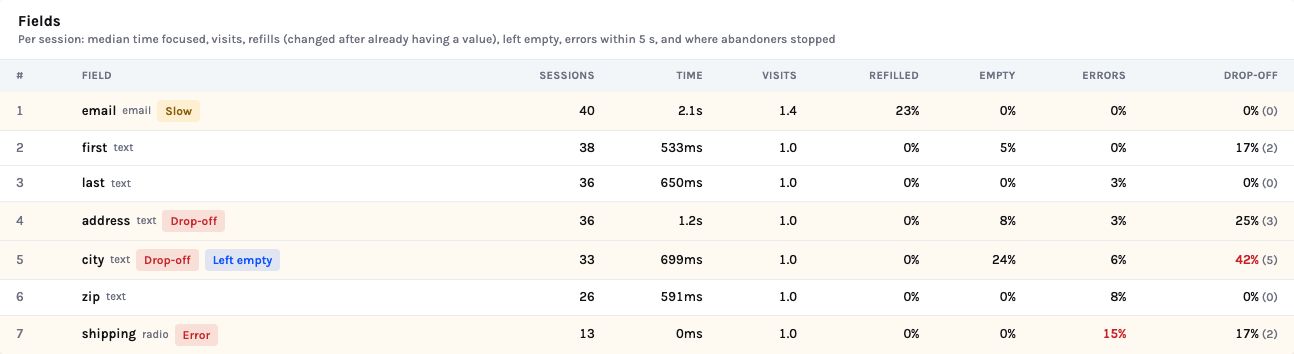
measure fields. InsightClickIQ measures them without their contents. Here is a real
form_field event from the Northwind checkout, exactly as stored:
{ "type": "form_field",
  "props": { "form": "#checkout-form", "form_name": "checkout",
             "field": "city", "field_type": "text", "order": 4,
             "focus_ms": 1017, "visits": 1, "changed": true,
             "refilled": false, "empty": false,
             "length_bucket": "1-10" },
  "el": { "tag": "form", "id": "checkout-form", "selector": "form#checkout-form" } }
The field’s name, its position, how long it held focus, whether it was changed or
re-filled, whether it was left empty, and a length bucket — 0, 1–10, 11–50 or
50+. Not the city. Password fields, anything with autocomplete="cc-*" or a
card-like name, hidden, submit and file inputs, and anything inside a blocked region are
skipped entirely, and the SDK stops at 60 fields per form.
Three attributes give you finer control without a release of the SDK:
| Attribute (or project setting) | Effect on events | Effect on replay |
|---|---|---|
data-private (mask_text_selector) | Element text is sent as **** | Text masked |
data-clickiq-block (block_selector) | No click, rage, dead or form events from inside | Not recorded at all |
mask_all_inputs (default on) | — (values are never read anyway) | Every input shows as dots |
respect_dnt | Honours Do Not Track and Global Privacy Control | Same |
clickiq("consent", false) | Stops; clears the queue, ids and cookie; remembered | Stops and clears the recording |
Replay follows the same rules. Every input is masked by default, so a recording of a checkout shows that a field was filled and how long it took, but never what went in it.
2. Identify people without naming them
Analytics needs to know that two sessions are the same person. It does not need to know who the
person is. clickiq("identify", id, traits) takes any stable id, and our advice
— written into the mobile SDK guides — is an account guid: never an email or a
name, and traits kept flat and free of personal content. iLearnRight, an education customer,
identifies students by guid with a role and a time zone, and nothing else.
identify("jane@school.org", {name: "Jane D."})Every event, session, export, report and AI prompt now carries a direct identifier. A screenshot of the People page is a personal-data incident.
identify("3f2c…9a1", {role: "student", tz: "Europe/London"})Sessions still join up across devices and visits. The mapping from guid to person stays in your own system, where your access controls already apply.
We should be honest that our own install page and README show an email trait in
the identify example, because many teams want it. A privacy-first deployment should not copy
that line. If you do need names — the executive usage report can rank users by a
user.name trait — that is a deliberate choice, made per project, and worth
writing down.
3. At ingest: keys, origins, and what the server adds
Each project has a write key. It is public by design — it sits in your page source — and it can add events but never read them; reading needs a signed-in user or an API key. Two things stop someone else’s page posting into your project with it: the project’s allowed origins list (a browser request from anywhere else gets a 403), and Rotate key, which issues a new one at once. Native apps send no Origin header, so for them the key alone scopes the project.
![The write key and Settings panels of the Northwind project: write key ciq_demo_northwind with Copy and Rotate key; allowed origins http://localhost:5225 and http://127.0.0.1:5225; session replay 100% of sessions; inputs Masked; mask selector [data-private]; block selector [data-clickiq-block]; retention 395 days](assets/img/blog/privacy_first_by_design-3.jpg)
The server enriches each event with browser, OS and device type parsed from the User-Agent, and with country, region and city from your CDN’s headers, a MaxMind database if you configure one, or the browser’s time zone. The client’s IP address is used for that lookup and never stored. Neither is the raw User-Agent string.
4. In storage: tenancy, retention and erasure
Tenancy
Every product table carries an organization column under Postgres row-level
security, and the application connects as an ordinary role, not a superuser, so the policy
actually binds. Routes scope every query as well; RLS is the second line, there for the day a
route has a bug. When the event table lives in ClickHouse, which has no RLS, the query builder
binds the organisation on every statement and the ClickHouse dialect refuses to execute a
statement without an organization = … predicate — a test asserts it on
every generated query. The console process should use a read-only ClickHouse user.
Retention
Each project has a retention_days, 395 by default, settable from 7 to 3,650. A
daily round at 03:00 local time deletes events older than the cutoff (dropping a whole monthly
partition instantly when no project still keeps a row in it), then the replay chunks and their
objects in the bucket, sessions that ended before the cutoff, people not seen since, cached AI
readings older than 30 days, and dismissed signals older than 90. An admin endpoint reports the
last run: on the demo, 4 projects checked in 0.16 seconds, nothing yet old enough to delete,
and two live partitions holding 42,192 and 228,798 events.
Erasure
A GDPR or CCPA request is one call. DELETE /api/people/{id} (analyst or admin)
collects every id the person was seen under — their user id and each anonymous browser id
— and deletes their sessions, events, replay chunks and replay objects, and the person
rows, returning the counts. DELETE /api/sessions/{id} (editors) does the same for
one session.
Two caveats on deletion
If you run the event table on ClickHouse, its retention is the table’s own TTL (CLICKIQ_CLICKHOUSE_TTL_DAYS, 400 by default), separate from the Postgres round, and the erasure call deletes from Postgres only today. Set the TTL to match your policy and handle erasure requests on ClickHouse explicitly until that is closed. Second, deletion is by the ids the person was seen under: if you identify by email, an erasure request has to give you that email.
5. The AI: what the model sees
InsightClickIQ is AI-first, which makes “what does the model see?” a fair question for every feature. The answer is consistent across all of them: the model plans and words; it never writes or runs SQL. It sees the project’s catalog (event names, property names, top values), numbers the engine computed, and for session summaries the event timeline — which, by everything above, contains no field values and only masked private text. It never sees the replay pixels. Every tool call is pinned to the caller’s organisation.
You choose the provider — Bedrock, Azure OpenAI, Vertex, OCI, or any OpenAI-compatible
endpoint, which can be one you host — or none at all. With CLICKIQ_AI=false
every AI surface still answers by rule, so an air-gapped deployment loses fluency, not
features.
6. Token hygiene
| Credential | What it can do | How to handle it |
|---|---|---|
Write key ciq_… | Add events to one project | Public. Restrict origins; rotate if abused |
| Console access token | Everything the signed-in user can do | Short-lived bearer; never in config |
| Personal API key | The same, for scripts and MCP clients | Does not expire with the session — store it like a password, revoke when done |
| Database and ClickHouse passwords | Everything | Secret refs: aws-sm://, azure-kv://, gcp-sm://, oci-vault:// |
| Token in a stream URL | Live view, agent runs, PDF print | Open issue — see below |
Configuration checks itself. On the demo, GET /api/health/config warns:
“INSIGHT_DATABASE_PASSWORD is set — secrets belong in the platform’s store;
use a *_REF / *_SECRET ref”. That is the laptop setup; production should not show it.
One finding from our own QA review is only partly closed. Browsers cannot send headers on an
EventSource, so the live stream, agent-run stream and server-side PDF route accept the access
token as ?token=. The API’s own logs now redact it; until the planned
short-lived stream ticket replaces it, strip token= from any proxy log in front
of the API as well.
What the product does not do for you
- It does not scan your custom properties.
track()andidentify()send what you pass. If you put an email in a property, it is stored. Keep props flat and free of free text. - It records URLs, including query strings. If your site puts personal data in a URL
(
?email=, a reset token), it will be in theurlcolumn. Fix it in the site. - It does not manage consent banners. It gives you
clickiq("consent", false)and DNT/GPC handling; deciding when to call them is your consent tool’s job. - Native apps send only what you call. The iOS, Android and React Native SDKs read
nothing from the UI automatically — safer by construction, but a careless
tap()label can still carry personal text. - Residency is a deployment choice. One database and one bucket per region; do not share a Postgres across regions.
The safest data is the data the browser never sent. Most of InsightClickIQ’s privacy model is decided before an event leaves the page.
How masked replays become evidence → · Identify by guid on web and mobile → · Tenancy and retention on ClickHouse →


