
An education product has a problem most analytics setups make worse. The same family touches it from three places: a parent compares tutors on a laptop, signs up and books a trial; the student opens the iPhone app that evening to start the lesson; a week later the parent checks progress on an Android tablet. If each of those surfaces reports to a different tool, or to the same tool in a different shape, the question the business actually cares about — how many sign-ups become a booked lesson, and where do the rest stop? — has no single answer.
iLearnRight is a tutoring and SAT-prep service with a React web app (served under
/rt) and native apps. This post walks through how it is wired into InsightClickIQ:
one contract for the browser and three mobile SDKs, people identified by an account guid and
nothing else, and the funnel that runs across all of it. It also shows the real state of the
project on the day the SDKs were verified, because a post about an install that pretends to
have months of data would not help anyone planning one.
The idea: a screen is a page
The browser SDK sends a pageview every time the route changes. The mobile SDKs do
not invent a second vocabulary for apps; they send the same event type with an
app:// URL. A screen called LessonList in the app with bundle id
com.ilearnright.app arrives as a pageview at
app://com.ilearnright.app/LessonList. The server stores the path as
/LessonList and the host as the bundle id. From that moment every report that works
on pages — top pages, paths, journeys, funnels, segments, an AI answer about where people
drop off — works on screens without a line of extra code.
platform, app_version, device_model) rather than as separate event types, so one query can cover every surface or be broken down by any of them.The other conventions follow the same rule: keep the event, change the field.
| What happens in the app | What the SDK sends | Where it lands |
|---|---|---|
| The student opens a screen | pageview, name: "screen", url app://<bundle>/<Screen> | path = /LessonList, host = com.ilearnright.app |
| The student leaves it | page_leave with duration_ms (time on screen) | Average time on page, as for the web |
| A button is tapped | click with el: {tag: "button", text: "Start lesson", selector: "LessonList/Start lesson"}, no x/y | Element-level click counts per screen |
| The app describes itself | device: {platform, os, os_version, model, app_version, sdk} instead of a User-Agent | platform, app_version, device_model; os = “iOS 17.5”; browser = the SDK name |
| Something throws | error with source = file or class; crashes with props.fatal = true | Errors page, grouped by fingerprint |
| The app goes to the background for 30 minutes | A new session_id on return, the current screen re-sent with props.resumed | Sessions that mean the same thing on every platform |
The three native SDKs are separate code bases with the same surface: init (or
configure on iOS) with a key and a host, then screen,
tap, track, identify, reset,
flush and optOut. Each keeps an offline queue on disk capped at 500
events, sends batches of up to 50, and backs off on network errors, 429 and 5xx. None has a
third-party dependency: the Android library uses HttpURLConnection and a
hand-written JSON encoder, the iOS package is Swift 6 with nothing else, and the React Native
package picks up AsyncStorage and device-info libraries only if they are already installed.
How each surface is wired
The React web app
The web app loads the snippet from a small module, src/lib/clickiq.ts, and only when
both VITE_CLICKIQ_KEY and VITE_CLICKIQ_HOST are set — otherwise
every helper is a no-op, so the app never depends on analytics being reachable. Route changes,
clicks, rage and dead clicks, form timing, errors, Core Web Vitals and replay are captured
automatically. The learning events are named explicitly where they happen:
track("Lesson booked", {subject, duration_minutes, lesson_type, amount}) in the
booking page’s success handler, Signed up on registration,
Profile completed, Diagnostic completed, Mock test
completed, Course enrolled, Asked AI tutor and a dozen
more.
React Native
One provider and one hook. ClickIQProvider takes the key, host, app version and
bundle id; useScreenTracking(navigationRef) listens to React Navigation and calls
screen() once per focused route, walking nested navigators. A button that matters
calls tap("Start lesson") and the business event beside it:
<Button title="Start lesson" onPress={() => { tap("Start lesson"); lessonStarted("math"); }} />iOS and Android
SwiftUI gets a modifier, .clickiqScreen("LessonList"), that sends the pageview on
appear and the page_leave on disappear; UIKit calls it from
viewDidAppear. Compose gets ClickIQScreen("LessonList") inside each
destination, and fragments call clickiqScreen() from onResume. Both
native SDKs install a crash handler that writes the crash to disk and reports it as an
error with fatal: true on the next launch, in the session it belonged
to.
Identify by guid, and nothing else
This is the rule that matters most for a business whose users include children. Every surface identifies a signed-in person by their account guid, never by an email or a name. The web helper sends the guid plus four non-identifying traits — role, time zone, intent and whether the profile is complete — and the React Native example sends the guid and the role. A student’s identity stays in iLearnRight’s own database; the analytics only ever sees a stable id it can join sessions on.
The student’s name and email now live in a second system, in every export, and in every AI prompt that reads the people table. Erasing them means finding them everywhere.
The analytics can count, join and segment people without knowing who they are. A parent and a student are told apart by role, not by a name.
The rest of the privacy posture comes from the product rather than from discipline:
- Native apps send what you allow. Without tap capture and replay, only what the app
passes to
screen,tap,track,identifyanderrorleaves the device. Native replay, added since this was first written, records screenshots with text inputs and views you mark private painted black on the device; a children’s app can leave it off, or turn on masking of all text. - On the web, field values never leave the browser. Form analytics sends lengths
(bucketed), counts and timings; password and card fields are skipped. Replay masks every
input by default,
data-privatemasks text, anddata-clickiq-blockremoves an element from recording and click capture entirely. - Keep props flat and free of personal content. No free text the user typed, no
addresses.
Profile completedcarriesminoras a flag — useful for segmenting, not a fact about a named child. - Sign-out is
reset(), which forgets the user, starts a new anonymous id and a new session, so a shared family tablet does not merge two people. optOut(true)clears ids, the session and the queue and stays off across launches.
Erasure is one call
When a family asks to be forgotten, DELETE /api/people/{id} removes the person, every anonymous id they were seen under, their sessions, events and replay objects. Because the analytics only ever held a guid, there is no second copy of their name to chase.
The funnel the business cares about
iLearnRight’s project lists six conversion events: Signed up,
Profile completed, Lesson booked, Tutor application
submitted, Diagnostic completed and Mock test completed. The
headline funnel is the first three in order — sign-up, a completed profile, a booked
lesson — as a single QuerySpec:
{"kind": "funnel", "range": "30d", "window": "7d",
 "steps": [{"event": "Signed up"}, {"event": "Profile completed"}, {"event": "Lesson booked"}]}
Because a screen is a pageview and a named event is a named event on every platform, the same
spec counts a parent who signs up on the web and books in the iOS app as one journey once both
surfaces identify them with the same guid. Add "breakdown": "platform" to the
trend of Lesson booked and the split between web, iOS and Android falls out; filter
on app_version and a release that broke booking on Android shows up as one line
going flat. None of this needs a mobile-specific report.
What the first day actually looked like
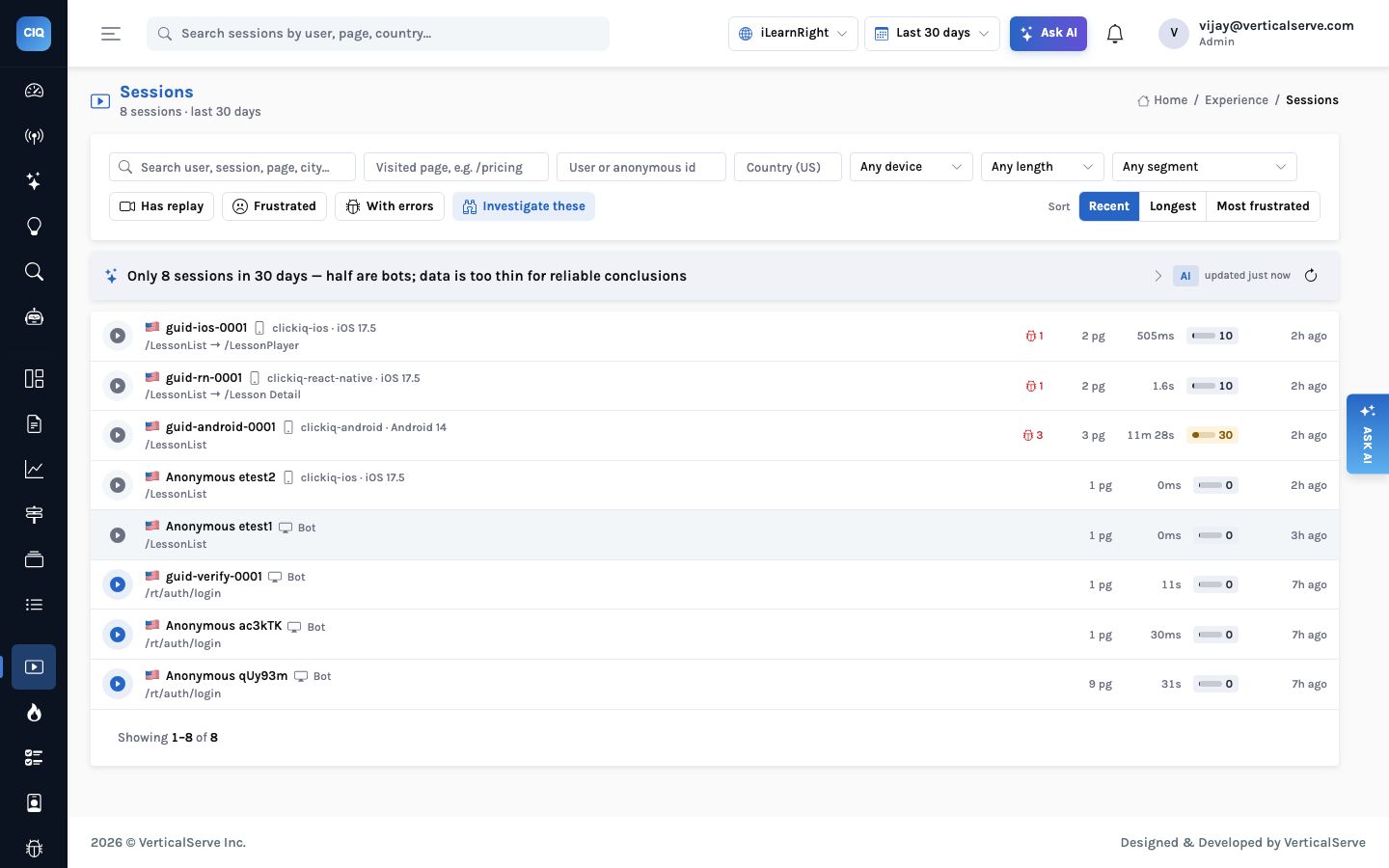
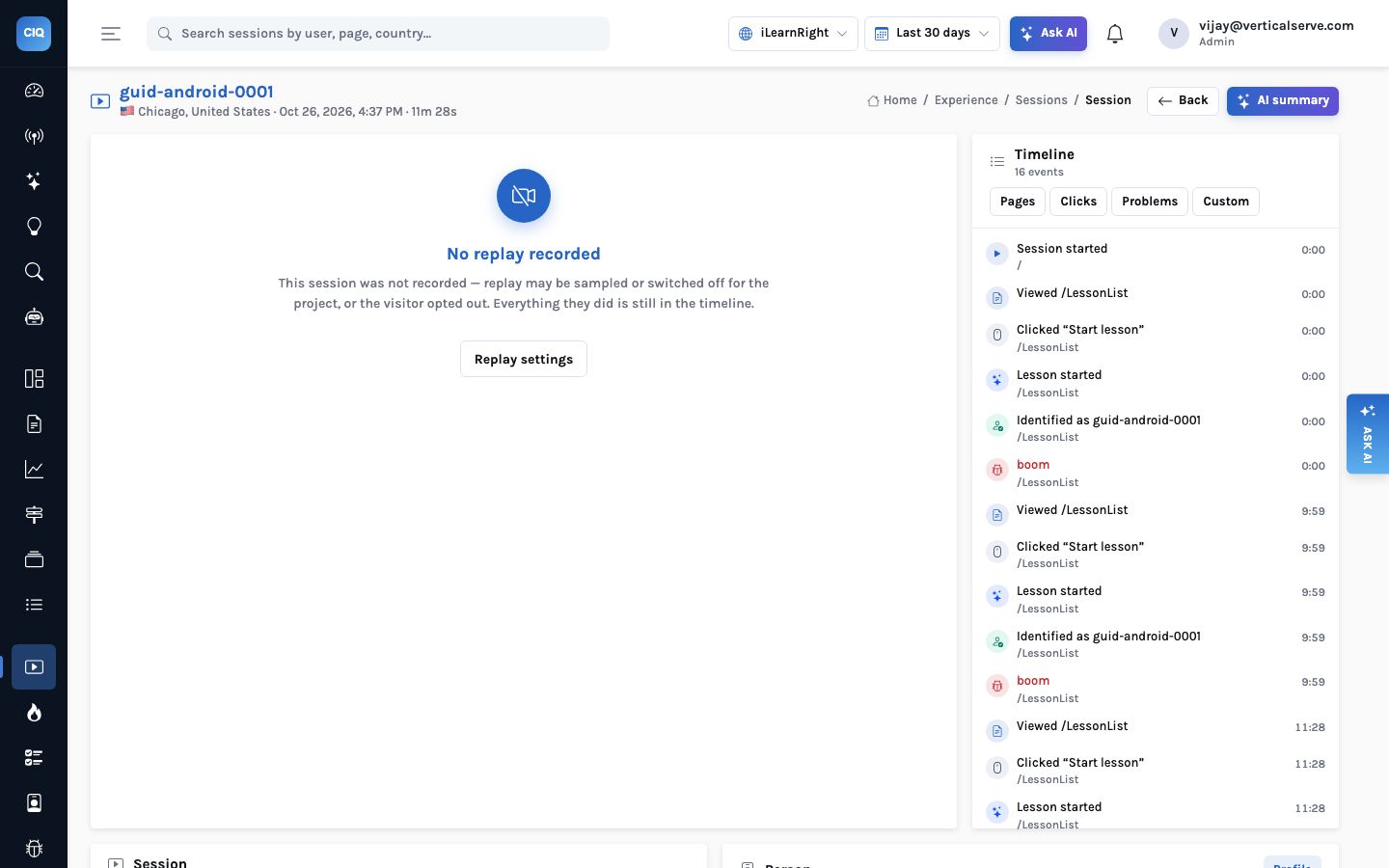
Here is the honest part. The project was created on October 26, the web app and all three SDKs were verified against it that afternoon, and real traffic had not started. So the data below is the verification runs — a Playwright script driving the web app, and the end-to-end test of each native SDK — not students.
That one screen is the argument for the contract. Three different SDKs written in three
languages produced rows that sit in the same list, with the same columns, and the console did
not need to know which was which: the browser column carries the SDK name, the
os column reads “iOS 17.5” or “Android 14”, and the entry
path is a screen.
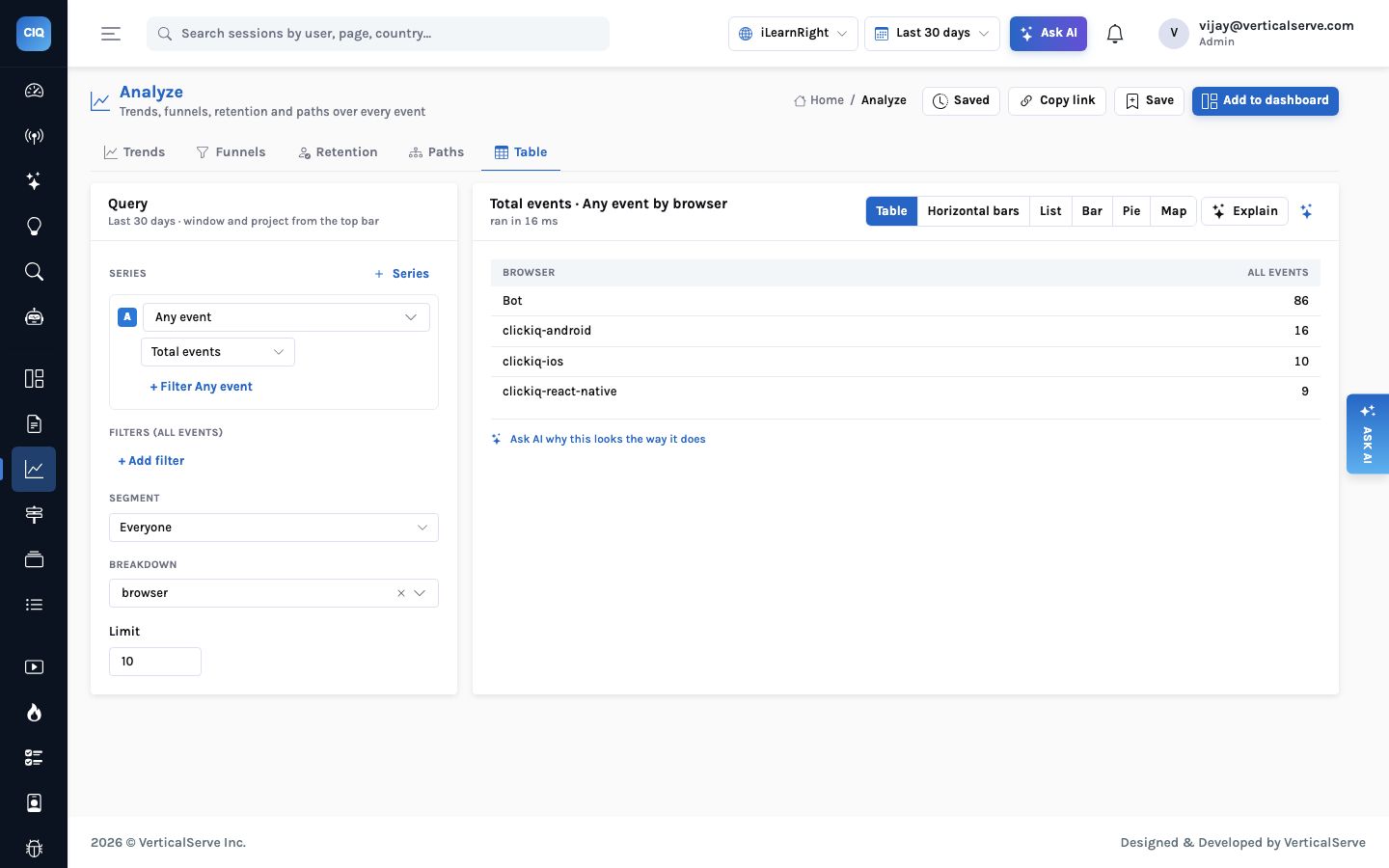
browser for platform or app_version and the same table splits by operating system or by release.What you get on each surface, honestly
The contract is shared; the capabilities are not identical, and it is better to plan around the gaps than to discover them.
| Capability | React web app | React Native / iOS / Android |
|---|---|---|
| Pages / screens, sessions, people, funnels, journeys, segments | Yes | Yes, unchanged |
| Named product events and identify | Yes | Yes |
| Clicks | Autocaptured, with page coordinates | Taps with coordinates, rage and dead taps (tap capture or tap()) |
| Errors | Uncaught errors, rejections, console errors | Uncaught errors; crashes sent on next launch |
| Session replay | Yes, inputs masked | Masked screenshots, opt-in per project |
| Heatmaps and zones | Yes | Tap heatmaps and zones per screen |
| Core Web Vitals | Yes | Mobile vitals instead: app start, screen load, frozen frames, ANR |
| Form field analytics | Yes, never values | No |
| Remote config and flags | Yes | Replay and sampling settings; feature flags on all three |
For a tutoring app the remaining gap is small. The questions that need form analytics — why parents abandon the booking form — are web questions, because booking and payment happen on the web. The questions about the apps are behavioural: which screens students reach, how long a lesson screen stays open, which release crashes or freezes. Screens, taps, named events and errors answer those, and tap heatmaps, mobile vitals and masked replay (added since this post was first written) show where and how.
What to put in the plan
- Agree the event names once, across teams.
Lesson bookedmust be spelt the same in the React app, the Swift code and the Kotlin code, or the funnel splits in three. A short list in the repository beats a wiki page. - Name screens for people, not for classes.
LessonListreads well in a journey;LessonListFragmentV2does not. Android’s automatic activity screens are convenient but name screens after classes; explicitClickIQScreencalls give you the choice. - Identify on login and reset on logout, on every surface. This is what joins the parent on the laptop to the student on the phone.
- Give the AI time. The console already reads the first day correctly — “data is too thin for reliable conclusions” — and will say more once there is more to read. Journeys need sessions in the hundreds before their patterns are worth acting on.
The parent on the laptop and the student on the phone are one family. One contract, one guid and one funnel is what lets the numbers say so.
How the privacy controls work in detail → · Ask the same data from Claude or Cursor →


