
An analytics console is a wall of numbers that each need a sentence. Errors are up — is that one bug or many? Sessions are flat — is that good for a Tuesday? LCP is 3.4 seconds — on which page, and does it matter? The sentence is the work an analyst does, and most products leave it to the reader. The ones that have added AI mostly added it as a destination: open the assistant, type the question you already had.
InsightClickIQ does it the other way round. Every screen in the console carries a contextual reading of what that screen is showing, written for the scope you are looking at — project, date range, filters, the error or person or form you opened. Every chart and every dashboard widget has an Explain. You do not ask; the reading is there when the page loads, with the numbers it rests on beside it.
What a reading is
Every reading, on every screen, has the same shape. That consistency is the point: you learn to read one and you can read them all.
| Part | Limit | What it is for |
|---|---|---|
| Headline | ≤ 90 characters | The one thing on this screen worth knowing, collapsed by default |
| Narrative | ≤ 120 words | The headline with its reasons, in plain sentences |
| Findings | ≤ 5 | Each tagged up, down, risk, win, anomaly or tip, with an action: a link to a console route, or a question for Ask AI |
| Evidence | 3–8 numbers | The figures the narrative rests on, as chips |
| Questions | ≤ 3 | Follow-ups, one click into Ask AI |
| Mode | AI or Rules | Who wrote the words; the badge is always shown |
| Cached, updated | — | How old the reading is, with a refresh button |
Rules first, model second
Behind every strip is one mechanism, not seventeen features. Each screen is a surface with a function that computes its facts in code from the real data: the KPIs against the previous period, the biggest movers, the device and country mix, the share of sessions with errors and how they converted. Those facts are compacted and handed to one shared narrate step, which asks the model to word them as JSON. The model sees numbers. It never sees raw events and never writes SQL.
What comes back is checked before it is shown: finding kinds must be ones the console knows,
every action link must point at a real console route (overview, signals, sessions, heatmaps,
forms and so on) or be an Ask question, and lengths are capped. If the check fails, or the
model is switched off (CLICKIQ_AI=false), or the call errors, a rules template
for that surface produces the same shape from the same facts, and the badge says
Rules instead of AI.
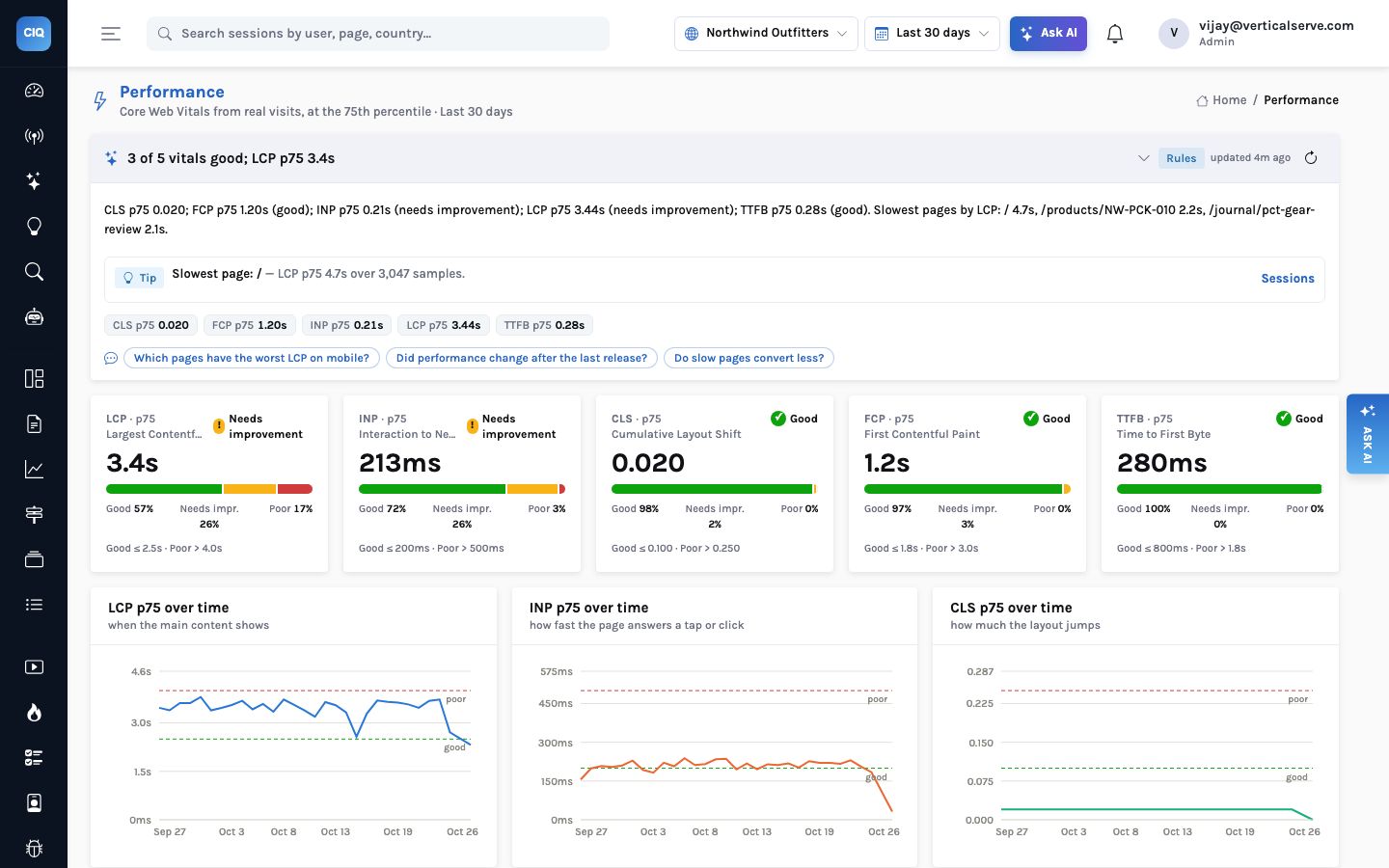
The rules path is not a theoretical fallback. On the Northwind demo, the Performance page answered with Rules while its neighbours said AI: the model’s JSON for that larger fact payload came back truncated and failed to parse, so the template answered. The reading is plainer — “3 of 5 vitals good; LCP p75 3.4s”, then each vital with its rating and the slowest pages by LCP — but every number in it is right, and the reader can see which kind of reading they are getting.
Why the fallback is silent, and why that is a known issue
Today the rules reading replaces a failed model reading without telling anyone. The reader sees an honest badge; the operator sees one log line. Our own QA review lists the fix — a larger token budget for big fact payloads, one retry on a parse failure, and logging the raw tail — as open. A Rules badge where you expected AI is worth a look in the logs.
Seventeen surfaces, one contract
Here is what each screen’s facts are made of. Screens that already have their own AI narration — a session summary, a heatmap’s Explain this page, forms, journeys — are delegated to it, so there is one reading per screen, not two competing ones.
| Surface | What its reading is computed from |
|---|---|
| overview | KPIs and conversion vs the previous period, page and source movers, devices, countries, visitors online |
| live | Visitors now vs the same hour last week, pages now, errors, rage and dead clicks in the last 15 minutes |
| events, event | The event mix vs previous: new and vanished names, movers; for one event, its trend, splits and the conversion of sessions that fired it |
| sessions, session | The filtered list against all sessions: frustration, conversion, errors, replay share, length, entry and exit; one session reuses its summary |
| people, person | New vs returning, identified share, most active and most frustrated; one person’s history |
| errors, error | Volume vs previous, new fingerprints, worst pages, conversion with and without errors; one error’s trend, browsers, pages and nearby annotations |
| performance | Each vital’s p75 vs previous with its rating, worst LCP pages, LCP by device |
| heatmap | The zones table and scroll bands (delegated to Explain this page) |
| forms, form | Field drop-off, time, refills, empties, errors (delegated to the forms service) |
| journeys | Mined patterns, converted vs dropped (delegated to the journeys service) |
| dashboard | Every widget’s query run under the current scope and compacted |
| chart | One chart’s result, its previous period, and drivers for a single series |
| project | Install health: events per day, custom, identify, vital and form events, replay coverage — tips like “no conversion events defined” |
Explain, on every chart
The chart surface is the one you meet most. Every dashboard widget has a small Explain button; every result in Analyze has one beside it. It runs the widget’s own query under the dashboard’s current scope, adds the previous period, and for a single series works out which source, device, page or country carried the change.
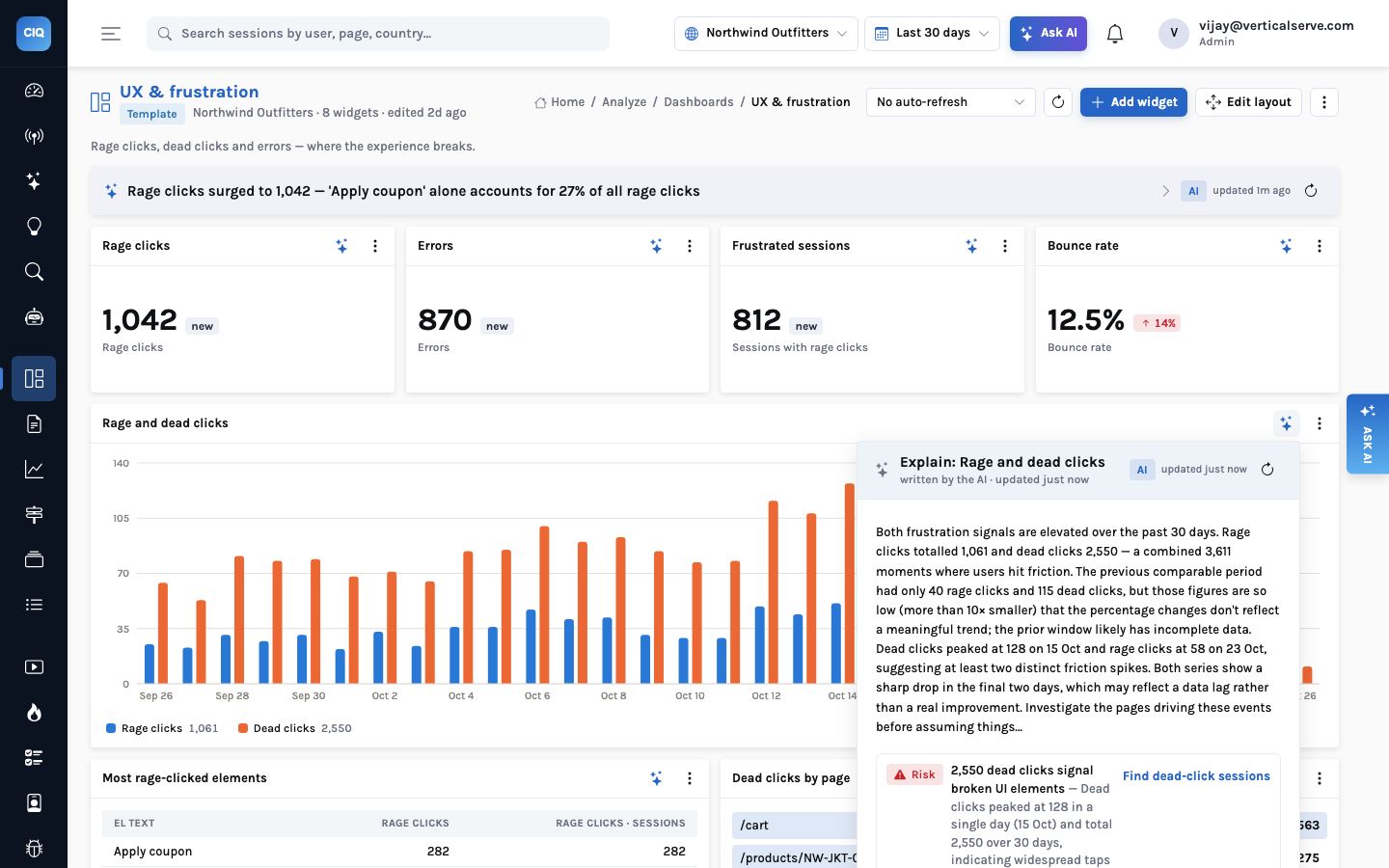
That refusal is worth dwelling on, because it is the failure mode of most automated commentary. A naive narrator sees +2,117% and leads with it. This one was handed both totals, saw that the earlier window was more than ten times smaller, and said the comparison was not meaningful. It is not perfect at this yet — the change pills on the same dashboard still show “new”, and our QA review asks for a floor below which no change is shown at all — but the reading is on the right side of it.
Read the reading critically
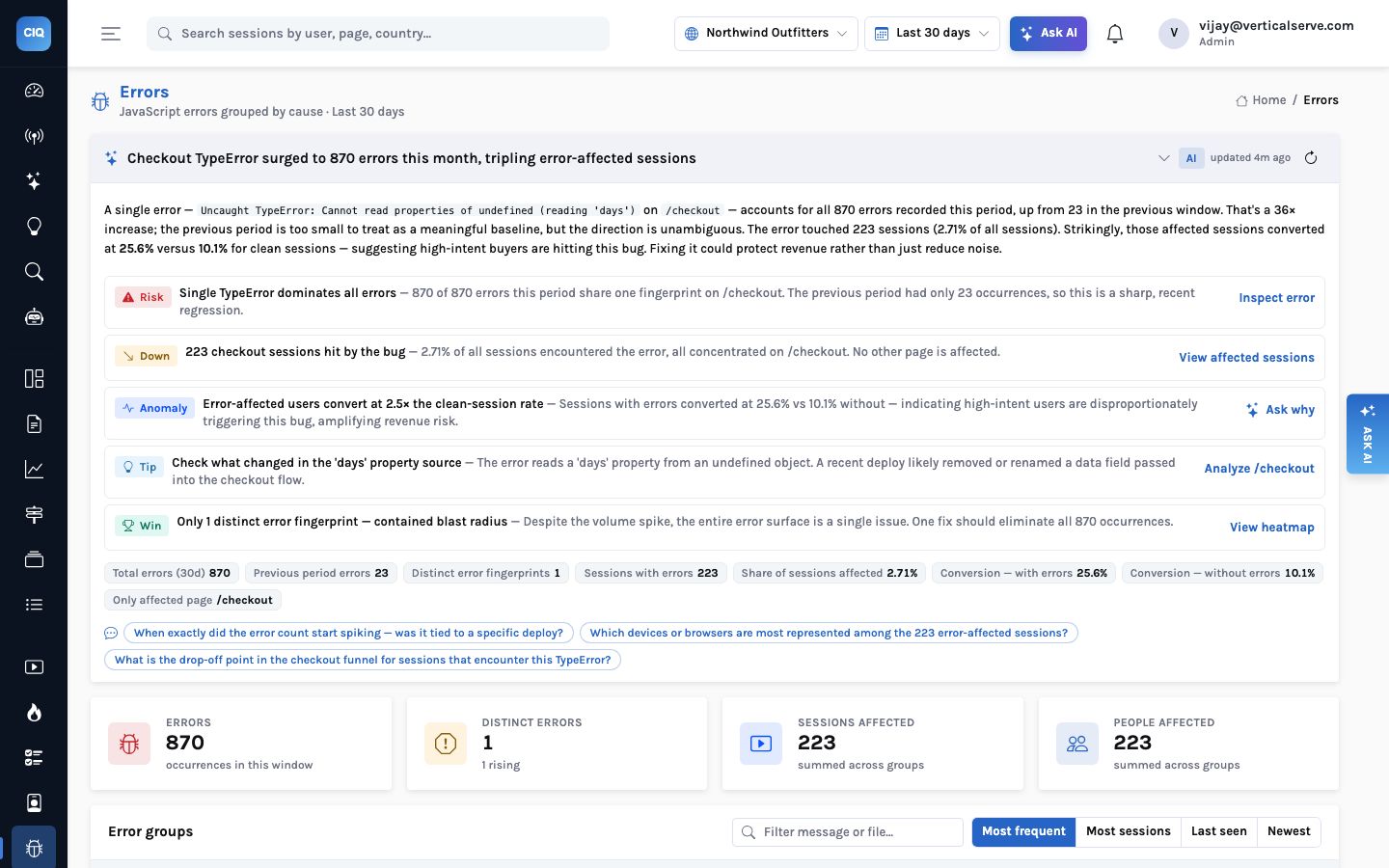
A reading is a starting point, and the evidence chips are there so you can argue with it. The Errors reading above contains a good example. Its third finding says sessions with the checkout error converted at 25.6% against 10.1% for sessions without — “indicating high-intent users are disproportionately triggering this bug.”
True as arithmetic, and the model framed it sensibly, but the obvious explanation is selection: the error only fires on the checkout page, and anyone who reaches checkout has already put something in a cart. They would convert above the site average whether or not the bug existed. The right comparison is sessions that reached checkout with and without the error. The finding comes with an Ask why button for exactly that reason: it hands the question to Ask AI, which runs the comparison as a real query rather than speculating.
Read as a fact about the bug, it suggests the error is harmless or even a sign of good traffic. Someone deprioritises the fix.
The chips show the two rates and the 223 sessions. Ask why runs checkout-reachers with vs without the error. The investigation of 20 frustrated sessions had already shown every one of them failed to place an order.
The cache, and why latency is the real design problem
Readings are cached per organisation, surface, project, date range and context: ten minutes for most surfaces, two for Overview and Live because those move. A refresh button regenerates one on demand. The effect on the demo is easy to measure:
That gap is the uncomfortable truth about AI on every screen. The numbers on a page render in about a second. The reading, the first time a scope is viewed, takes seven to thirteen seconds, almost all of it the model. Our QA walk of every route found pages settling in 10 to 15 seconds, every one of them waiting on the strip, not on the data.
It matters more than it sounds. A reading that arrives after the reader has already scanned the page and formed a view is a reading nobody reads; a strip that pulses for twelve seconds on every first visit teaches people to scroll past it. The facts are ready in about a second because they are computed in code. The current plan, and the top recommendation in the QA review, is to use that: render the rules reading immediately, stream the model’s wording in when it arrives, and pre-warm a scope’s readings when the Overview loads.
What you get today
Readings are synchronous on first view and instant from the cache for 2–10 minutes after. In practice a team looking at the same project and range shares the warm cache: the first person to open Errors in the morning waits ten seconds, everyone after them does not. The numbers themselves never wait for the model.
What it is not
- Not a replacement for the screen. The reading sits above the numbers and is collapsed to a headline by default. The page underneath is unchanged.
- Not a chat. It answers the question the screen implies. Your own question goes to Ask AI, where a deep-analysis mode runs a multi-step agent with a visible trace.
- Not free. Each first view of a scope is a model call. Caching and the shared narrate step keep it to one call per screen per scope per ten minutes, not one per chart.
- Not dependent on the model. Turn the model off and every strip still answers, in the Rules voice, from the same facts.
The facts are computed before the model is asked anything, and they are on the screen whether or not it answers. The model’s job is the sentence.
What AI-native analytics means here → · Signals with a cost on them → · Reports with AI narrative panels →


