
Every analytics tool can draw a funnel. You name the steps — product, cart, checkout, order — and it tells you how many people made it through each one. The funnel is only as good as your guess about the steps. If the visitors who buy take a route you did not think of, or the ones who leave do something you never put on the diagram, the funnel cannot show it.
InsightClickIQ’s Journeys page starts from the other end. It reads the sessions themselves, finds the sequences that recur, measures each one, tags the ones that matter, and has the AI write up what it found from those numbers. Nothing is configured beforehand. This post walks through what it found on the Northwind Outfitters demo store over the last 30 days, and how each finding leads to a replay.
How patterns are found
The method is deliberately simple, so a product manager can reason about it:
- Sequences. Each session in the window becomes an ordered list of the pages it viewed (or, with Pages + events, pages interleaved with your custom events). Consecutive repeats collapse, so a reload is not a step.
- Patterns. Every contiguous run of 2 to 5 steps is a candidate. A candidate is kept when at least max(5, 1% of sessions) contain it.
- Pruning. A short pattern is dropped when a longer one containing it covers at least 80% of its sessions, so the list is not three versions of the same path.
- Scoring and tags. For each pattern: sessions, share, conversion (did the session convert after the pattern’s last step), median time, frustration rate and exit rate. Then the tags: golden is the best-converting pattern with at least 2% share and conversion above the site rate; loop repeats a step; detour converts at half the site rate or less; exit means more than 60% of its sessions end there.
All of that is computed in code. The model sees the resulting table — never the events — and writes a narrative and up to five insights, each pointing at a pattern by index. With no model configured, a rules writer produces the same shape.
What it found on Northwind
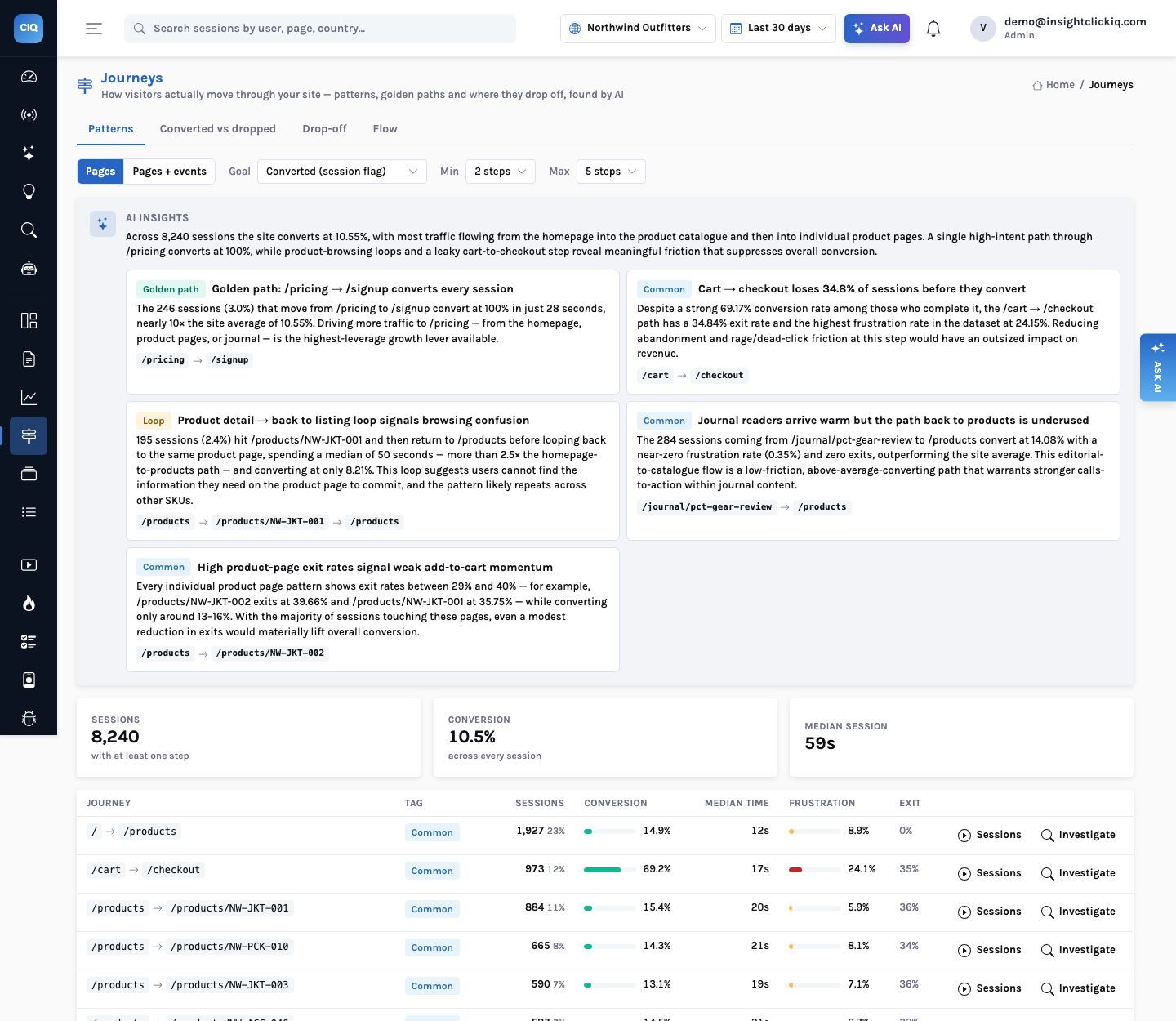
Across 8,242 sessions the site converts at 10.5%, with a median session of 59 seconds. The Patterns tab opens with the AI’s reading and then the table:
/pricing → /signup) is the pattern it is about, so you can find its row in the table and open its sessions.| Pattern | Tag | Sessions | Conversion | Frustration | Exit |
|---|---|---|---|---|---|
| / → /products | common | 1,927 (23%) | 14.9% | 8.9% | 0% |
| /cart → /checkout | common | 973 (12%) | 69.2% | 24.1% | 34.8% |
| /products → /products/NW-JKT-001 | common | 884 (11%) | 15.4% | 5.9% | 36% |
| /journal/pct-gear-review → /products | common | 284 (3%) | 14.1% | 0.4% | 0% |
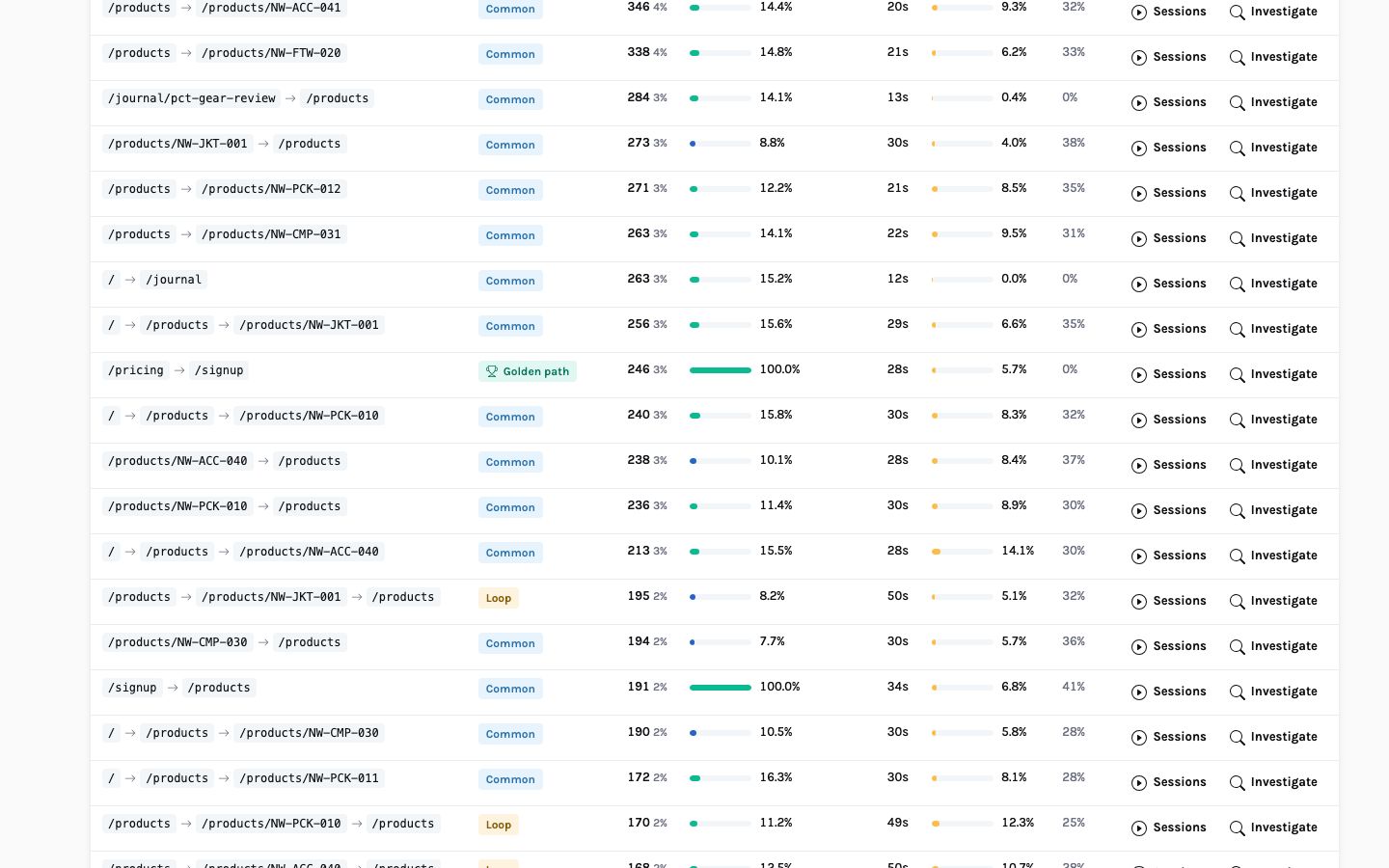
| /pricing → /signup | golden | 246 (3%) | 100% | 5.7% | 0% |
| /products → /products/NW-JKT-001 → /products | loop | 195 (2%) | 8.2% | 5.1% | 32% |
The golden path
Visitors who go from /pricing to /signup — the store’s
membership — convert every time: 246 sessions, 100%. That is partly by definition (signing up
is one of the project’s conversion events), and the AI says plainly what follows from it:
“Driving more traffic to /pricing is the highest-leverage growth lever visible in the
data.” The Converted-vs-dropped view, below, shows why that matters: /pricing
is also a page 5.8% of non-converters land on and leave.
The loop
195 sessions go from the catalogue to the Ridgeline Shell Jacket and straight back to the catalogue. They spend a median 50 seconds — more than twice the 20 seconds of a visitor who just views the product — and convert at 8.2%, below the site’s 10.5%. The insight’s reading: “The repeated return to the catalogue suggests users cannot find enough information on the product page to commit.” The same pattern appears on two other products (NW-PCK-010 and NW-ACC-040, 170 and 168 sessions). A signal elsewhere in the product explains part of it: the star-rating line on those product pages (“★ 4.8 · 1,180 reviews”) draws dead clicks, because it looks like a link to the reviews and is not one.
The leak
The /cart → /checkout pattern is the store’s highest-intent path: 973
sessions converting at 69.2%. It is also where 34.8% of those sessions end, and its frustration
rate — 24.1% — is the highest of any pattern in the table.
Converted versus dropped
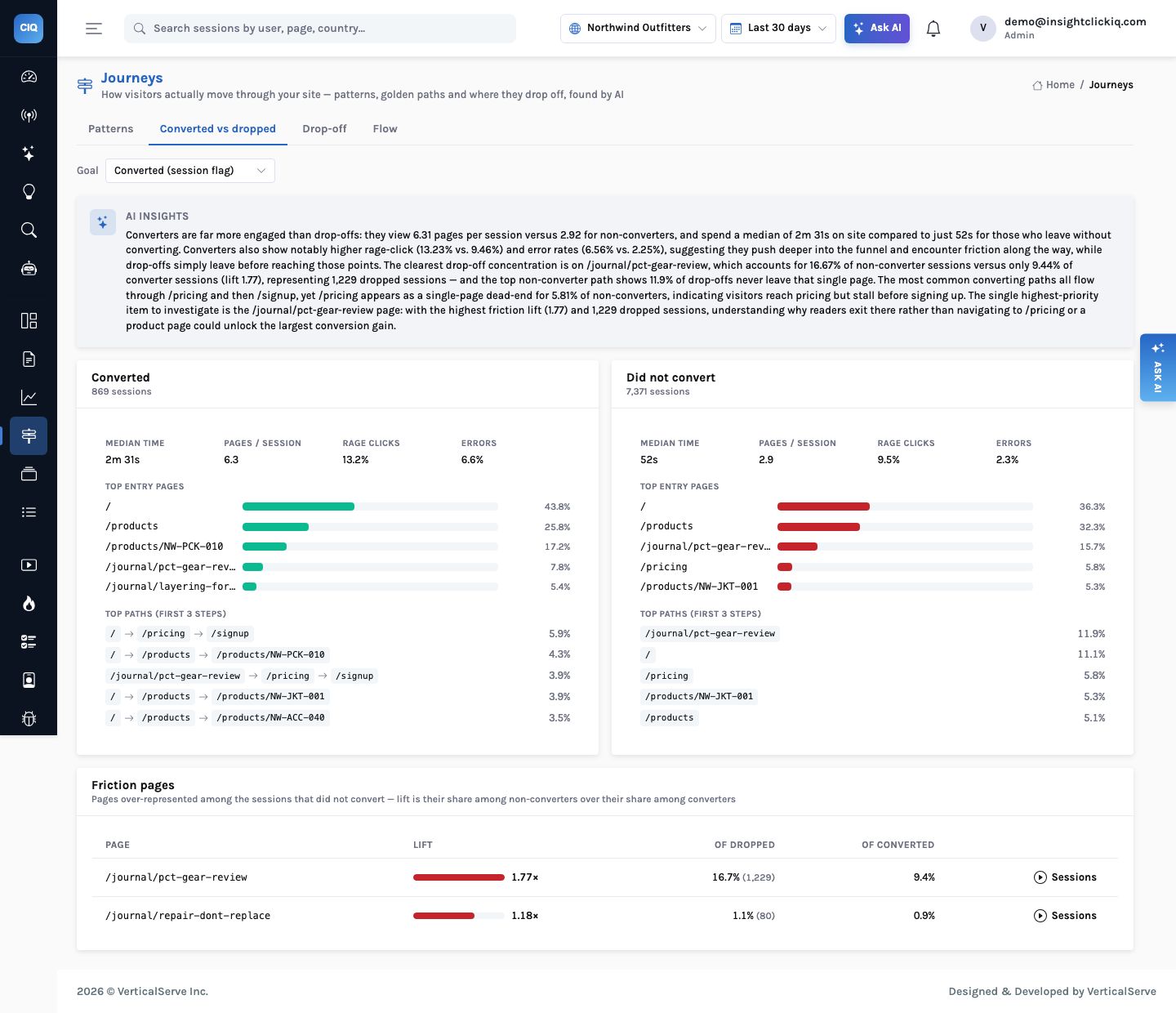
The second tab splits the window into sessions that converted and sessions that did not, and puts them side by side:
| Converted | Did not convert | |
|---|---|---|
| Sessions | 869 | 7,373 |
| Median session | 2m 31s | 52s |
| Pages per session | 6.3 | 2.9 |
| Rage-click rate | 13.2% | 9.5% |
| Error rate | 6.6% | 2.3% |
| Top path | / → /pricing → /signup (5.9%) | /journal/pct-gear-review alone (11.9%) |
Two things in that table are worth slowing down for. First, converters show more rage clicks and errors than non-converters. The AI’s narrative handles it carefully: this “may reflect the extra interactions that come with deeper browsing rather than pure frustration” — people who reach checkout are the only ones who can hit a checkout error. A rate per session is not a rate per opportunity, and the narrative does not pretend it is.
Second, the friction page. /journal/pct-gear-review, a gear-review article, appears in
16.7% of dropped sessions and 9.4% of converted ones — a lift of 1.77 across about 1,230
dropped sessions. Yet on the Patterns tab, visitors going from the same article to
/products are the cleanest traffic on the site (14.1% conversion, 0.4%
frustration). Both are true. The article sends good visitors onward; most of its readers never
go anywhere. The recommendation follows directly: give the article a next step — a link to
the reviewed product or to /pricing.
Why the weekly digest agrees
The same article is the week’s biggest page mover in the digest (−539 views, −75%) because the Reddit thread that sent people to it went quiet. Journeys shows what that traffic was worth while it lasted: mostly single-page visits. The two features read the same events and reach consistent conclusions, which is what you want before you act on either.
Drop-off, then the replay
The third tab answers a narrower question: of the sessions that did step A, how many never reached
step B within a window, what did they do instead, and what went wrong? For Northwind we asked it
about the leak: viewed /cart, never reached /checkout within a day.
Every one of the 287 exited from the cart page. 51.9% rage-clicked, 64.8% made dead clicks, 34.5% were flagged as frustrated, and none hit a JavaScript error. The answer lists up to ten of those sessions, replays first and most frustrated first, ready to open.
Here the narrative makes a guess it labels as a guess: it says the problem is “most likely the checkout button or a similar call-to-action”. The drop-off analysis does not know which element took the dead clicks — that is a different feature’s job. Open the cart page in Heatmaps and the zone table answers it: the dead clicks are on Apply coupon, not on Checkout, which converts its clickers at 68% (see the zones post). Open the most frustrated of the listed sessions and its timeline shows the order of events: clicks on the cart page that did nothing, then the exit.
Tells you 22.8% of cart viewers did not reach checkout. You knew to look there because you drew the funnel. It cannot tell you about the jacket loop, the membership path or the review article, because you did not draw them.
Finds the leak and the paths you did not draw, tags them, and gives you the sessions behind each row. The funnel is still there (Analyze) for the steps you know matter.
What the AI does and does not do here
- It does not find the patterns. Mining, counting, tagging and the friction-page lift are computed in code from up to 300,000 events and 50,000 sessions per window; the answer says when it was sampled.
- It does read the table and decide which five patterns are worth a paragraph, and it writes those paragraphs from the numbers in the rows.
- It does make inferences — “suggests users cannot find enough information” — and the wording marks them as inferences. The replays are how you confirm one.
- Agents use the same three tools (
journey_patterns,journey_compare,journey_dropoff); the journey-explorer playbook strings them together and finishes with the sessions.
The useful journeys are the ones nobody drew: a path that always converts, a loop that never does, and a page that sends a few people onward and most people home.
Try it on your own site
Journeys needs nothing beyond the snippet: pageviews and SPA route changes are captured automatically. Mark your conversion events (Sites & apps → settings) so sessions carry a converted flag, or pick any custom event as the goal on the page. Then look at three things in order: the golden path (how do you send more people down it?), the top loop (what is the page failing to answer?), and the first friction page (what is the next step it is missing?).


