
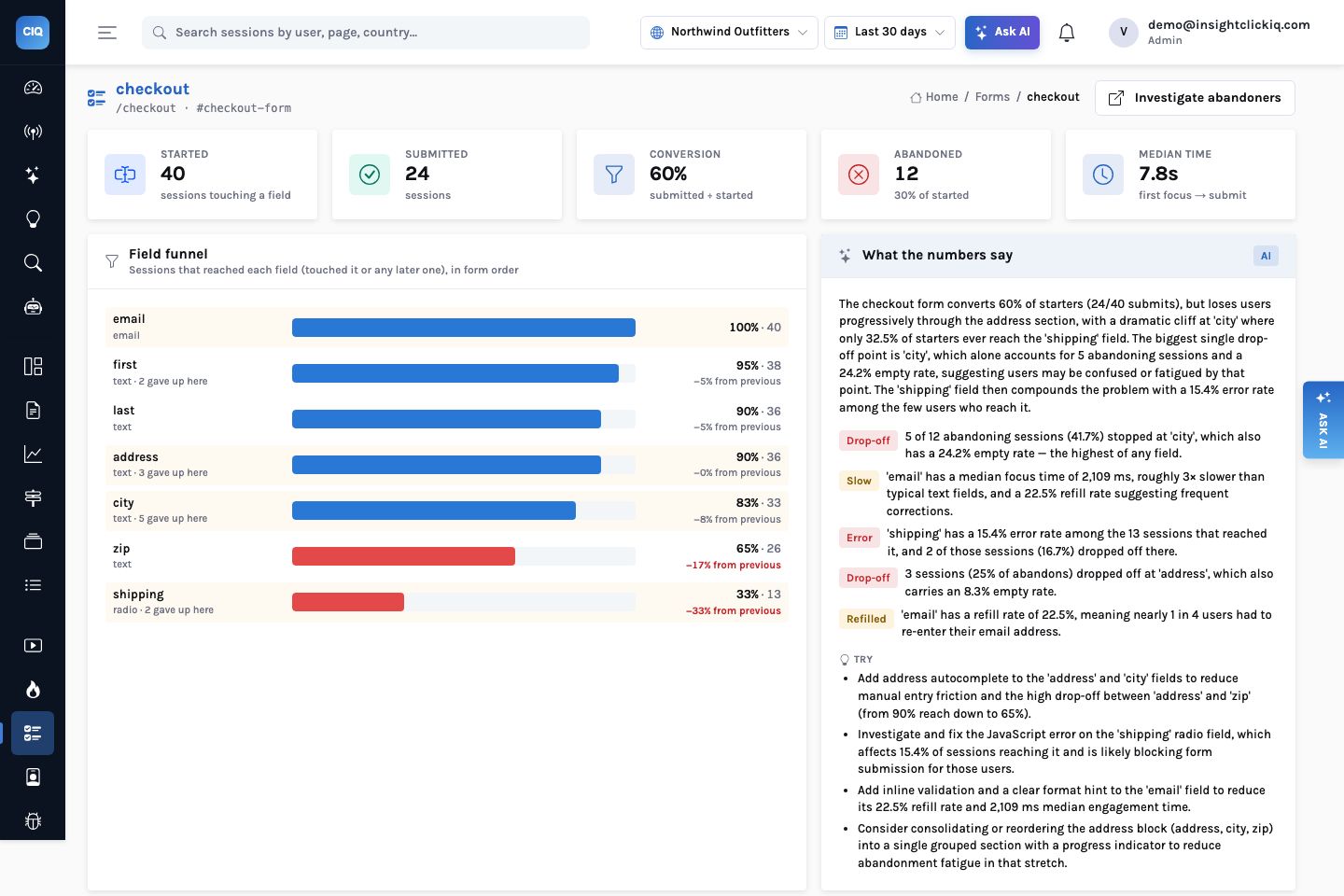
Forms are where intent turns into revenue, sign-ups and applications, and they are where analytics usually goes blind. A pageview tells you someone reached the checkout page. A submit event tells you they finished. Everything in between — the address they started and abandoned, the email they typed three times, the delivery option that threw an error — is invisible, or visible only in a replay you happened to watch.
InsightClickIQ captures form behaviour automatically for every <form> on the
page (and any element marked data-clickiq-form="name"). The obvious objection is
privacy: a tool that watches forms sounds like a tool that reads them. It does not, and the design
of what is sent is the first thing to explain.
What leaves the browser, and what never does
When a field loses focus (or a select, checkbox or radio changes), the SDK sends a
form_field event with the field’s name, type and position in the form, how long it
was focused, how many times it was visited, whether it was changed, whether it was refilled
(changed after it already had a value), whether it was left empty, and a length bucket —
0, 1–10, 11–50 or 50+. The value itself
is never read into the event. Password fields, card fields (autocomplete="cc-*"
and card-like names), hidden, file and submit inputs, and anything inside
[data-clickiq-block] are skipped entirely. A submit sends form_submit with
the number of fields touched and the time from first focus; leaving the page with a touched,
unsubmitted form sends form_abandon with the last field.
That is enough to answer every question in this post. It is also why form analytics is on by
default: the project setting forms or the init option can switch it off, but there is
nothing sensitive in it to switch off.
The checkout form
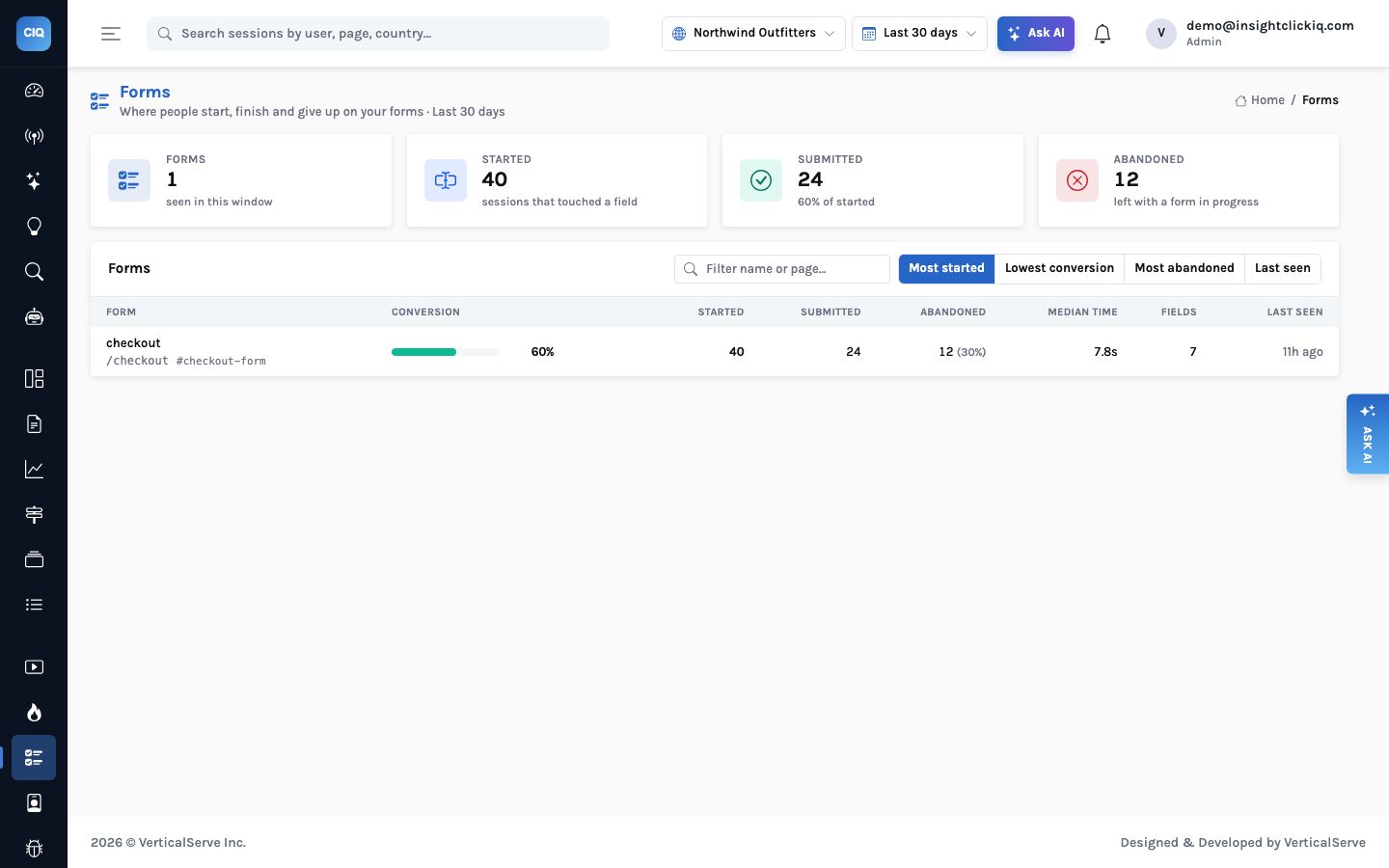
The Forms page lists every form the SDK has seen, with starts, submits, abandons and conversion.
Northwind has one, #checkout-form on /checkout, with seven tracked
fields:
A caveat before the detail: these are small numbers. The demo’s thirty-day history is backfilled server-side, and backfilled events carry no form telemetry; only the sessions driven through a real browser do. Forty starts is enough to show what the page does, not enough to bet a redesign on. On a live checkout the same page fills with thousands.
Reading it field by field
| Field | Sessions | Focus (median) | Refilled | Empty | Errors | Last field of abandoners |
|---|---|---|---|---|---|---|
| 40 | 2.1 s | 23% | 0% | 0% | 0 | |
| first | 38 | 533 ms | 0% | 5% | 0% | 2 |
| last | 36 | 650 ms | 0% | 0% | 3% | 0 |
| address | 36 | 1.2 s | 0% | 8% | 3% | 3 |
| city | 33 | 699 ms | 0% | 24% | 6% | 5 |
| zip | 26 | 591 ms | 0% | 0% | 8% | 0 |
| shipping (radio) | 13 | — | 0% | 0% | 15% | 2 |
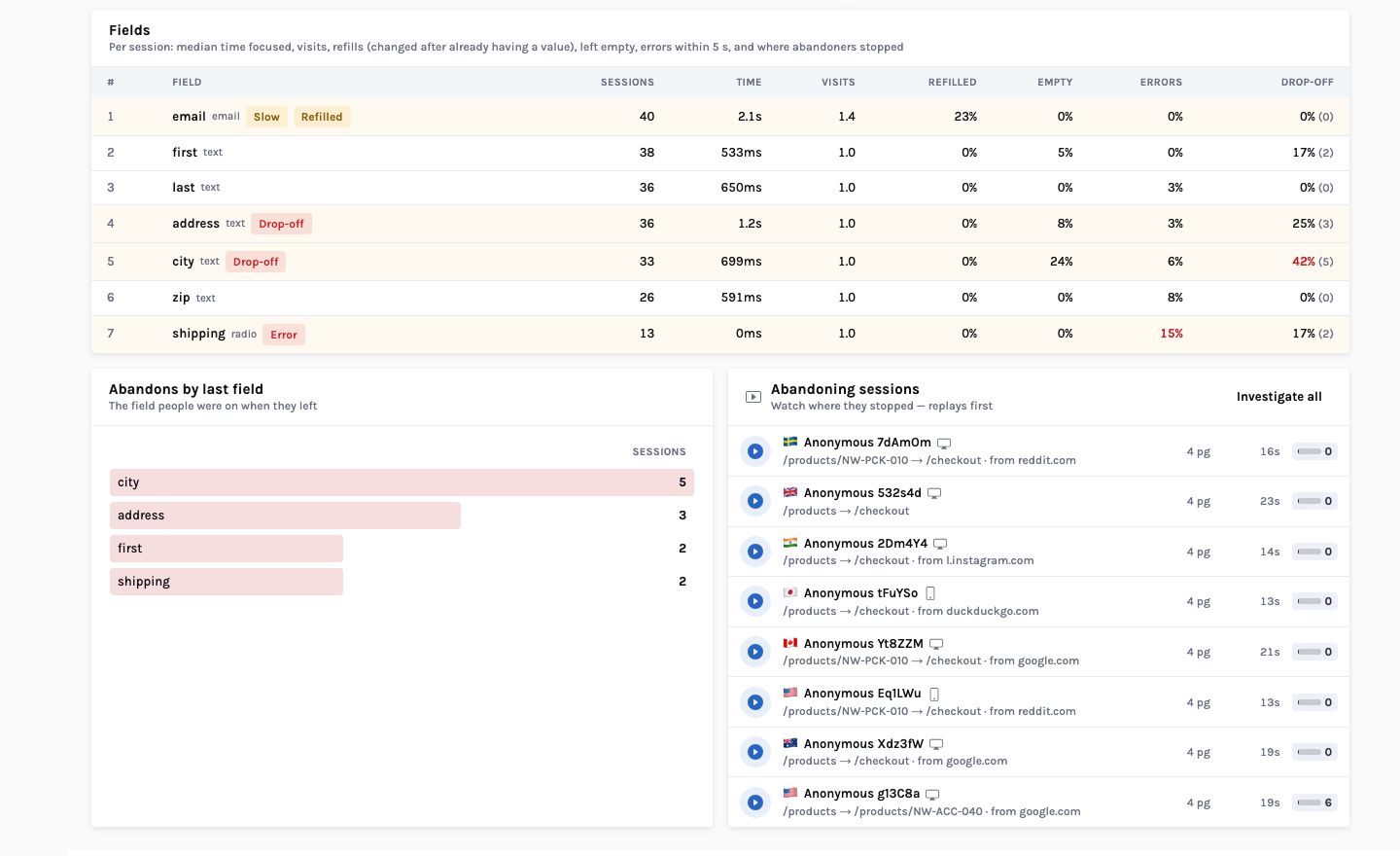
Email is slow and retyped. A median of 2.1 seconds focused, against roughly 0.5–0.7 s for the name fields, and 23% of the people who touched it changed it after it already had a value. The SDK does not know what they typed — but it knows they typed it twice. The usual causes are a format the validation rejects late, or autofill putting in an address people then correct.
City is where people leave. Five of the twelve abandoning sessions stopped at city, more than at any other field, and 24% of the sessions that touched it left it empty. Address and city together account for eight of the twelve abandons. That is an address block problem, not a city-field problem.
Shipping has the highest error rate, and the number needs care. 15% of the sessions that
reached the shipping radio had a JavaScript error within five seconds of it. Shipping is the last
field before Place order, and Northwind’s checkout has a known crash on submit —
TypeError: Cannot read properties of undefined (reading ‘days’), in what is
almost certainly the delivery-estimate code. The error is attributed to the last field touched
before it, so the most likely reading is “the submit crashes after people choose a delivery
option”, not “the radio button is broken”. The error page and the replays settle
which.
What the AI adds
The card at the top right is written by the model from the computed table only — it sees the numbers above, never an event, and writes no SQL. On the run we recorded its narrative began: “The checkout form converts 60% of starters (24/40 submits), but loses users progressively through the address section, with a dramatic cliff at ‘city’ where only 32.5% of starters ever reach the ‘shipping’ field.” Its findings matched the rules’ thresholds, and its recommendations were concrete:
- Replace the separate address, city and zip fields with an address lookup, to reduce the five-session drop-off at city and three at address.
- Add inline validation and a format hint to email, for the 22.5% refill rate and the 2.1-second focus time.
- Investigate and fix the JavaScript error on the shipping step — “a technical bug is likely preventing submission for a meaningful share of near-completers.”
- Review the zip validation messages (a 7.7% error rate that people push through).
Without a model, the rules produce the findings from fixed thresholds — the top drop-off field, a field slower than twice the median field, a refill rate over 25%, an empty rate over 40%, an error rate over 10% — and the card is marked Rules. Note that the email refill rate, at 22.5%, sits under the rules’ 25% line; the model flagged it anyway alongside the slow focus time. That is the kind of judgement the model is there for, and it is visible because both the rate and the threshold are on the page.
A finding is not a fix
“Use an address lookup” is a reasonable recommendation and the model makes it confidently. With 33 sessions touching city, it is a hypothesis. The honest next step is the one the page offers: watch the abandoning sessions, then change one thing and measure the field funnel again.
Four shapes to look for on any form
Northwind’s form is small, but the shapes in it recur on every form we have looked at, and each points at a different kind of fix:
- A cluster of abandons on consecutive fields (address, then city) is a section people find tedious or do not have to hand. Shorten it, prefill it, or move it later, after the commitment.
- A high refill rate on one field (email) is validation or autofill fighting the user. Look at when the error message appears and what the browser fills in.
- A high empty rate on a field that is not optional (city, at 24%) usually means people skipped it and were sent back, or a later field made it redundant. Either mark it clearly or remove it.
- Errors attributed to the last field before submit are usually the submit itself. Read them on the Errors page before redesigning the field.
None of those needs a value to diagnose. They need the order of fields, the time spent, and what happened next — which is exactly what the events carry.
From a field to the people
Under the fields table the page lists up to eight abandoning sessions, replays first. Each opens in the replay with inputs masked by default — you see a field being filled, not what was typed. Investigate abandoners opens a new investigation prefilled with the form’s path and converted = false: up to 40 abandoning sessions summarised and grouped into themes, with evidence chips that seek each replay to the moment it went wrong.
The form converts 60%. Somebody suggests shortening it. Nobody knows which field to cut, and the error that fires after the last one is in a different tool.
Abandons cluster on the address block; email is retyped by one in four; the submit error shows up against the last field. Three different fixes, each with sessions to watch.
Setting it up
- Nothing to do for standard
<form>elements. For a form built from divs in a React app, adddata-clickiq-form="checkout"to the container. - Give fields a
nameorid; the SDK falls back to the aria-label, placeholder or selector, which reads worse on the page. - Wrap anything a customer would recognise as theirs — notes, documents, health or financial
details — in
data-clickiq-block. It is already never read; blocking also removes it from replays. - Up to 60 fields per form are tracked. Forms agents can read too: the form-doctor playbook runs
forms_listandform_detailand finishes with the abandoning sessions.
You do not need to read what someone typed to know they typed it twice, left it empty, or gave up on it.


