
An experiment platform tells you that a variant is ahead. A survey tool tells you what people typed. A mobile replay tool lets you watch a phone screen. Each of those is useful, and each leaves the same job to you: read the numbers, decide what they mean, and go and find the session that proves it. That last step is where most analysis stops, because it is slow.
This round of InsightClickIQ adds the four capabilities teams most often asked for — feature flags with A/B tests, in-product surveys, native session replay, and analytics for the AI agents they ship — and builds each one to the rule the rest of the product follows. The engine computes the numbers. The model writes only from those numbers, in a shape the product can check. And every claim links to something you can open: a results table, a replay at a second, a dashboard. Below is what that looks like on the demo projects, with the figures the product actually returned.
Experiments: a verdict you can argue with
A flag in InsightClickIQ is boolean or multivariate, switched on or off, narrowed by targeting
rules (person traits, country, device, platform, app version) and rolled out to a share of the
people who match. The bucket is a hash of the flag key and the person, so the browser, the iOS
app, the Android app and your server all give the same person the same answer. An experiment is
a flag with a goal event. The SDKs send a $flag_exposure event the first time a
person reads the flag in a session, and that event is what the results count.
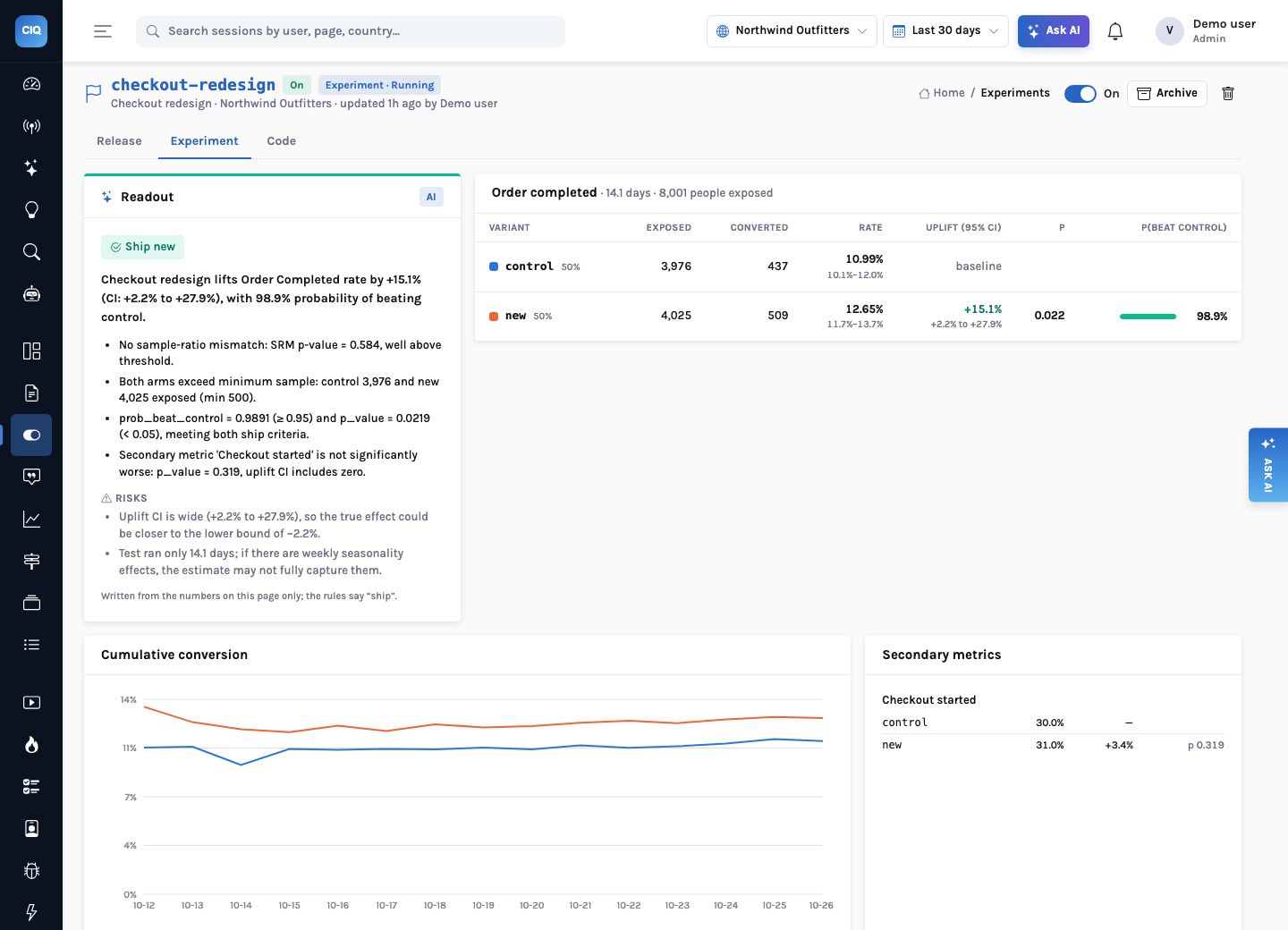
The Northwind demo store runs checkout-redesign: a one-page checkout against the
current one, 50/50, goal Order completed, secondary metric Checkout started,
at least 500 people per arm. After 14.1 days and 8,001 exposed people, the results were:
| Variant | Exposed | Converted | Rate (95% interval) | Uplift (95% interval) | p | P(beat control) |
|---|---|---|---|---|---|---|
| control | 3,976 | 437 | 10.99% (10.1–12.0%) | baseline | — | — |
| new | 4,025 | 509 | 12.65% (11.7–13.7%) | +15.1% (+2.2% to +27.9%) | 0.022 | 98.9% |
None of those numbers came from the model. The rate intervals are Wilson intervals; the uplift interval is the unpooled difference interval divided by the control rate; the p-value is a two-sided pooled z-test; the probability of beating control comes from Beta posteriors with 20,000 Monte-Carlo draws and a fixed seed, so it does not change between page loads. A chi-square test compares the exposed counts with the 50/50 weights: p = 0.584, no sample-ratio mismatch.
Only then does the model get involved. It receives those numbers and nothing else, and answers with a verdict (ship, keep running or stop), a variant, a headline, reasons and risks. On this test it wrote: “Checkout redesign lifts order completion rate by 15.1% (CI: 2.2%–27.9%), with 98.9% probability of beating control.” Its first risk is the one a careful analyst would raise: “The uplift confidence interval is wide (2.2%–27.9%), so the true effect could be closer to the lower bound in production.”
That last point is what makes the readout safe to put in front of a product manager. The rules are short and published: a sample-ratio mismatch stops the test; any arm under its minimum keeps it running; a probability of beating control of at least 0.95 with p below 0.05 and a positive uplift ships, unless a secondary metric got significantly worse; 28 days with nothing significant stops it. The model adds the words and the judgement about risk. It cannot overrule the arithmetic.
Surveys: what people said, next to what happened to them
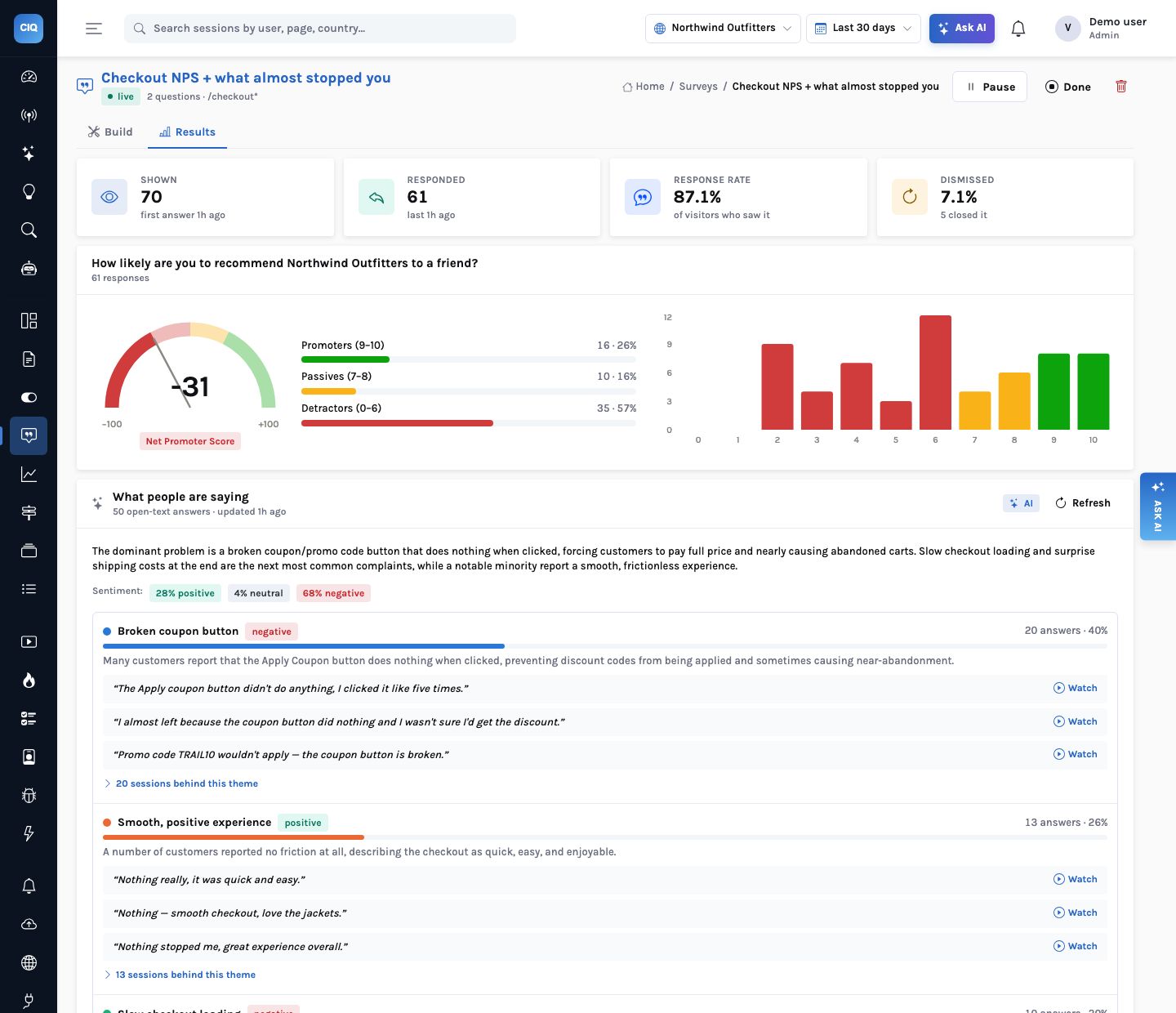
The demo store runs a two-question survey on /checkout*, two seconds after the page
opens: “How likely are you to recommend Northwind Outfitters to a friend?” and
“What almost stopped you from buying today?”. It was shown to 70 visitors and
answered by 61 (87.1%); 5 dismissed it. The Net Promoter Score is −31: 16
promoters, 10 passives, 35 detractors. By device it is −24 on mobile and −35 on
desktop.
A score tells you that something is wrong. The 50 open-text answers say what, and reading 50 answers is exactly the job a model does well. InsightClickIQ sends the latest answers (up to 300) in one call, numbered, after removing email addresses and phone numbers and cutting each answer to 500 characters. The model returns themes as lists of answer numbers. The product then counts the answers, picks the quotes and attaches the sessions from those numbers, so a count in a theme is never a number the model wrote.
| Theme | Answers | Share | Sentiment | Sessions with a replay |
|---|---|---|---|---|
| Broken coupon button | 20 | 40% | negative | 18 of 20 |
| Smooth, positive experience | 13 | 26% | positive | 13 of 13 |
| Slow checkout loading | 10 | 20% | negative | 9 of 10 |
| Surprise shipping costs | 5 | 10% | negative | 5 of 5 |
| Forced account creation | 2 | 4% | negative | 2 of 2 |
The first theme is the same problem the rest of the product had already found from behaviour
alone: the dead “Apply coupon” button on /cart. Here it arrives in
customers’ own words — “The Apply coupon button didn’t do anything, I
clicked it like five times.” — and each quote has a Watch link to the replay
of the session that wrote it. That is the difference worth having: you can check a theme in
thirty seconds by watching two of its sessions, instead of trusting a word cloud.
Answers are ordinary events (Survey shown, Survey responded,
Survey dismissed) on the session that gave them, so every other part of the product
already understands them: promoters per week is a trend, NPS by country is a table, and
“detractors who reached checkout” is a segment. Nowhere else does the open text
reach the model: the session summariser shows it as [open-text answer], and the
agent tool returns counts and themes, never the raw answers.
Native replay: the same summary, on a phone
Native replay in the iOS, Android and React Native SDKs records screenshots, not video: one on a screen change, one 0.3 seconds after a tap, and at most one a second while the screen is changing. An unchanged screen sends nothing. Text inputs, password fields, web views and any view the app marks private are painted black on the device before the image is encoded (on React Native, the server paints the measured regions before anything is stored), and the server refuses a frame that is neither masked nor carries the regions to mask.
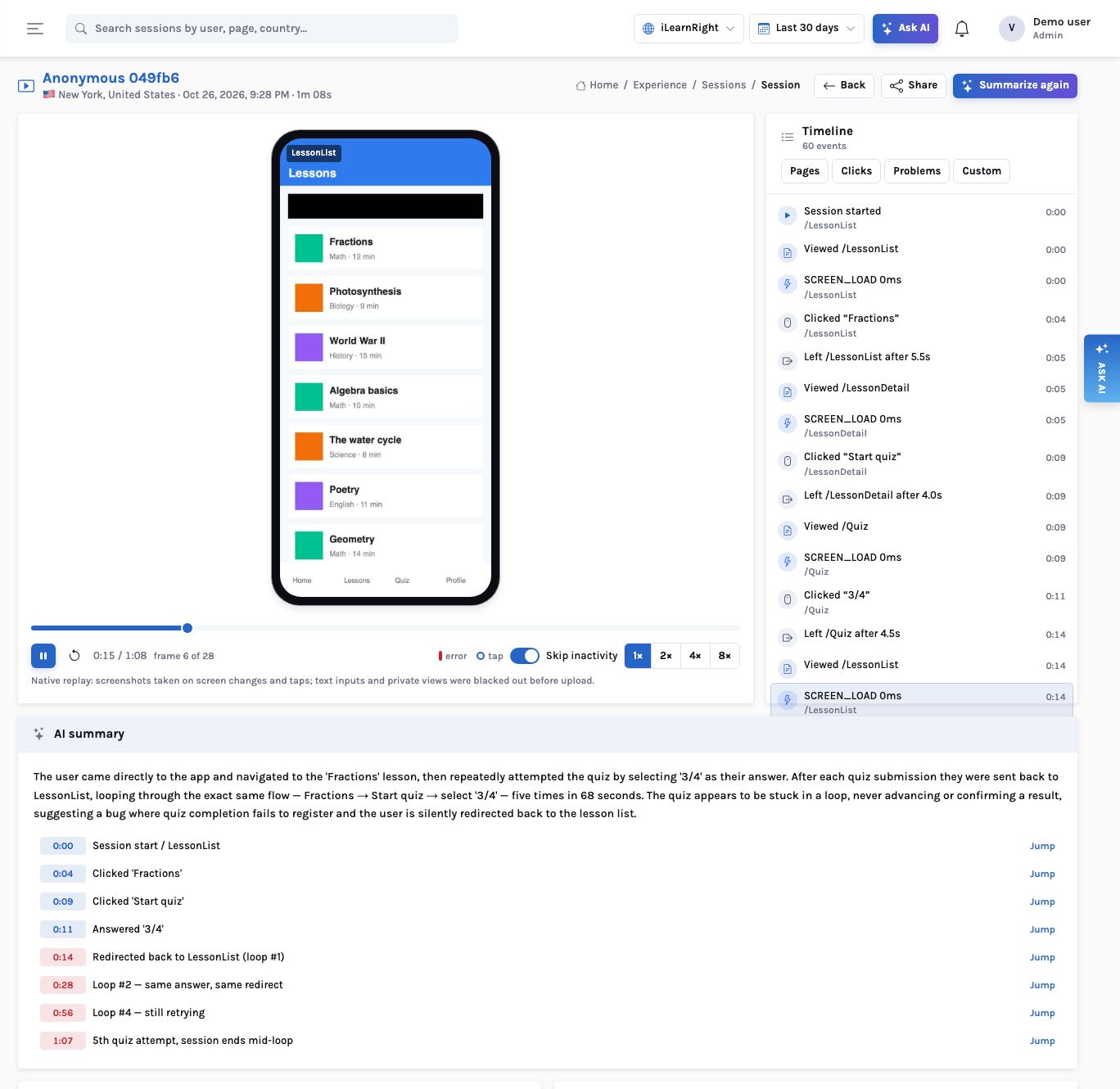
Because the AI summary reads the event timeline rather than the pixels, native sessions get the same treatment as web ones without a new model or a new prompt. On the iLearnRight demo, an iOS session of 68 seconds produced 60 events and 28 frames. Its summary reads: “After each quiz submission they were sent back to LessonList, looping through the exact same flow — Fractions → Start quiz → select ‘3/4’ — five times in 68 seconds. The quiz appears to be stuck in a loop, never advancing or confirming a result.” It marks eight highlights; each Jump seeks the frame player.
Native apps also gained the other two things replay usually sits beside. Taps now carry their position, so Heatmaps has an iOS and Android switch, drawn on the newest frame of each screen (on iLearnRight, Retry on the lesson list takes 33 taps, 11 of them rage). And the SDKs measure app start, screen load, frozen frames and ANRs; the Mobile tab of Performance rates them and its insight leads with the worst one: 2 of 12 native sessions had the main thread blocked.
Agent analytics: watching your own AI the way it watches your checkout
More of the products our customers build now include an AI agent or a copilot, and its quality is
part of the product. InsightClickIQ treats each model call, tool call and rating as an event:
$ai_generation, $ai_tool_call and $ai_feedback. The Python
SDK sends them from a with clickiq.ai.trace(...) block or a LangChain callback
handler; browser copilots use clickiq.ai.generation. Prompt and response text is
never sent unless both the SDK and the project opt in.
The Insurance 360 demo has two internal agents. In 30 days they made 2,037 generations for 119 people; 53 failed; p95 latency was 4.1 seconds. The same signal loop that sizes frustration and error spikes on the website runs two checks per agent, and both fired:
| Signal | Rule | What it said |
|---|---|---|
| Error spike | Yesterday’s error rate against the 14 days before: at least 20 generations, 5 errors, 5%, and twice the baseline | “renewal-assistant: 27% of AI generations failed yesterday (usually 1.8%)” — critical |
| Latency regression | p95 of the last 3 full days against the 11 before: at least 1.5× and +500 ms | “claims-copilot: AI latency regressed — p95 6.3s over the last 3 days (was 3.7s)” — warning |
Each signal carries a recommendation written from those numbers (for the error spike: check whether the failures are timeouts, schema errors or provider rate limits), and the AI agents dashboard and weekly report template put the same figures in front of the people who own the agents: error rate by agent, tokens and cost by model, thumbs-down share, the slowest tools.
Where the four meet
The value of putting these in one product is that they point at each other. The survey’s coupon theme links to replays; those replays carry comments pinned to the second the coupon click died, and a share link sends that one session to the developer who will fix it. The fix ships behind a flag; the experiment reads it out; the digest reports the change in orders. In the app, the same learner’s stuck quiz shows up as a loop in a replay summary, a rage cluster on a tap heatmap and an ANR on the Mobile tab.
- MondaySurvey themes
NPS −31 on checkout; the top theme is the coupon button, 20 answers, 18 with a replay.
- MondayComment and share
A comment at 0:16 on one of those replays; a 7-day link with the replay and summary scopes goes to the agency that built the cart.
- WednesdayShip behind a flag
The fix goes out to 50% of visitors; exposures and orders arrive as events.
- Two weeks laterReadout
Ship, keep running or stop, with intervals, a ratio check and the risks; the rules verdict beside it.
What it does not do
- Experiments test conversions. The goal is whether a person did an event after their first exposure; revenue per visitor is not an experiment metric. Flags reach a browser on its next fetch (start, identify, reset or reload), not instantly.
- Native apps render surveys themselves. The SDKs return the live surveys and send the answers; there is no native survey UI yet.
- Native replay is stills. At most one frame a second, so animations are lost. React Native finds only the inputs you wrap, and Jetpack Compose content needs a registered private region.
- Agent cost is what you send. InsightClickIQ does not price tokens; the demo’s costs use illustrative rates.
- Without a model, the words change, not the numbers. Readouts fall back to the rules, survey themes to a keyword lexicon, summaries to a rules summary, each marked as such.
Why build it this way
Each of these capabilities could have been a chat box over a table. We chose the narrower design: the model gets computed numbers or numbered answers, returns a structured verdict or a list of theme members, and the product checks it and attaches the evidence. It is less impressive in a demo and much easier to trust in a review.
The engine does the arithmetic, the model does the reading, and every sentence has a link under it.
Flags and experiments → · Surveys → · Native heatmaps, vitals and replay → · AI agent analytics → · Comments and sharing →


